# Spinnaker Version Tags
Copy as Markdown[Open in ChatGPT](https://chatgpt.com/?q=Read%20https%3A%2F%2Fcoralogix.com%2Fdocs%2Fdeveloper-portal%2Fapis%2Fversion-tags%2Fspinnaker-version-tags.md%20and%20help%20me%20with%20my%20question%20about%20this%20Coralogix%20documentation%20page.)[Open in Claude](https://claude.ai/new?q=Read%20https%3A%2F%2Fcoralogix.com%2Fdocs%2Fdeveloper-portal%2Fapis%2Fversion-tags%2Fspinnaker-version-tags.md%20and%20help%20me%20with%20my%20question%20about%20this%20Coralogix%20documentation%20page.)
Coralogix provides seamless integration with `Spinnaker` deployment pipelines so you can push tags to Coralogix automatically from your pipelines.
## Prerequisites[](#prerequisites "Direct link to Prerequisites")
* Have `Spinnaker` deployed, for more information on how to deploy:
* API Token - To use this API you need to [create](https://coralogix.com/docs/docs/user-guides/account-management/api-keys/api-keys/.md) a personal or team API key. It’s recommended to use permission presets, as they are automatically updated with all relevant permissions. Alternatively, you can manually add individual permissions.
| Preset | Action | Description |
| --------------- | --------------------------------------------------------------------------------------------------------- | -------------------------------------------------------------------------------------------------- |
| CICDIntegration | `VERSION-BENCHMARK-TAGS:READ`
`VERSION-BENCHMARKS-REPORTS:READ`
`VERSION-BENCHMARK-TAGS:UPDATE` | View Version Benchmark Tags
View Version Benchmark Reports
Modify Version Benchmark Tags |
## [](https://github.com/coralogix/integrations-docs/blob/master/integrations/spinnaker/README.rst#configuration)Configuration[](#configuration "Direct link to configuration")
To create a custom webhook stage, you'll need to add configuration for the stage in `orca-local.yml`.
Choose the https\://api./api/v1/external/tags endpoint that corresponds to your Coralogix [domain](https://coralogix.com/docs/docs/user-guides/account-management/account-settings/coralogix-domain/.md) using the domain selector at the top of the page.
Here is the content of **orca-local.yml**:
```
webhook:
preconfigured:
- label: Coralogix Tag
type: coralogixTag
enabled: true
description: Push tag to Coralogix
parameters:
- label: Coralogix API URL
name: url
type: string
description: Coralogix API endpoint
defaultValue: coralogix.com
- label: Coralogix API Token
name: token
type: string
description: Coralogix API Token
- label: Tag
name: tag
type: string
description: Tag Name
- label: Application
name: application
type: string
description: Application Name
- label: Subsystem
name: subsystem
type: string
description: Subsystem Name
url: https://api.eu2.coralogix.com/api/v1/external/tags
method: POST
customHeaders:
Authorization:
- Bearer ${parameterValues['token']}
Content-Type:
- application/json
payload: |-
{
"name": "${parameterValues['tag']}",
"application": ["${parameterValues['application']}"],
"subsystem": ["${parameterValues['subsystem']}"],
"iconUrl": "https://raw.githubusercontent.com/coralogix/integrations-docs/master/integrations/spinnaker/images/spinnaker.png"
}
```
After you create a custom configuration, redeploy your `Spinnaker` instance with `Halyard`:
```
hal deploy apply
```
## [](https://github.com/coralogix/integrations-docs/blob/master/integrations/spinnaker/README.rst#usage)Usage[](#usage "Direct link to usage")
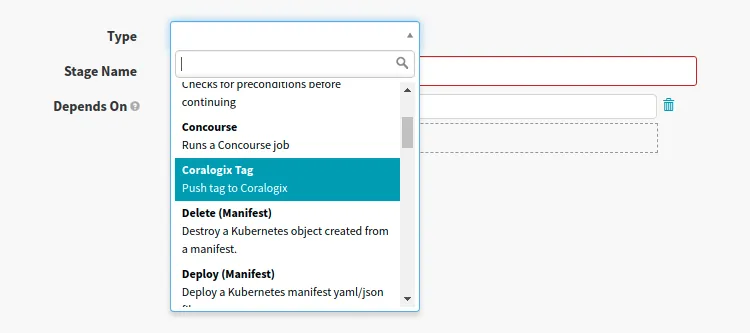
Add a new stage to push the tag to *Coralogix*:
[](https://github.com/coralogix/integrations-docs/blob/master/integrations/spinnaker/images/1.png)
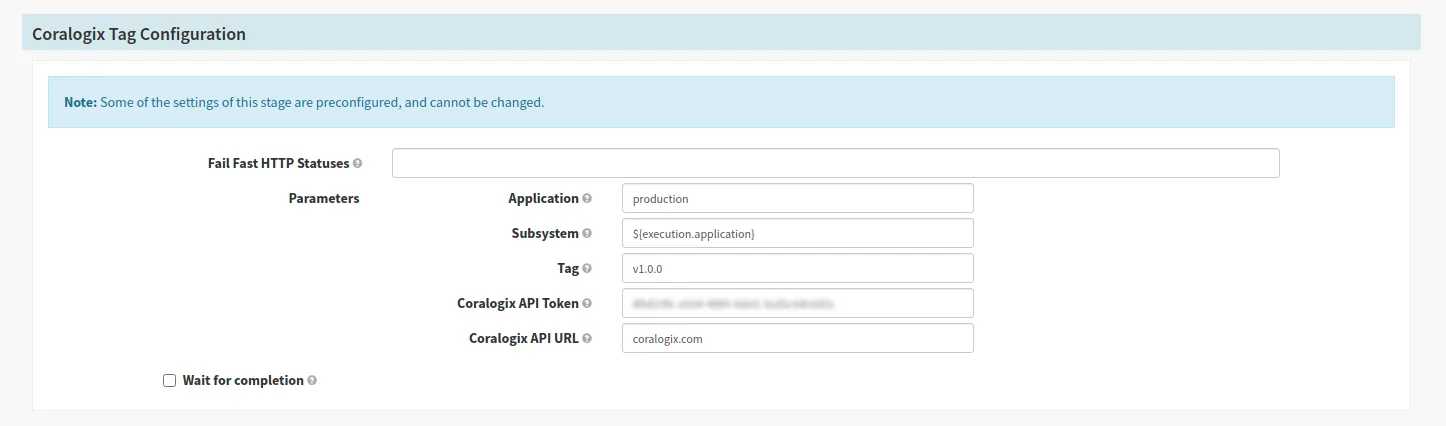
Configure stage to push tag to your account:
[](https://github.com/coralogix/integrations-docs/blob/master/integrations/spinnaker/images/2.png)
**Note:** You can use Spinnaker [pipeline expressions](https://spinnaker.io/reference/pipeline/expressions/) to define parameters for the tag.
## Additional resources[](#additional-resources "Direct link to Additional resources")
| | |
| ------------------- | ------------------------------------------------------------------------------------------- |
| Coralogix Endpoints | [Coralogix Endpoints](https://coralogix.com/docs/docs/integrations/coralogix-endpoints/.md) |