AWS EventBridge
AWS EventBridge provides a serverless event bus service that enables you to collect and route data from your applications and services to any target destination. By integrating EventBridge with Coralogix, you can stream real-time application data for comprehensive monitoring and analysis.
Requirements
AWS account
Amazon EventBridge event bus created
Create an API destination to Coralogix
Go to EventBridge > API destinations, and create a new API destination.
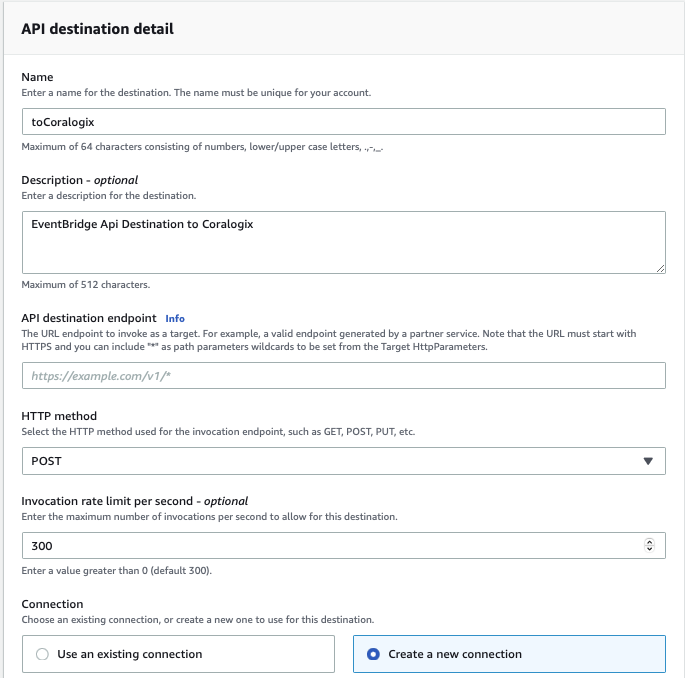
For the API destination endpoint, choose the https://ingress./aws/event-bridge endpoint that corresponds to your Coralogix domain using the domain selector at the top of the page.
Create a new connection:

Optionally, specify the application and subsystem name.
Click on Invocation Http Parameters and add 2 parameters as shown in the screenshot below. The values can be anything you would like to identify the logs with.

To send your data to Coralogix, create your unique Coralogix Send-Your-Data API key and fill the values as detailed below.
| Setting | Value |
|---|---|
| Authorization type | API Key |
| API Key Name | x-amz-event-bridge-access-key |
| API Key Value | Your Coralogix Send-Your-Data API key |
Create an EventBridge Rule
Create a rule to route the events to the API destination. On the Buses section, select Rules.
Click on Create rule
Give the rule a name, select the correct event bus, and click Next.
For Event pattern (source), scroll down and select the desired source. "GuardDuty Findings", for example.

Select EventBridge API destination as the target.
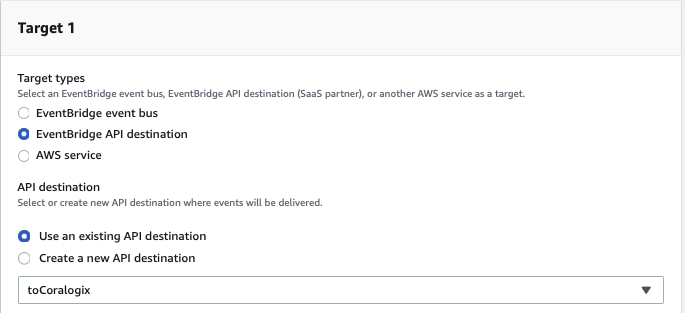
Every event that goes to the selected event bus will be sent to Coralogix.
Notes
A "resources" key is present in the AWS EventBridge and Cloudtrail integrations. If you are integrating both EventBridge and CloudTrail logs, create a parsing rule to rename the mentioned field to avoid mapping conflicts.
Additional resources
| Coralogix Endpoints | Coralogix Endpoints |
Support
Need help?
Our world-class customer success team is available 24/7 to walk you through your setup and answer any questions that may come up.
Feel free to reach out to us via our in-app chat or by sending us an email at [email protected].