Validation
Validate that you have enabled Kubernetes Observability using OpenTelemetry and are sending cluster telemetry to Coralogix.
STEP 1. Check that the cluster collector are running in your cluster.
Search for pods in the deployed namespace with the following:
kubectl get pods -o wide -n $NAMESPACE
OpenTelemetry Cluster Collector pods named coralogix-opentelemetry-collector-xxx and Kube State Metrics pods named otel-integration-kube-state-metrics-xxx should appear with Running status.

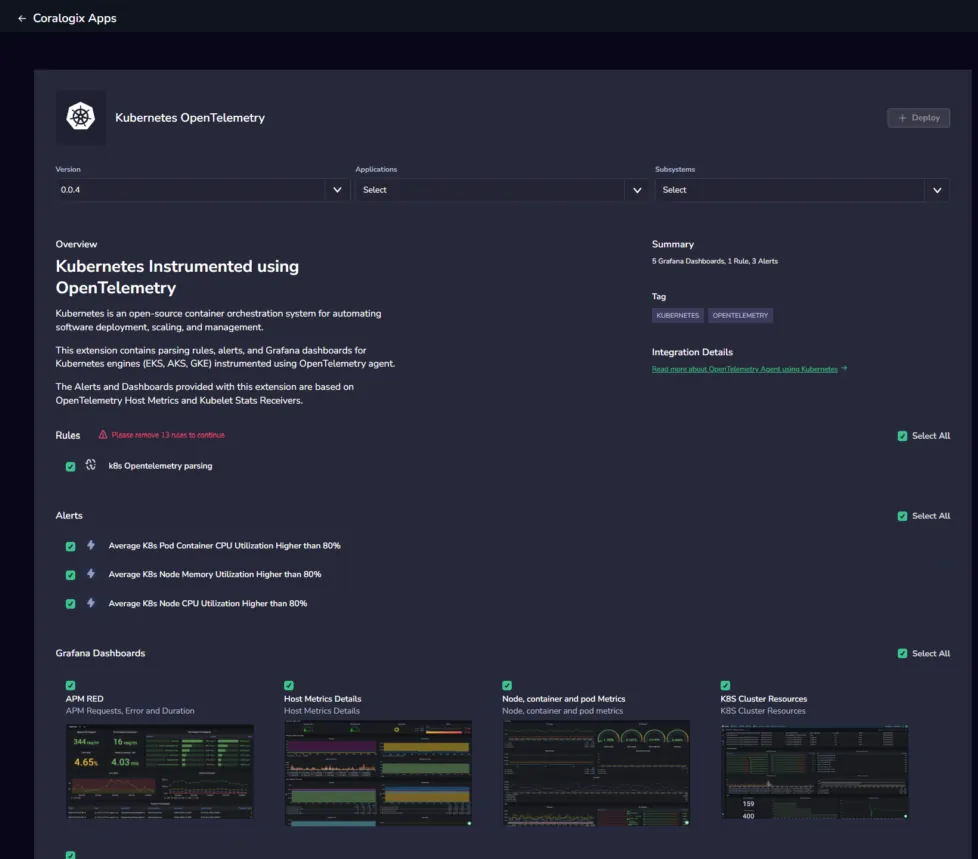
STEP 2. Install the Kubernetes OpenTelemetry extension packages in your Coralogix account by accessing Data Flow > Extensions. Use this to hit the ground running with predefined alerts, parsing rules, dashboards, saved views, and actions.
-
Open the Kubernetes OpenTelemetry extension with the latest version.
-
Select Applications and Subsystems for all related Kubernetes telemetry or select All for both.
-
Click + Deploy.
Next Steps
Troubleshoot your configuration here.