# GitLab Version Tags
Copy as Markdown[Open in ChatGPT](https://chatgpt.com/?q=Read%20https%3A%2F%2Fcoralogix.com%2Fdocs%2Fdeveloper-portal%2Fapis%2Fversion-tags%2Fgitlab-version-tags.md%20and%20help%20me%20with%20my%20question%20about%20this%20Coralogix%20documentation%20page.)[Open in Claude](https://claude.ai/new?q=Read%20https%3A%2F%2Fcoralogix.com%2Fdocs%2Fdeveloper-portal%2Fapis%2Fversion-tags%2Fgitlab-version-tags.md%20and%20help%20me%20with%20my%20question%20about%20this%20Coralogix%20documentation%20page.)
This tutorial demonstrates how to integrate Coralogix with your [GitLab](https://coralogix.com/docs/docs/integrations/contextual-data/gitlab-data-ingestion/.md) deployment pipelines.
## Configuration[](#configuration "Direct link to Configuration")
**Use GitLab webhooks to inform Coralogix when a new build is issued**.
**STEP 1**. Log in to GitLab using your credentials and navigate to your project page.
**STEP 2.** Click **Settings** > Webhooks.
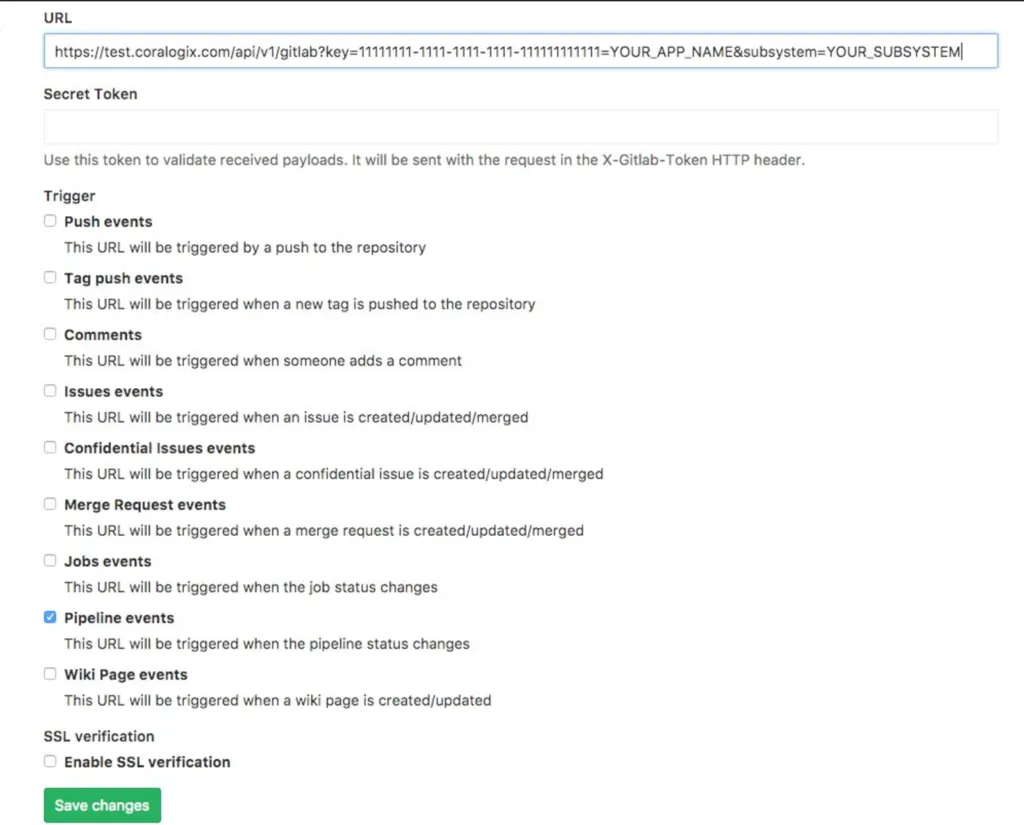
**STEP 3**. Choose the https\://api./api/v1/external/gitlab endpoint that corresponds to your Coralogix [domain](https://coralogix.com/docs/docs/user-guides/account-management/account-settings/coralogix-domain/.md) using the domain selector at the top of the page. Add the following URL:
https\://api./api/v1/external/gitlab?application=**APPLICATION\_NAME**\&subsystem=**SUBSYSTEM\_NAME**\&name=**TAG\_NAME**
Insert the following parameters:
**DOMAIN**: Coralogix [domain](https://coralogix.com/docs/docs/user-guides/account-management/account-settings/coralogix-domain/.md) associated with your account
**APPLICATION\_NAME**: [Application name](https://coralogix.com/docs/docs/user-guides/account-management/account-settings/application-and-subsystem-names/.md) as it appears in your Coralogix UI
**SUBSYSTEM\_NAME**: [Subsystem name](https://coralogix.com/docs/docs/user-guides/account-management/account-settings/application-and-subsystem-names/.md) as it appears in your Coralogix UI. Add one or more subsystem names separated by a comma.
**TAG\_NAME** - Tag name. If this parameter is not inserted, values are taken from GitLab payload fields *project.name* and *object\_attributes.ref*, as explained [here](https://docs.gitlab.com/ee/user/project/integrations/webhook_events.html#pipeline-events).
**STEP 4**. To use this API you need to [create](https://coralogix.com/docs/docs/user-guides/account-management/api-keys/api-keys/.md) a personal or team API key. It’s recommended to use permission presets, as they are automatically updated with all relevant permissions. Alternatively, you can manually add individual permissions.
| Preset | Action | Description |
| --------------- | --------------------------------------------------------------------------------------------------------- | -------------------------------------------------------------------------------------------------- |
| CICDIntegration | `VERSION-BENCHMARK-TAGS:READ`
`VERSION-BENCHMARKS-REPORTS:READ`
`VERSION-BENCHMARK-TAGS:UPDATE` | View Version Benchmark Tags
View Version Benchmark Reports
Modify Version Benchmark Tags |
Note
* The **Secret Token** is obligatory.
* Input the **Secret Token** in the Secret Token field below the URL in GitLab.
**STEP 5**. Select **Pipeline events** as a trigger and click save changes.
[](https://coralogix.com/docs/docs/assets/images/Screen-Shot-2017-06-04-at-22.07.28-1024x825-554656530f3fabaa95ec8ba62d39c862.webp)
## Additional resources[](#additional-resources "Direct link to Additional resources")
| | |
| ------------- | --------------------------------------------------------------------------------------------------------------- |
| Documentation | [GitLab Data Ingestion](https://coralogix.com/docs/docs/integrations/contextual-data/gitlab-data-ingestion/.md) |