Azure activity logs
Activity logs are the audit trail of operations performed on the resources in a subscription, creations, deletions, and updates. That is the management plane, as distinct from the resource logs that record what happens inside a resource.
Collection takes two moves: an export that streams the activity log to an Event Hub, and the Event Hub integration that forwards from there.
What you need
- An Azure account with an active subscription.
- An Event Hub namespace. If yours restricts public access, enable VNet support first. See the optional configuration steps.
Export the activity log
Navigate to your Subscription, then Activity log, then select Export Activity Logs.
Select Add diagnostic setting and give it a name.
Select the categories you want. Administrative, Security, ServiceHealth, Alert, Recommendation, Policy, Autoscale, and ResourceHealth. Under Destination details, select Stream to an event hub and choose your subscription, namespace, event hub, and policy. Select Save.
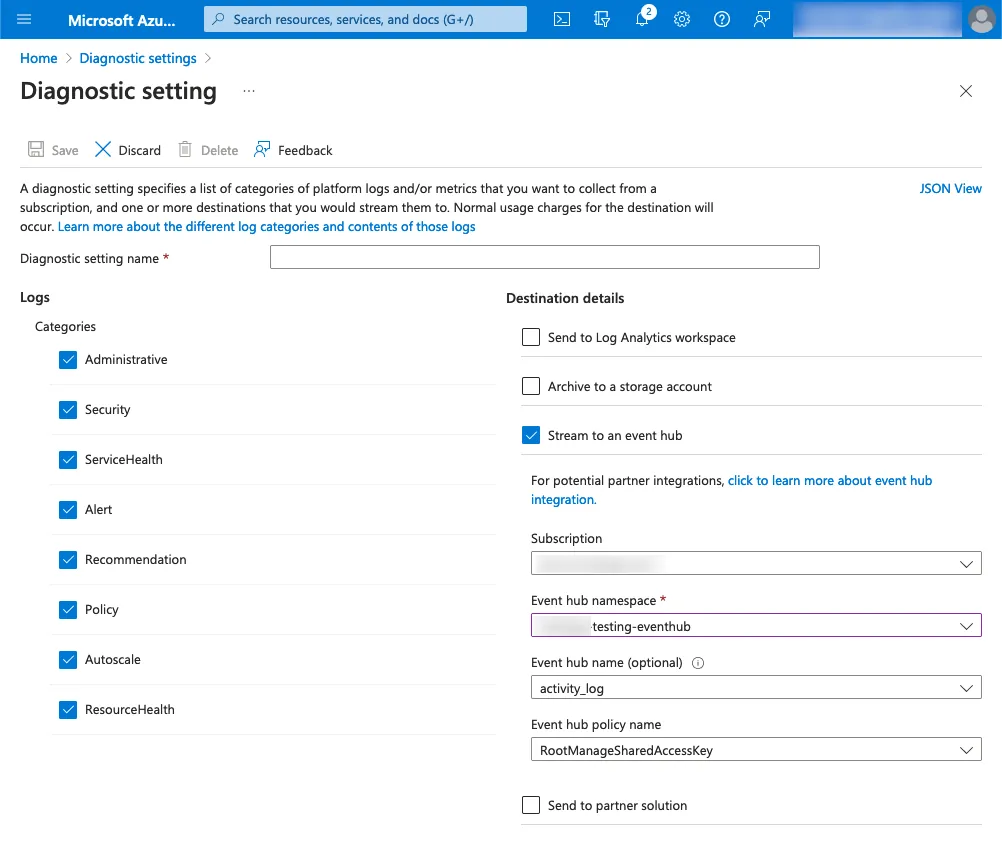
Shows the eight activity log categories alongside the Event Hub destination they stream to.
Forward from the Event Hub
Deploy the Azure Event Hub integration to collect the messages and submit them to Coralogix. Two deployment paths are available:
| Path | Use |
|---|---|
| Azure Event Hub ARM | Deploy from an ARM template |
| ARM Event Hub integration package | Deploy the packaged version |
| Azure Event Hub Terraform | Deploy with Terraform |