Deprecation Notice: The Coralogix .NET SDK (Coralogix.SDK, CoralogixCoreSDK) is deprecated in favor of the OpenTelemetry .NET SDK and will no longer be supported after June 30, 2026. See the .NET OpenTelemetry instrumentation guide for setup options and the end-of-life notice for migration details.
.NET Deprecated
This guide shows how to send .NET application logs to Coralogix using the OpenTelemetry .NET SDK with Microsoft.Extensions.Logging, the OTLP log exporter, and a Resource that sets service.name, cx.application.name, and cx.subsystem.name. This replaces shipping logs through the legacy Coralogix .NET SDK.
Use a supported .NET version (8.0 or later is recommended) with current OpenTelemetry.* packages.
Package dependencies setup
Create a console application and add the OpenTelemetry SDK, OTLP exporter, and logging packages (versions are examples; use the latest compatible releases from NuGet):
dotnet new console -n DotnetOtelLogsSample -o DotnetOtelLogsSample
cd DotnetOtelLogsSample
dotnet add package OpenTelemetry --version 1.15.3
dotnet add package OpenTelemetry.Exporter.OpenTelemetryProtocol --version 1.15.3
dotnet add package Microsoft.Extensions.Logging --version 8.0.0
Select the https://ingress. endpoint that corresponds to your Coralogix domain using the domain selector at the top of the page.
Application implementation
- Build a
ResourceBuilderwithAddServiceforservice.name(and version), then addcx.application.nameandcx.subsystem.nameas resource attributes. - Call
LoggerFactory.CreatewithAddOpenTelemetryandAddOtlpExporter, pointing at your OTLP/gRPC endpoint (the sample defaults tohttp://localhost:4317for a local collector). - Create an
ILoggerwith a category name (for example the class name). Emit logs at the level you need; the sample usesLogErrorto match a simple smoke test.
Replace Program.cs with the following:
using System;
using System.Collections.Generic;
using System.Threading;
using Microsoft.Extensions.Logging;
using OpenTelemetry.Logs;
using OpenTelemetry.Resources;

namespace DotnetOtelLogsSample;

internal static class Program
{
    private static void Main()
    {
        var endpoint = Environment.GetEnvironmentVariable("OTEL_EXPORTER_OTLP_ENDPOINT")
            ?? "http://localhost:4317";
        var serviceName = Environment.GetEnvironmentVariable("OTEL_SERVICE_NAME")
            ?? "dotnet-otel-logs-sample";
        var applicationName = Environment.GetEnvironmentVariable("CORALOGIX_APPLICATION")
            ?? "dotnet-otel-app";
        var subsystemName = Environment.GetEnvironmentVariable("CORALOGIX_SUBSYSTEM")
            ?? "worker";

        var resourceBuilder = ResourceBuilder.CreateDefault()
            .AddService(serviceName: serviceName, serviceVersion: "1.0.0")
            .AddAttributes(new Dictionary<string, object>
            {
                ["cx.application.name"] = applicationName,
                ["cx.subsystem.name"] = subsystemName,
            });

        using var loggerFactory = LoggerFactory.Create(builder =>
        {
            builder.AddOpenTelemetry(logging =>
            {
                logging.SetResourceBuilder(resourceBuilder);
                logging.AddOtlpExporter(options =>
                {
                    options.Endpoint = new Uri(endpoint);
                });
            });
        });

        var logger = loggerFactory.CreateLogger("My class");

        var i = 0;
        do
        {
            logger.LogError("Hello World Coralogix");
            i++;
            Thread.Sleep(1000);
        } while (i < 5);

        Thread.Sleep(1500);
        Console.WriteLine("Done: flush window completed");
    }
}
Run the sample:
dotnet run
Notes
- The OTLP exporter batches records. Keep the process alive briefly after your last log (as in the sample) so batches can export before exit.
- If you upgrade packages, follow the OpenTelemetry .NET logs documentation for any API or package layout changes.
- For a broader walkthrough (shared resource builders, traces, and metrics), see .NET OpenTelemetry instrumentation.
Logging output
With the OpenTelemetry SDK, you can send logs either to a local OpenTelemetry Collector or directly to Coralogix using an OTLP endpoint.
OpenTelemetry Collector
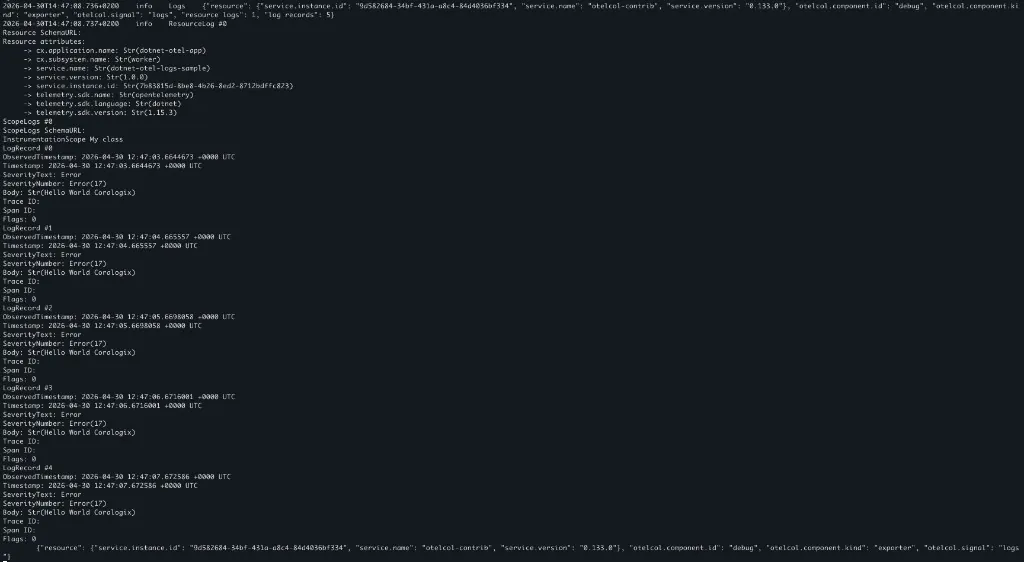
Set OTEL_EXPORTER_OTLP_ENDPOINT to your collector’s OTLP/gRPC address (often http://localhost:4317 or http://collector:4317). With a debug exporter on the collector, log records show resource attributes such as cx.application.name, cx.subsystem.name, and service.name, plus the log body and severity.
Coralogix OpenTelemetry endpoint
Authenticate with your Send-Your-Data API key and point the OTLP exporter at your Coralogix endpoint. The sample reads CORALOGIX_APPLICATION and CORALOGIX_SUBSYSTEM for cx.application.name and cx.subsystem.name (defaults match a local collector; override them when sending to Coralogix).
OTEL_EXPORTER_OTLP_ENDPOINT=https://ingress.eu2.coralogix.com:443
OTEL_EXPORTER_OTLP_HEADERS="Authorization=Bearer send_your_data_key"
OTEL_SERVICE_NAME=dotnet-otel-logs-sample
CORALOGIX_APPLICATION=hello
CORALOGIX_SUBSYSTEM=world
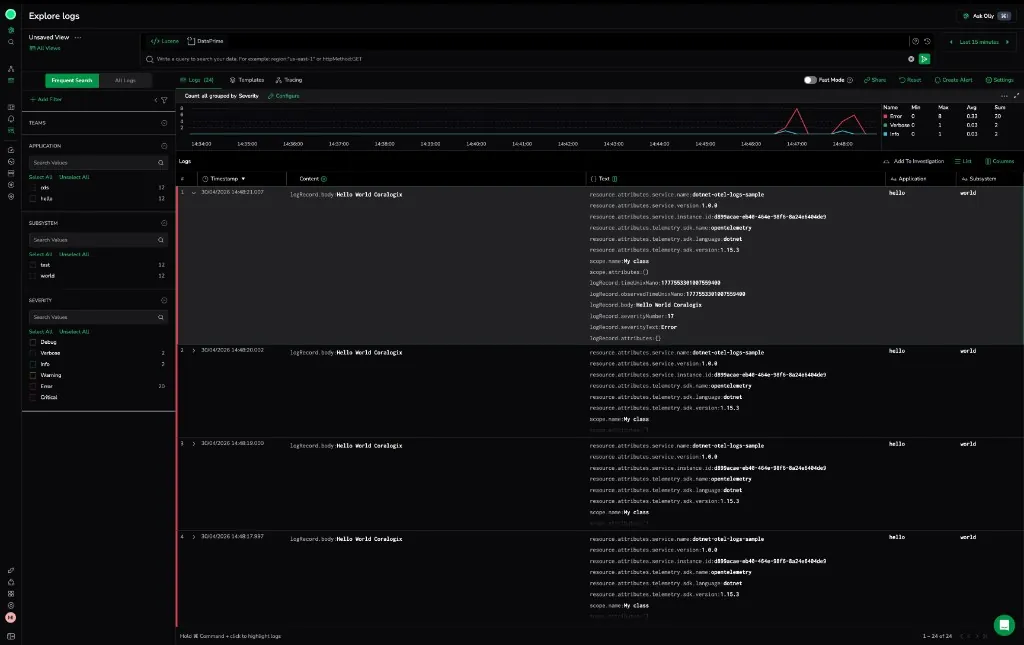
In Explore logs, application and subsystem filters reflect those resource attributes; expanded rows show logRecord.body, severity, and resource.attributes.service.name.
Additional resources
| OpenTelemetry .NET | OpenTelemetry .NET docs |
| Coralogix Endpoints | Coralogix Endpoints |