Code Agents alerts
Deploy a prebuilt set of alerts for Claude Code and GitHub Copilot activity. The Code Agents Alerts extension installs 12 ready-to-use metric threshold alerts that catch cost spikes, runaway sessions, unused licenses, adoption drops, and unapproved models before they become expensive or risky.
Use the alerts out of the box, or tune their thresholds to your environment. Each alert behaves like a standard Coralogix metric alert and integrates with your existing notification channels and workflows.
What you need
- Claude Code or GitHub Copilot metrics flowing into Coralogix through the Claude Code & Cowork or GitHub Copilot integrations.
- An existing application and subsystem in your account. Alerts that group by
modeloruser_emailstill evaluate account-wide; the application and subsystem you deploy under scope which data the extension can read. - The
EXTENSIONS:READCONFIGpermission, plusALERTS:METRICSUPDATECONFIGto deploy the alerts. Without both, the extension is not deployable. See Permissions list.
Set up
- In Coralogix, navigate to Integrations, then Extensions.
- Find the Code Agents Alerts card (search by name or filter by Observability) and select it to open the detail page.
- From the Version dropdown, select the version you want to deploy.
- From the Applications and Subsystems dropdowns, select the scope to deploy under.
- Under Alerts, all 12 alerts are selected by default. Deselect any alert you do not want to deploy.
- Select Deploy.
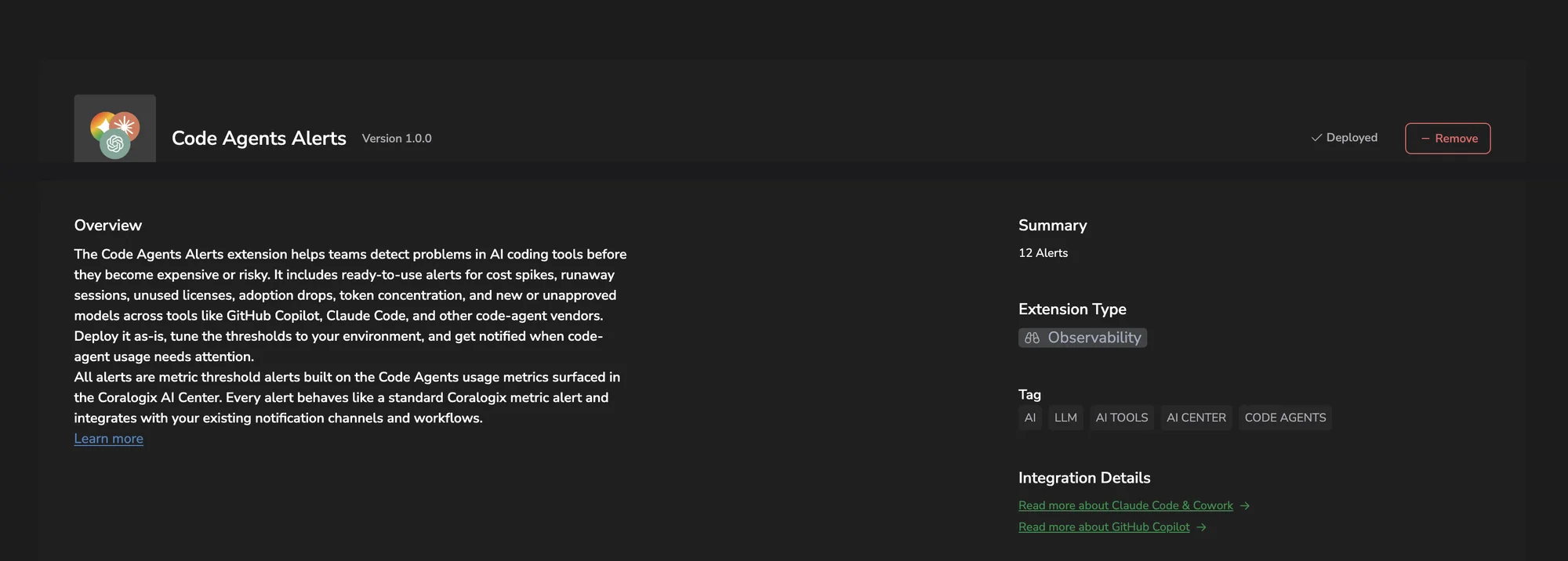
The extension creates the 12 alerts in your account. To view them, navigate to Alerting, then Alert definition management. Alert names start with Claude code | or GitHub Copilot | .
Use it
Customize an alert
After deployment, the alerts behave like any other metric threshold alert. You can edit thresholds, schedules, notifications, group-by keys, and priority.
- In Coralogix, navigate to Alerting, then Alert definition management.
- Find the alert you deployed. Alert names start with
Claude code |orGitHub Copilot |. - Select the alert to open it for editing.
- Adjust the threshold, time window, evaluation window, group-by keys, or notification settings.
- Save your changes.
Update or remove the extension
When a new version of the extension is published, the Extensions page shows an UPDATE AVAILABLE indicator on the card.
To install the new version:
- Navigate to Integrations, then Extensions.
- Select the Code Agents Alerts card.
- Select Update.
To uninstall the extension and its alerts, select Remove from the same page.
How it works
Unlike alerts built on span data, the Code Agents Alerts extension evaluates PromQL directly against the metrics that the Claude Code & Cowork and GitHub Copilot integrations already emit (claude_code_* and github_copilot_*). There is no separate Events2Metrics conversion step: the extension deploys 12 metric threshold alerts as-is, using the standard Coralogix alerting engine.
Reference
Alerts
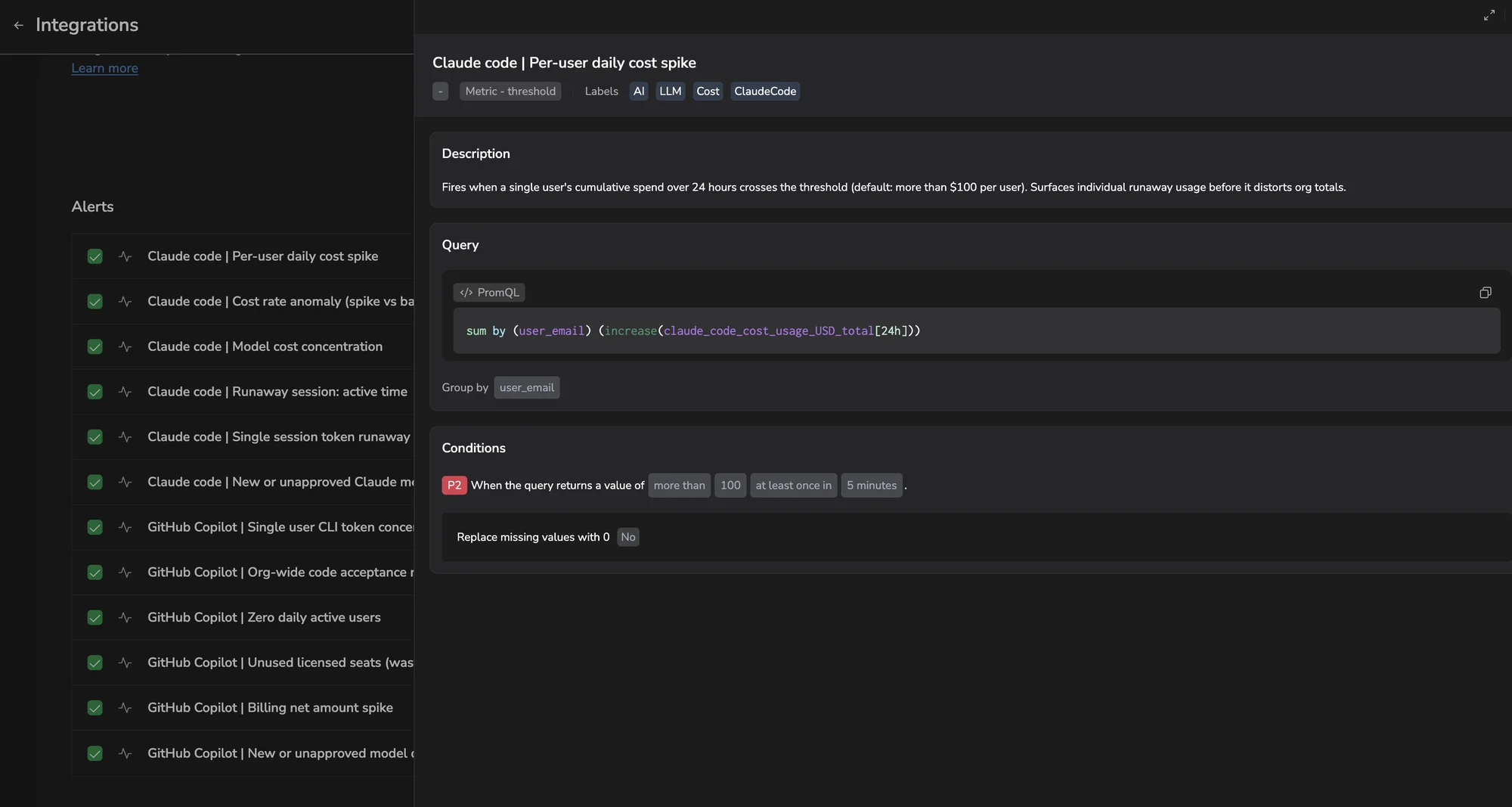
Each alert deploys with the query, condition, and severity below. Select an alert to expand it.
P2. Fires when token usage is recorded against a Claude model that had no usage over the preceding 7 days.
count by (model) (increase(claude_code_token_usage_tokens_total[24h]))
unless
count by (model) (increase(claude_code_token_usage_tokens_total[7d] offset 24h))
Condition: more than 0, at least once in 1 minute. Group by model.
P2. Fires when a single user's cumulative spend over 24 hours crosses the threshold.
sum by (user_email) (increase(claude_code_cost_usage_USD_total[24h]))
Condition: more than 100, at least once in 5 minutes. Group by user_email.
P2. Compares the last 15-minute cost rate against the 1-hour rolling average.
sum(rate(claude_code_cost_usage_USD_total[15m]))
/ sum(rate(claude_code_cost_usage_USD_total[1h]))
Condition: more than 3, at least once in 5 minutes.
P3. Fires when a single model accounts for more than the threshold share of total spend.
sum by (model) (increase(claude_code_cost_usage_USD_total[1h]))
/ ignoring(model) group_left sum(increase(claude_code_cost_usage_USD_total[1h]))
Condition: more than 0.8 (80%), at least once in 5 minutes. Group by model.
P2. Fires when a single session accumulates more than the threshold of active agent time.
max by (session_id, user_email) (
  increase(claude_code_active_time_total_s_total[3h])
)
Condition: more than 7200 seconds (2 hours), at least once in 5 minutes. Group by session_id, user_email.
P2. Fires when any individual session consumes more than the threshold of tokens in a 1-hour window.
max by (session_id, user_email) (
  increase(claude_code_token_usage_tokens_total[1h])
)
Condition: more than 50000000 tokens, at least once in 5 minutes. Group by session_id, user_email.
P3. Fires when one user accounts for more than the threshold share of total CLI tokens (prompt + output) over the last 24 hours.
(sum by (user_email) (sum_over_time(github_copilot_user_cli_prompt_tokens_sum[24h]))
+ sum by (user_email) (sum_over_time(github_copilot_user_cli_output_tokens_sum[24h])))
/ on() group_left() (
  sum(sum_over_time(github_copilot_user_cli_prompt_tokens_sum[24h]))
  + sum(sum_over_time(github_copilot_user_cli_output_tokens_sum[24h]))
  + 1
)
Condition: more than 0.6 (60%), at least once in 5 minutes. Group by user_email.
P3. Fires when accepted suggestions as a share of total generated suggestions over the last 24 hours drops below the threshold.
sum(sum_over_time(github_copilot_org_code_acceptance_activity_count[24h]))
/ (sum(sum_over_time(github_copilot_org_code_generation_activity_count[24h])) + 1)
Condition: less than 0.2 (20%), at least once in 5 minutes.
P2. Fires when there have been no active users at all over the last 24 hours.
sum(max_over_time(github_copilot_org_daily_active_users[24h]))
Condition: less than or equal to 0, at least once in 5 minutes. Missing values are treated as 0.
P3. Fires when billed seats exceed monthly active users by more than the threshold.
sum(sum_over_time(github_copilot_billing_net_quantity[24h]))
- sum(max_over_time(github_copilot_org_monthly_active_users[24h]))
Condition: more than 20, at least once in 5 minutes.
P2. Fires when Copilot net billing increases more than the threshold compared to 7 days ago.
sum(sum_over_time(github_copilot_billing_net_amount[24h]))
/ (sum(sum_over_time(github_copilot_billing_net_amount[24h] offset 7d)) + 1)
Condition: more than 1.3 (a 30% increase), at least once in 5 minutes.
P2. Fires when a model records org-wide Copilot interactions in the last 24 hours but had none over the preceding 7 days.
count by (model) (
  sum_over_time(github_copilot_org_user_initiated_interaction_count_by_model_feature[24h])
)
unless
count by (model) (
  sum_over_time(github_copilot_org_user_initiated_interaction_count_by_model_feature[7d] offset 24h)
)
Condition: more than 0, at least once in 1 minute. Group by model.
Thresholds and windows above are the extension's shipped defaults. Adjust them after deployment to match your team's usage patterns and budget, the same way you would customize any alert.
Limitations
- The extension currently covers Claude Code and GitHub Copilot. Support for other code agents (Cursor, Codex, and others) is planned.
- Each alert evaluates a fixed PromQL query against the underlying
claude_code_*orgithub_copilot_*metrics. To alert on a different aggregation or grouping, build a custom alert directly against those metrics instead of editing the deployed one.
Troubleshoot
No alerts are firing. Cause: Claude Code or GitHub Copilot metrics are not flowing into the application and subsystem the extension was deployed under. Fix: confirm activity appears on the Claude Code or Copilot dashboards for that scope.