Code Agents ROI
Most code agent dashboards stop at adoption and spend: who uses the agent, how many sessions, how many tokens. They don't answer the question that matters: what did that spend deliver? Code Agents ROI connects Claude Code cost to the work it produced. It follows the cost of each session to the Jira or Linear features it worked on and to the pull requests that merged. It then compares AI-assisted work with work that had no AI session, in your own repositories and teams.
You find it on the Impact tab: AI Center > Code Agents > Claude > Impact. It answers three questions:
- Which features did the money fund?
- Did our AI spend turn into merged code?
- Do AI-assisted pull requests ship faster than work with no AI session?
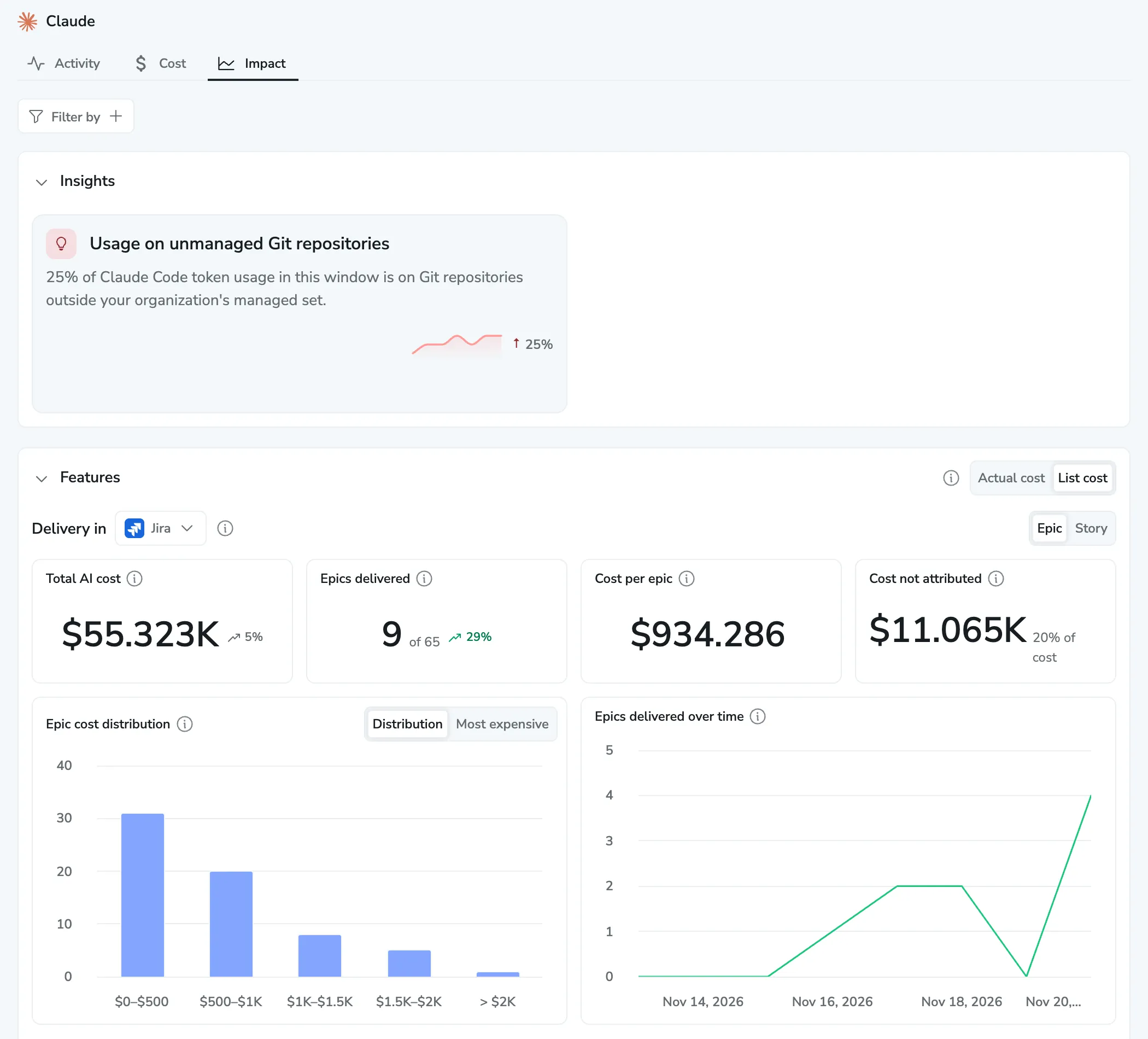
Code Agents ROI is available on the Claude dashboard, for Claude Code.
Use cases
In Features, Epic cost distribution shows how many epics fall in each cost range. Select Most expensive, then an epic, to list its pull requests. Cost not attributed shows how much spend you cannot tie to a feature.
In Delivery, read Cost that merged and Cost per merged PR beside AI cost. A large drop on Cost that merged means cost went to work that did not merge. Open Models to see which model it came from.
AI-assisted vs no AI session compares Time to PR and Time to merge for the same repositories. Where the time goes splits the time into stages. A stage where the AI-assisted median is lower is where AI speeds delivery up.
The comparison runs on your own teams, repositories, and workflows, not on a synthetic benchmark. It compares different pieces of work, so treat it as a signal, not proof of cause.
Set up
You need AI-CODE-AGENTS:READ to view the dashboards and INTEGRATIONS:DEPLOY to connect GitHub, Jira, or Linear. See Permissions. Connect the sources in any order:
| Source | What it gives |
|---|---|
| Claude Code with span telemetry turned on | Session cost at list price. Restart Claude Code after you turn it on. The Claude Enterprise API adds actual cost |
| The Claude Code hooks | The branch of each session, which ties cost to pull requests and items |
| GitHub, with Event format set to Pull request activity | Pull requests with review and merge times, for Delivery |
| Jira or Linear | Epics and stories, or projects and issues, with assignees and status, for Features |
Without the hooks, these widgets read Install the Claude hooks to see this data.
- Features: Cost per epic, Cost not attributed, Epic cost distribution, and the AI cost, Stories done, Models, and Cost / story done columns of the list.
- Delivery: Cost that merged, Cost per merged PR, AI cost that merged, AI-assisted vs no AI session, and the Merged PRs, Merge rate, Cost / merged PR, and Rewritten in 30d columns of the breakdown.
- Attributed cost in the pull request drawers.
Coralogix ties cost and pull requests to an item by its key, such as ABC-123 in Jira or TEAM-123 in Linear. The branch name exists before the pull request, so put the key there. The key decides how much cost reaches an item: cost on a branch with no key goes to Cost not attributed.
Features
Features lists the work your teams delivered. A toggle sets the level: Epic or Story for Jira, Project or Issue for Linear. The labels follow the level, so Epics delivered and Cost per epic read Stories delivered and Cost per story at story level.
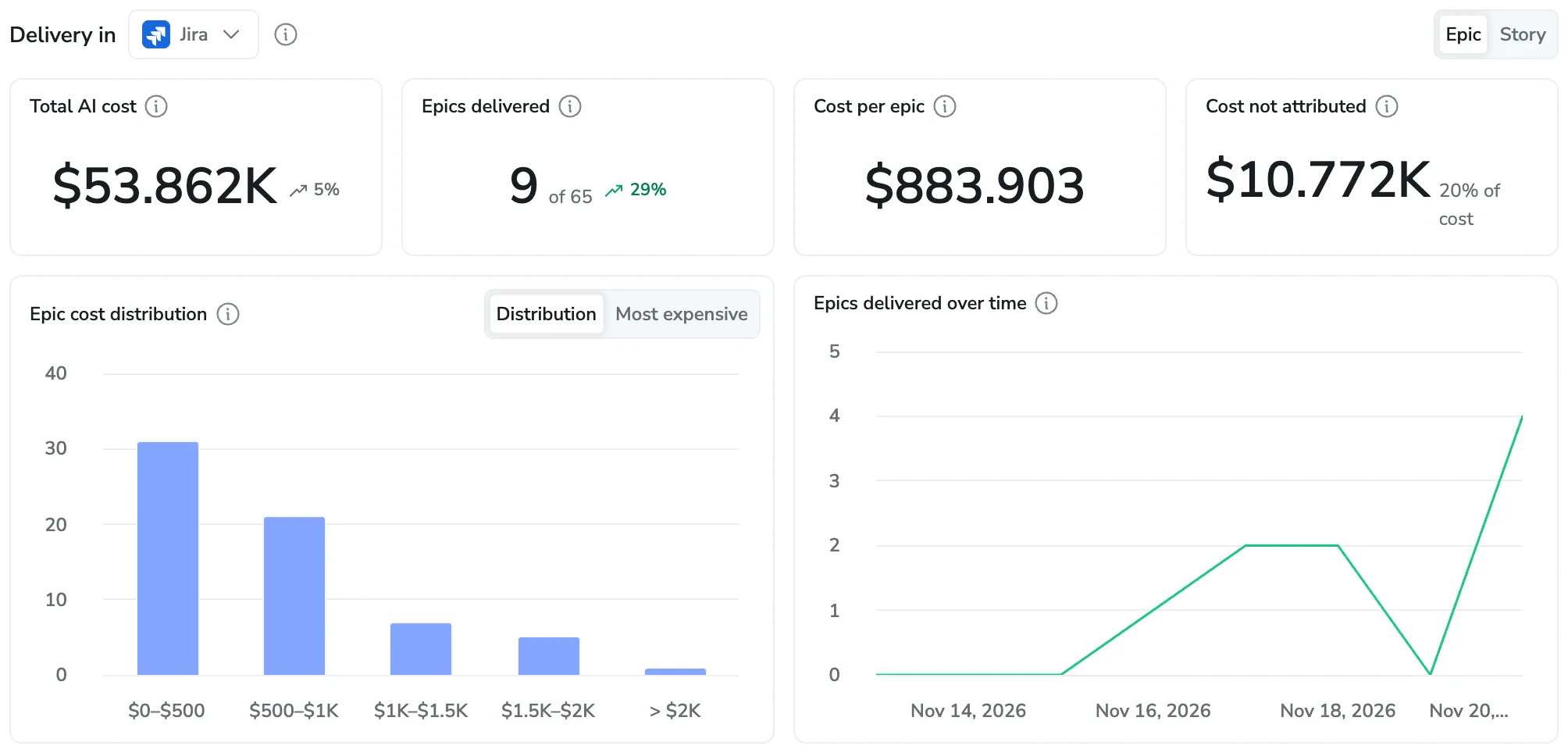
The cards and charts give the portfolio view:
| Widget | What it shows |
|---|---|
| Total AI cost | The AI cost for the period, against the previous period. |
| Epics delivered | The items that reached the done status in the period, of all the items with AI cost against them. |
| Cost per epic | The AI cost of the delivered items divided by their number. |
| Cost not attributed | The AI cost that links to no item, and its share of the total. |
| Epic cost distribution | How many items fall in each cost range, so one expensive outlier does not read as the norm. Select Most expensive to list the five items with the most AI cost, then select one for its pull requests. |
| Epics delivered over time | The items that reached the done status, over time. Select a point to list them. |
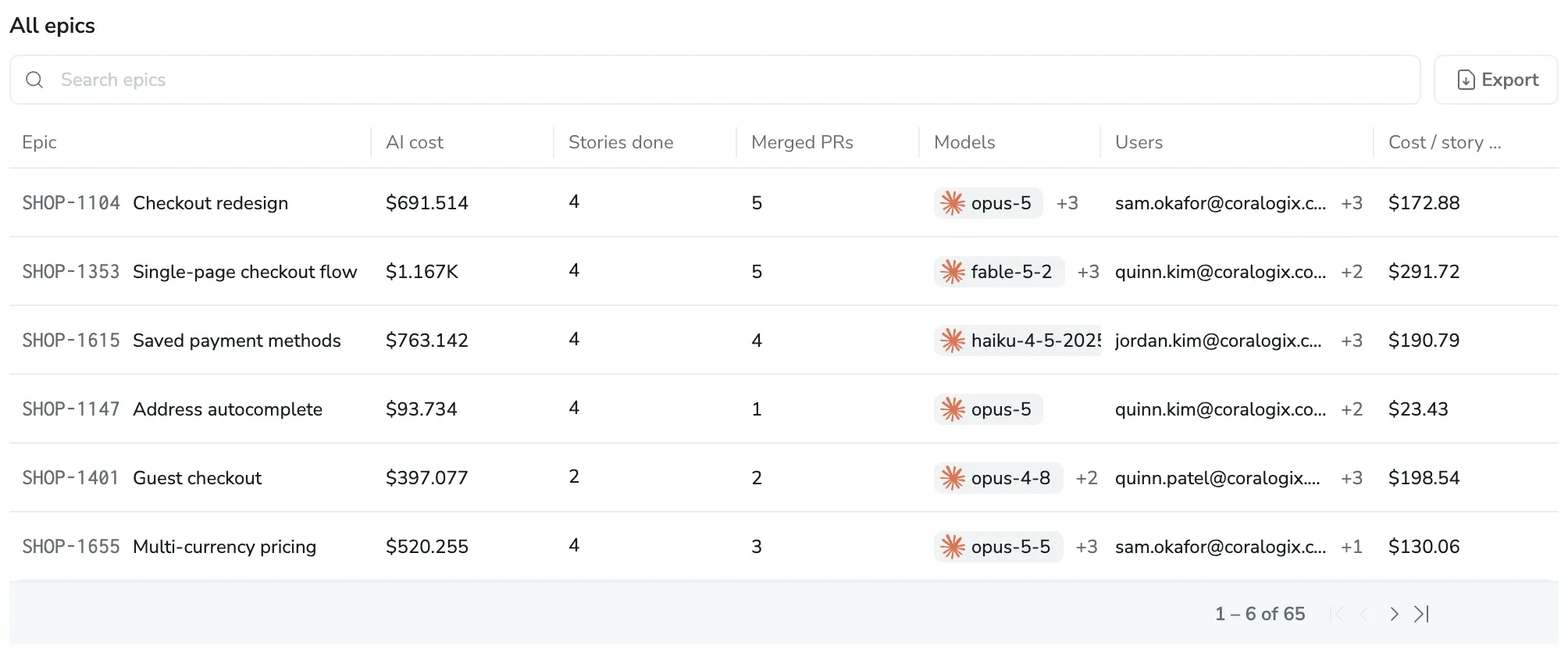
All epics (or All stories, All projects, All issues) lists each item. Search it, or select Export to download it. The columns depend on the level:
| Column | Level | Description |
|---|---|---|
| Epic or Story | Both | The Jira key and the title of the item. |
| AI cost | Both | The AI cost attributed to the item. |
| Stories done | Epic | The stories of the epic that are done. |
| Merged PRs | Both | The merged pull requests linked to the item. Shows a dash until you connect GitHub. |
| Models | Both | The models behind the item's AI cost. |
| Users | Both | The assignees of the item. For an epic, the assignees of its stories. |
| Cost / story done | Epic | AI cost divided by Stories done. |
| Status | Story | Done or In progress. |
At story level, the list counts every item at that level, tasks and bugs included, and the cost of a subtask rolls up to its parent. Linear uses the same columns, with project for epic and issue for story.
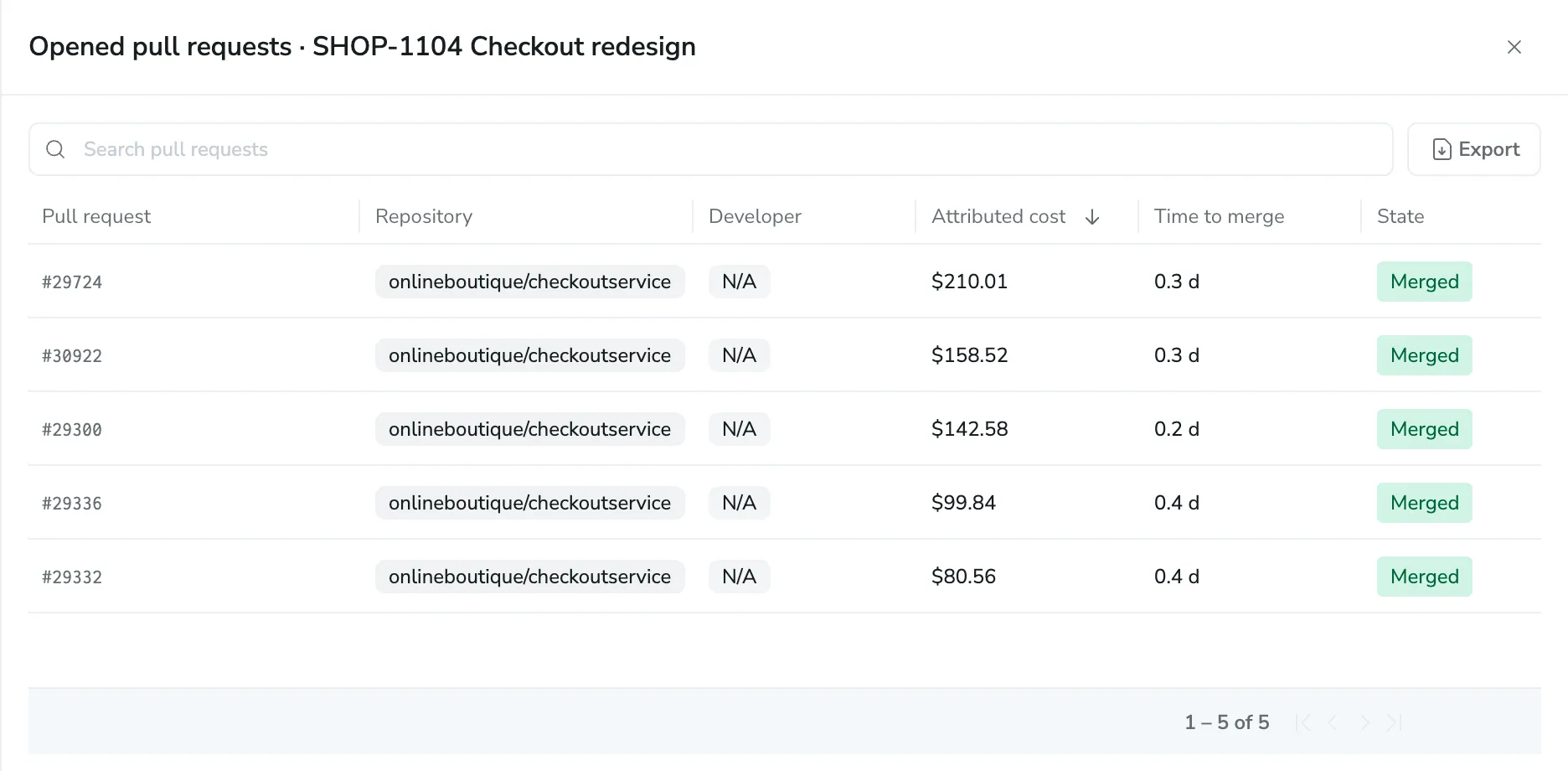
Select a row to open Opened pull requests for the item. Each pull request shows its Repository, Developer, Attributed cost, Time to merge, and State: Open, Merged, or Closed. Attributed cost is the AI cost of the sessions on the pull request's branch.
Delivery
Delivery needs GitHub. Four cards follow the cost from spend to shipped code.

AI cost that merged plots All AI cost against the Merged part of it, and Merged PRs switches it to merged pull requests over time.
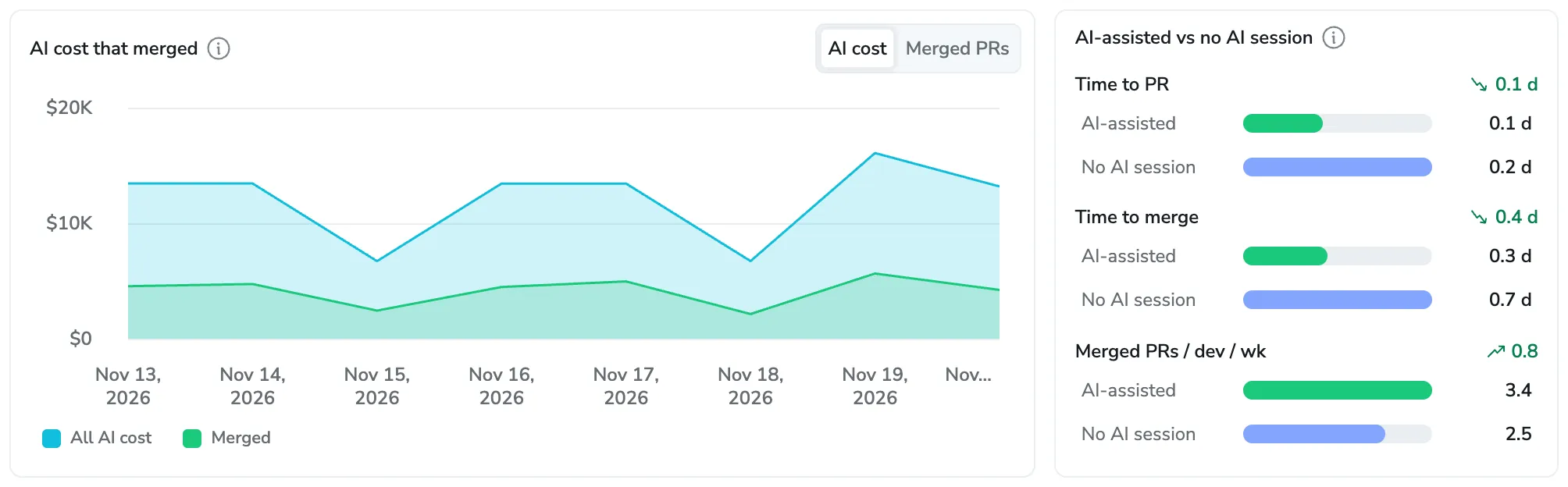
Where the time goes has three stages, from First commit → PR opened to First review → merged.

The breakdown by Users or Models ends with the No AI session row. Select a model row to list its pull requests.
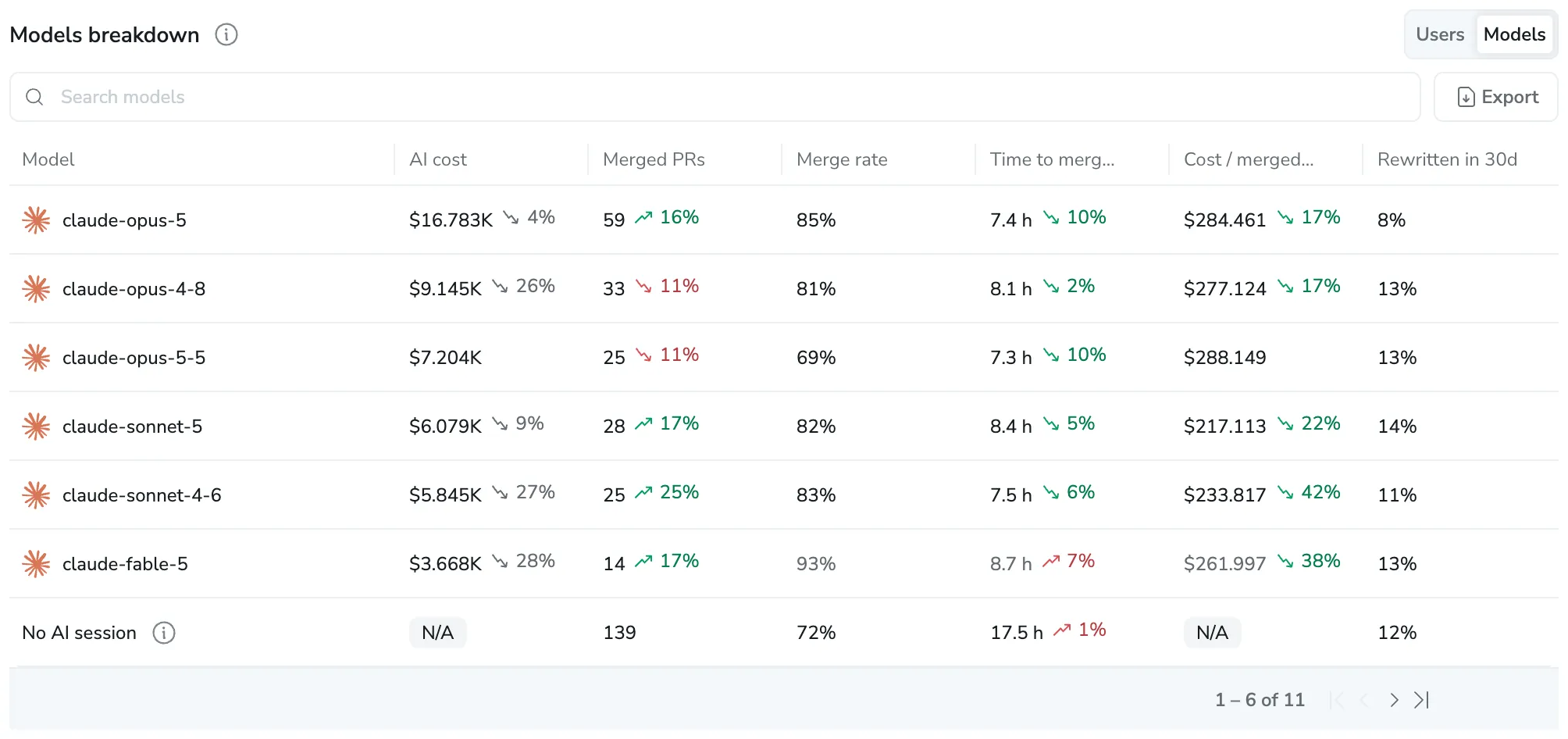
The Actual cost and List cost toggle changes the cost basis. Cost tied to a pull request or an item exists at list price only.
How cost is attributed
Coralogix links a pull request to an item by the key in the branch name, then in the pull request title, and uses the first key it finds. A pull request without a key counts in Delivery but in no row of Features. A session's cost lands on its branch, so it reaches that branch's pull request and item.
How AI-assisted pull requests are identified
A pull request counts as AI-assisted for Claude Code when it carries one of these markers:
- A commit trailer that starts with
Co-authored-by: Claude, in any case. Claude Code adds it by default, and itsattributionsetting can remove it. - The author
claude[bot]. - A branch that starts with
claude/. - With the hooks, a branch that a Claude Code session worked on.
Pull requests with the markers of other agents, such as a Copilot or cursor[bot] author or a codex/, copilot/, cursor/, or devin/ branch, count for those agents and stay out of the No AI session baseline.
Key metrics
- Cost that merged: the AI cost that reached a merged pull request. The indicator shows the share that did not.
- Cost per epic (or story, project, issue): the AI cost of delivered items divided by their number. Items in progress do not count.
- Cost not attributed: the AI cost that links to no Jira or Linear item.
- Done: the item is in the tracker's done status category: Done in Jira, completed in Linear.
- Merge rate: the share of pull requests opened in the period that merged. Rows under 20 merged pull requests are greyed out.
- Rewritten in 30d: the share of merged lines changed again within 30 days.
- No AI session: the baseline. It holds merged pull requests with no agent marker, in repositories where an AI-assisted pull request merged.
- N/A versus 0: N/A means no data. 0 is a measured zero.
Change indicators compare with the previous period. Stage figures are medians.
Current limitations and data freshness
These show N/A or a dash today, because the data is not available yet: Merged PRs / dev / wk, Rewritten in 30d, the Developer column of the pull request drawers, and, for Linear, Projects delivered and Cost per project.
Pull requests take up to about an hour to appear. New Jira and Linear issues take up to about two hours, and status changes a few hours.
Troubleshoot
| Symptom | Cause | Resolution |
|---|---|---|
| A setup checklist or a Connect notice | Delivery needs GitHub, and Features needs Jira or Linear. | Connect GitHub, Jira, or Linear. |
| Install the Claude hooks to see this data. | The widget needs the hooks. | See Set up. |
| High Cost not attributed, or an item with no cost or pull requests | No branch name or pull request title carries the item's key. | Add the key, as the tip in Set up describes. |
| A Claude Code pull request shows as No AI session | The trailer is off, and the branch and author carry no marker. | Turn the trailer back on in attribution, or start the branch with claude/. |
| AI cost or Merged PRs shows no data | No session reported cost, or GitHub reported no pull requests. | Widen the time range. Check the span telemetry and the Coralogix app on your GitHub organization. |
| Attributed cost is priced at list price only. | Actual cost is on. | Select List cost. |
| Can't filter by and a filter name | The widget cannot apply that filter. The pull request widgets need the hooks to apply Model, User, Application, and Subsystem. | Remove the filter. |