AI security posture management
AI Security Posture Management (AI SPM) in AI Center offers CISOs and security teams a holistic view of AI usage within their organization, enabling them to identify risks and enforce security best practices. It supports AI application discovery, allowing teams to monitor where and by whom AI is being used. The dashboard highlights key security metrics, including identified security issues, insights into risky users, and an overall AI Security Posture Score.
Why you need AI SPM
Use AI SPM to:
- Generate a detailed report on AI use in your repositories, empowering you to develop and execute effective mitigation strategies.
- Get insights on high-risk users and activities, helping you prioritize your investigation efforts.
- Visualize AI application usage across the organization to maintain compliance and ensure performance integrity.
How it works
- Use AI Discovery integration with GitHub to initiate a scan across all GitHub repositories within the organization to identify AI-related code and determine if the apps are being monitored by Coralogix. For integration details, see GitHub App for AI Discovery.
- Once the scan is complete, a summary of all AI projects within the organization is provided.
- The AI SPM dashboards are updated with key security and user data, including the total number of AI applications and any security violations. AI SPM also calculates an overall security posture score (ranging from 1 to 100), based on the number of apps monitored by Coralogix and whether they have security evaluations assigned to them.
Access AI SPM
- In the Coralogix UI, navigate to AI Center, then AI-SPM.
- Use the time picker to select the desired time interval for metrics collection.
Discover new AI apps
Scan your GitHub repositories to identify all AI-related code.
-
Ensure you have organization-wide GitHub access permissions. Only users with this level of access can initiate app discovery.
-
In the AI App Discovery section of the AI SPM page, select Integrate GitHub.
-
The system scans all GitHub repositories within your organization.
-
Once the scan is complete, the list of discovered AI apps is displayed in the AI App Discovery section.
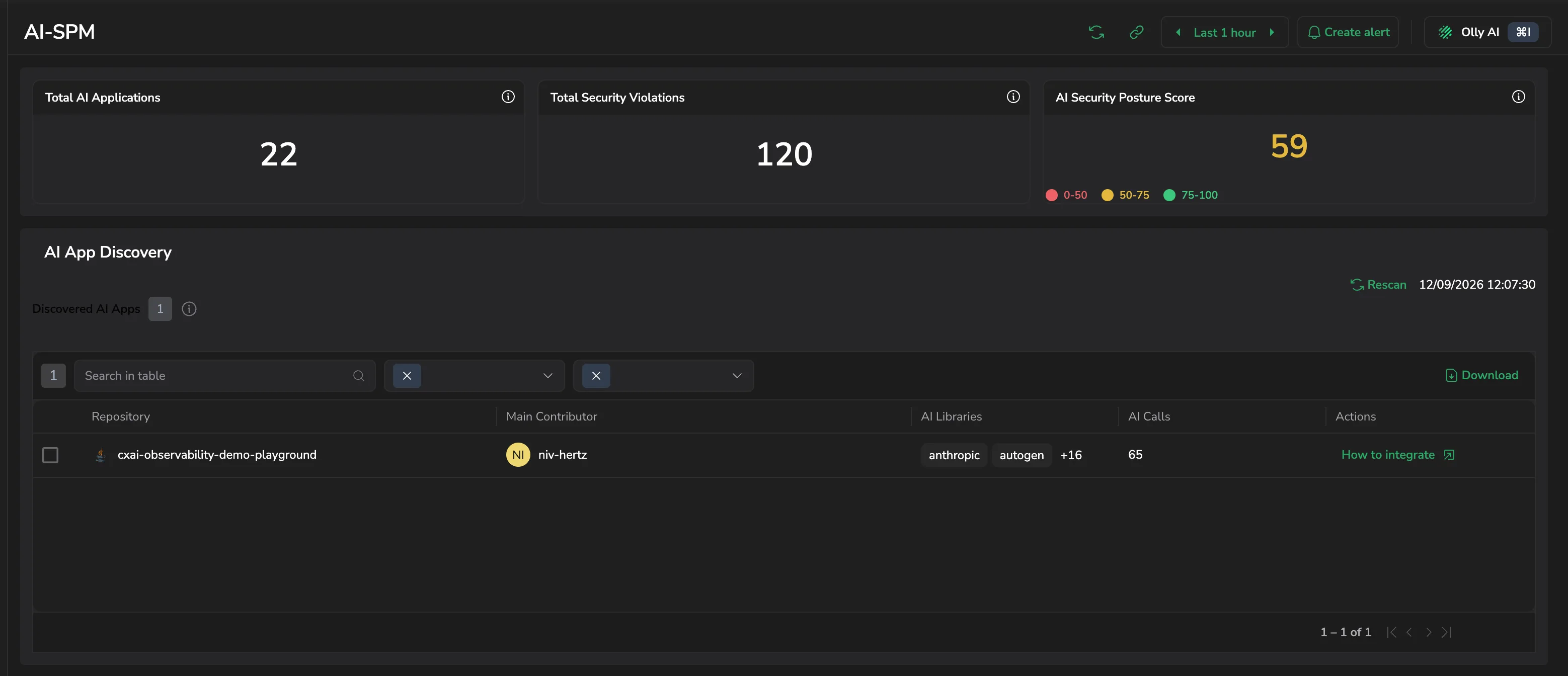
Discovered AI Apps counts what the scan found. Each row covers one repository:
- Repository: the GitHub repository containing the discovered AI app.
- Main Contributor: the developer committing most of its AI code.
- AI Libraries: the AI libraries the app uses.
- AI Calls: LLM calls made from that repository.
- Actions: How to integrate opens the setup guide for an app Coralogix isn't monitoring yet.
Search the table, narrow it with the filters beside the search box, or select Download to export it. Rescan runs discovery again, and the timestamp beside it records the last run.
Totals
This section includes the following counters:
-
Total AI Applications: The total number of discovered AI apps (monitored and unmonitored).
-
Total Security Violations: The total number of security violations recorded across all monitored apps.
-
AI Security Posture Score: A calculated score based on two factors:
- 50 points if all the user's applications, including those discovered in AI discovery, are monitored by Coralogix.
- 50 points if all applications have at least one security policy.
For example, if 1 out of 7 applications lacks a security policy, the user's score is reduced proportionally, rather than losing the full 50 points.
The score is banded for readability: 0 to 50, 50 to 75, and 75 to 100.
Security issues over time
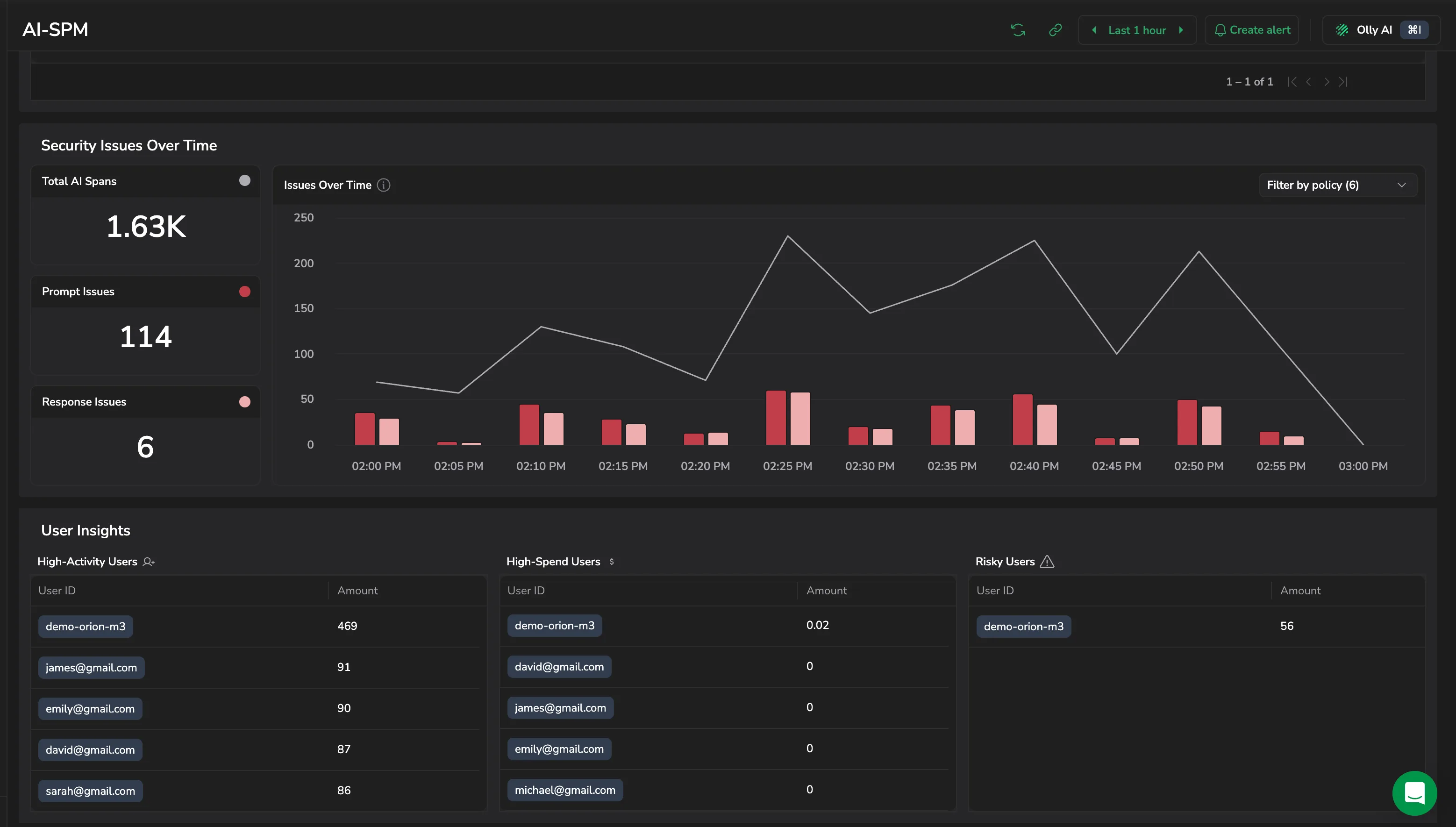
Visualize your application usage, displaying the total number of LLM calls (prompts and responses) and the call count flagged for security issues.
- Total AI Spans: AI spans across all monitored applications.
- Prompt Issues: the number of prompts that contain issues.
- Response Issues: the number of responses that contain issues.
- Issues Over Time: flagged prompts and responses against total volume. Use Filter by policy to narrow the chart to the policies you care about.
User insights
Gain a clear overview of user data and trends, making it easy to compare app users and identify high-cost, high-spend, and high-risk profiles.
- High-Activity Users: the users who sent the most messages.
- High-Spend Users: the users with the highest spend.
- Risky Users: the users with the most security-related issues detected in their messages.
Each table lists User ID against the Amount for that measure.
This capability is available only if the optional User ID parameter is provided during the AI Observability setup.
Next steps
Understand how AI Center usage is measured and billed with AI Units pricing.