# Coralogix reporter
Copy as Markdown[Open in ChatGPT](https://chatgpt.com/?q=Read%20https%3A%2F%2Fcoralogix.com%2Fdocs%2Fuser-guides%2Falerting%2Fcoralogix-reporter.md%20and%20help%20me%20with%20my%20question%20about%20this%20Coralogix%20documentation%20page.)[Open in Claude](https://claude.ai/new?q=Read%20https%3A%2F%2Fcoralogix.com%2Fdocs%2Fuser-guides%2Falerting%2Fcoralogix-reporter.md%20and%20help%20me%20with%20my%20question%20about%20this%20Coralogix%20documentation%20page.)
Coralogix reporter allows you to automate the generation of a periodic report that includes the formatted results of a predefined [**OpenSearch Query**](https://coralogix.com/docs/docs/user-guides/visualizations/hosted-opensearch-view/opensearch-api/.md). This report can be distributed automatically to a mailing list.
To define and set up a report go to AWS's [Serverless Application Repository](https://eu-central-1.console.aws.amazon.com/serverlessrepo/home?region=eu-central-1#/available-applications) and search for "Coralogix". Click on the link to **Coralogix-Reporter**.
The application requires the following parameters:
* Verified [AWS SES](https://docs.aws.amazon.com/ses/latest/DeveloperGuide/verify-email-addresses.html) email/domain.
* **CoralogixRegion.** Region associated with your Coralogix **[domain](https://coralogix.com/docs/docs/user-guides/account-management/account-settings/coralogix-domain/.md)**
* You need to [create](https://coralogix.com/docs/docs/user-guides/account-management/api-keys/api-keys/.md) a personal or team **API key**. It's recommended to use permission presets, as they are automatically updated with all relevant permissions. Alternatively, you can manually add individual permissions.
| Preset | Action | Description |
| ------------ | ------------------------------------------------------------------------------------------------------------------------------------------------------------------------------------------------------------------ | ------------------------------------------------------------------------------------------------------------------------------------------------------------------------------------------------ |
| DataQuerying | `LEGACY-ARCHIVE-QUERIES:EXECUTE`
`LOGS.DATA-API#HIGH:READDATA`
`LOGS.DATA-API#LOW:READDATA`
`METRICS.DATA-API#HIGH:READDATA`
`SPANS.DATA-API#HIGH:READDATA`
`SPANS.DATA-API#LOW:READDATA` | Query Data from the Archive
Query Frequent Search Logs
Query Monitoring & Compliance Logs
Query Metrics
Query Frequent Search Spans
Query Monitoring & Compliance Spans |
* **Query.** [OpenSearch query](https://opensearch.org/docs/latest/query-dsl/index/)
* **Index** - the OpenSearch index to query. If you want to query logs, then use `*`. If you want to query Logs2Metrics, then use `*:*_log_metrics*`.
* **Sender.** a list of comma-separated e-mails
* **Recipient.** a list of comma-separated e-mails
* **RequestTimeout.** The OpenSearch query timeout
* **Schedule.** [CloudWatch rules schedule expression](https://docs.aws.amazon.com/AmazonCloudWatch/latest/events/ScheduledEvents.html#RateExpressions)
* **ScheduleEnable.** `true` when the schedule is active and `false` when it is inactive
* **Subject.** report email subject line
* **Template.** [JMESPath](https://jmespath.org/) expression to structure the OpenSearch response
Note
Do not change the function memory size and function timeout parameters. You can adjust the query request timeout based on your needs.
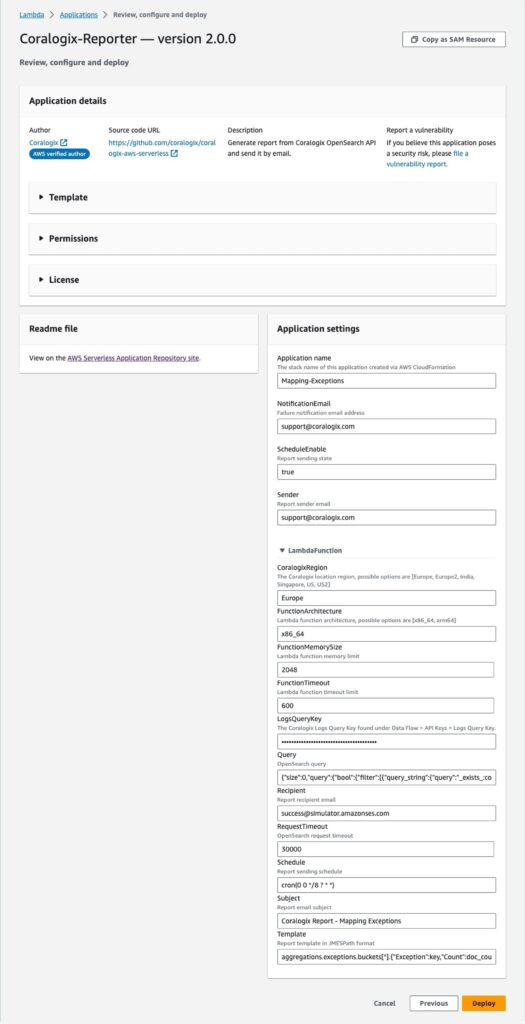
### Report example[](#report-example "Direct link to Report example")
Query the account every day at 08:00 to find mapping exceptions:
OpenSearch query:
```
{"size":0,"query":{"bool":{"filter":[{"query_string":{"query":"_exists_:coralogix.failed_reason"}},{"range":{"coralogix.timestamp":{"gte":"now-24h","lt":"now"}}}]}},"aggs":{"exceptions":{"terms":{"field":"coralogix.failed_reason","size":20}}}}
```
Schedule:
```
cron(0 0 */8 ? * *)
```
Template:
```
aggregations.exceptions.buckets[*].{"Exception":key,"Count":doc_count}
```
[](https://coralogix.com/docs/docs/assets/images/Coralogix-Reporter-525x1024-5694cac7471e26dcab798309ddb0b5b5.jpg)
## Related resources[](#related-resources "Direct link to Related resources")
[Introduction to alerts](https://coralogix.com/docs/docs/user-guides/alerting/introduction-to-alerts/.md)[Incidents](https://coralogix.com/docs/docs/user-guides/alerting/incidents/.md)[Alert aggregation](https://coralogix.com/docs/docs/user-guides/alerting/alert-aggregation/.md)