# Archive query from the explore screen
Copy as Markdown[Open in ChatGPT](https://chatgpt.com/?q=Read%20https%3A%2F%2Fcoralogix.com%2Fdocs%2Fuser-guides%2Fdata-query%2Farchive-query%2Farchive-query-from-the-explore-screen.md%20and%20help%20me%20with%20my%20question%20about%20this%20Coralogix%20documentation%20page.)[Open in Claude](https://claude.ai/new?q=Read%20https%3A%2F%2Fcoralogix.com%2Fdocs%2Fuser-guides%2Fdata-query%2Farchive-query%2Farchive-query-from-the-explore-screen.md%20and%20help%20me%20with%20my%20question%20about%20this%20Coralogix%20documentation%20page.)
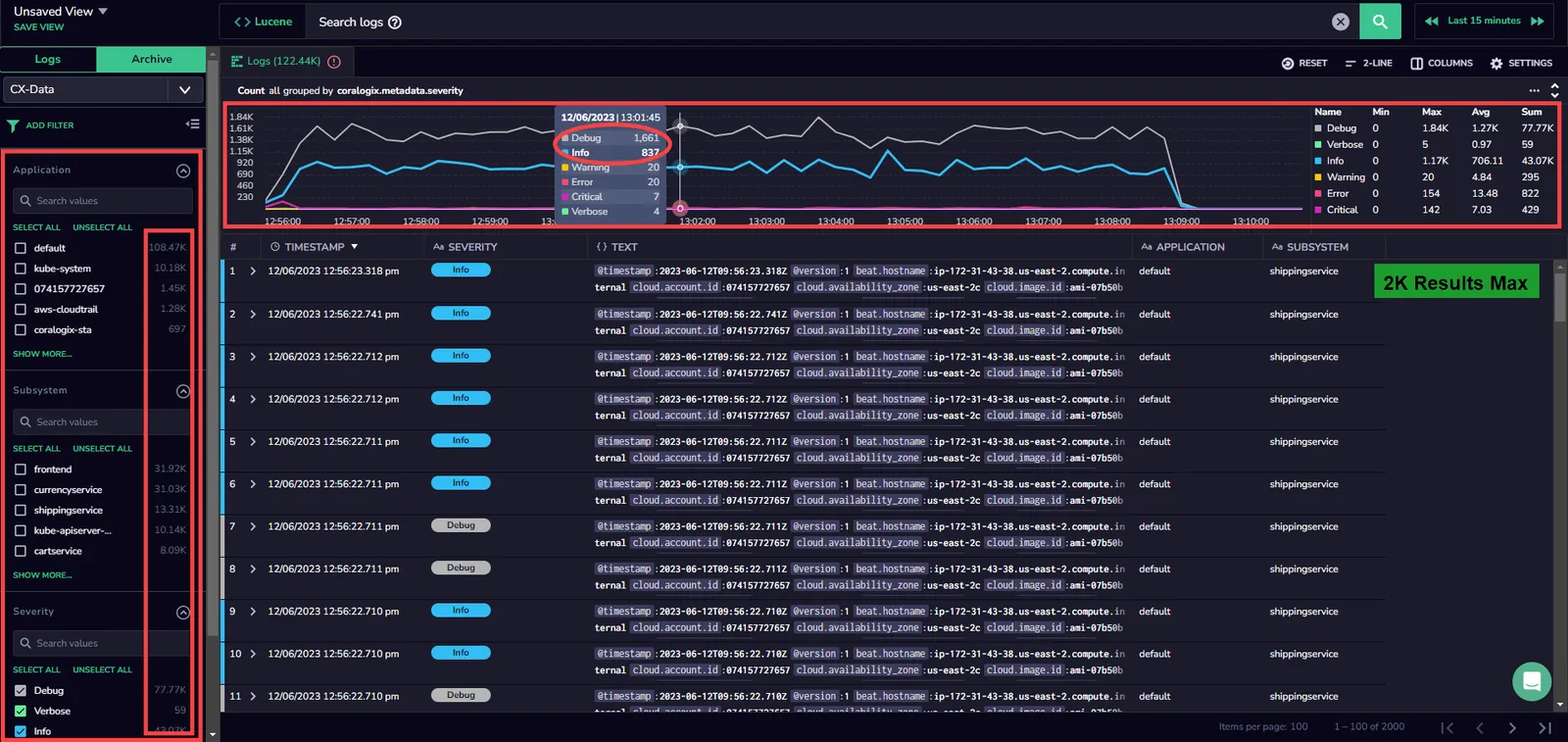
Directly query logs and spans in your S3 archive from your **Explore Screen**. Using text-based queries or specific query languages such as DataPrime or Lucene, you may query your data irrespective of its priority or timeframe and regardless of your daily quota - all with the ease of familiar functionalities.
## Overview[](#overview "Direct link to Overview")
Query the data in your S3 archive directly from your [Explore screen](https://coralogix.com/docs/docs/user-guides/data_exploration/.md).
Use this feature to:
* Query your archive in the Coralogix UI using any text, [Lucene](https://coralogix.com/docs/docs/user-guides/alerting/lucene-query-builder/.md), or [DataPrime](https://coralogix.com/docs/docs/dataprime/introduction/welcome-to-the-dataprime-reference/.md) syntax query, irrespective of log priority or daily quota.
* Enjoy various data sources. Using [DataPrime](https://coralogix.com/docs/docs/dataprime/introduction/welcome-to-the-dataprime-reference/.md), you may query logs or spans.
* Query data with unlimited time frames. There are no restrictions on how far back in time your data can go.
* View query results alongside live data streams and with the use of familiar functionalities.
* Store more of your data in our [Monitoring](https://coralogix.com/docs/docs/user-guides/account-management/tco-optimizer/.md#features-by-priority-level) and [Compliance](https://coralogix.com/docs/docs/user-guides/account-management/tco-optimizer/.md#features-by-priority-level) priority levels, while maintaining interactive query times and saving on costs.
## Prerequisites[](#prerequisites "Direct link to Prerequisites")
* Read/ Write permissions enabled in your [AWS S3 bucket](https://coralogix.com/tutorials/archive-s3-bucket-forever/)
## Getting started[](#getting-started "Direct link to Getting started")
1
.
From your Coralogix toolbar, navigate to **Explore** > **Logs** tab.
2
.
Select **Archive** the upper left-hand corner of your Logs screen.
3
.
Select **CX-Data** in the dropdown menu.
## Explore screen functionalities[](#explore-screen-functionalities "Direct link to Explore screen functionalities")
### Query[](#query "Direct link to Query")
[Query](https://coralogix.com/docs/docs/user-guides/data_exploration/.md) using any text, [Lucene](https://coralogix.com/docs/docs/user-guides/alerting/lucene-query-builder/.md), or [DataPrime](https://coralogix.com/docs/docs/dataprime/introduction/welcome-to-the-dataprime-reference/.md) syntax query.
### Filter[](#filter "Direct link to Filter")
[Filter](https://coralogix.com/docs/docs/user-guides/data_exploration/.md) your logs using application, subsystem, and severity filters.
### Manage settings[](#manage-settings "Direct link to Manage settings")
Manage your settings by clicking on **SETTINGS** in the upper right-hand corner of your screen.
Select **ACTIONS** to trigger 3rd party services based on your search results and / or values under specific keys. Find out more [here](https://coralogix.com/docs/docs/user-guides/data_exploration/custom_actions/.md).
## Limitations[](#limitations "Direct link to Limitations")
The following limitations on Explore Screen archive queries are described below.
| Limitation | Description |
| --------------------- | ----------------------------------------------------------------------------------------------------------------------------------------------------------------------------------------------------------------------------------------------------------------------------------------------------- |
| Bytes processed | Up to 30% of daily ingested bytes |
| Parquet files scanned | Up to 500,000 files |
| Total log results | 2,000 default
30,000 using `limit `
5,000 with frequent search analytical query (i.e. aggregation)
15,000 frequent search exploratory query (non-aggregation) |
| Exported log results | Up to 2,000 results.
Exporting the data in the logs grid from an archive query is limited to the top 20 pages (100 logs per page), so you can export a max of 2000 logs at a time. In order to export all archive query logs, create an archive query by navigating Data Flow > Archive Queries. |
| Ordering | Archive query ordering is guaranteed only for up to 10,000 results. |
[](https://coralogix.com/docs/docs/assets/images/Untitled-34-607db6fca1af71e4f5dcdb3f5f00b09f.webp)
Note
* You may incur slight delays when querying archived data, when compared with other Explore screen queries.
* It is possible to use the same query syntax as queries run in [Background Queries](https://coralogix.com/docs/docs/user-guides/dataengine/background_queries_v1/.md)
See the [limitations](https://coralogix.com/docs/docs/dataprime/API/limitations/.md#background-query-limitations) page for a comprehensive list of query limitations.
### Warnings[](#warnings "Direct link to Warnings")
Once a limit is reached, a warning message is displayed. Refine your query results to avoid reaching a limit.
## Refine your query results[](#refine-your-query-results "Direct link to Refine your query results")
Refine your query results using any of the following methods:
* Apply more selective filters to your queries (for example, on application or subsystem).
* If using the DataPrime extract operator and subsequently filtering its results, create a parsing rule and filter on the parsed field instead.
* Avoid regular expressions or wildcards in filters.
* In DataPrime, switch from using the contains operator on strings to the free text search operator (\~).