Unified Threat Intelligence
Malware detection is an essential capability for modern businesses that helps them identify threats and malicious activity posing a risk to their environments, investigate them, and respond quickly.
Threat intelligence feeds are trusted sources of information about potential cyber threats, such as malicious activity. With that said, incorporating threat feeds into your data to detect suspicious activity can require complex configuration, often leading to the sub-utilization of this important source of information.
The Coralogix Unified Threat Intelligence relies on our Streama© technology to provide you with built-in seamless integration with some of the world’s leading threat intelligence feeds with hundreds of thousands threat entities curated by our security experts.
Coralogix does not require any API integration, special syntax, or format change. It automatically enriches your data with malicious indicators in real-time as they are streamed, allowing you to query, visualize, and alert on potential threats.
Enriched information is then stored to your own remote storage. This allows you to query directly from Coralogix with infinite retention and even research the data with external tools.
What you need
SECURITY-ENRICHMENT:READCONFIG: view Unified Threat Intelligence Enrichment configuration (Data Admin, Observability Lead, Platform Admin, Security User).SECURITY-ENRICHMENT:UPDATECONFIG: create or manage Unified Threat Intelligence Enrichment (Data Admin, Platform Admin, Security User).
How can the Unified Threat Intelligence help to improve my security?
Take a look at these use-cases to get a feel for the many ways that our Unified Threat Intelligence can serve you.
Phishing is a social engineering attack practice, causing people to share credentials, sensitive information or install malware by impersonating a legitimate website. The Unified Threat Intelligence helps you detect any network activity from your organization’s environment to a reported phishing website, allowing you to identify which users were involved and investigate the impact.
Phishing is the number one attack vector to infiltrate your organization by obtaining user credentials. The Unified Threat Intelligence helps you detect any user visiting a phishing site (through domain/URL) or a phishing site that is hosted on your infrastructure.
Malware installed on an internal machine in your environment may gain access to your sensitive data and exfiltrate it by uploading this data to an attacker’s website. The Unified Threat Intelligence helps you to immediately detect network activities to such websites reported as malicious, block them, and assess the data leakage that may have occurred.
Hackers use bots to perform large scale attacks. These include denial of service (DDoS) attacks that can flood a website with connection requests, causing it to stop serving legitimate customers, distribute spam emails, make fraudulent purchases, and more. C&C communication is used by hackers to send the operation commands to the bots. The Unified Threat Intelligence allows you to detect this command and control communication by inspecting your network activity logs and discovering communication to/from command and control servers. Using this feature, you can easily see which machines perform this network activity and are infected with bots.
Hackers use brute-force scanning to scan your network environment and find exposed resources which allow them to penetrate your environment and attack it. The Unified Threat Intelligence allows you to detect incoming network traffic coming from IPs and servers reported as malicious. With this improved security posture, you can block those requests, assess any risk and its impact, and immediately decide upon mitigation steps.
How it works
Coralogix operates a dedicated Threat Intel Platform that collects indicators of compromise (IOCs) from multiple source classes, then validates, scores, and maintains them before they are used for enrichment.
The flow has three stages:
Collection. Open-source feeds, security research publications, internal incident investigations, and structured threat reports are polled continuously for new indicators.
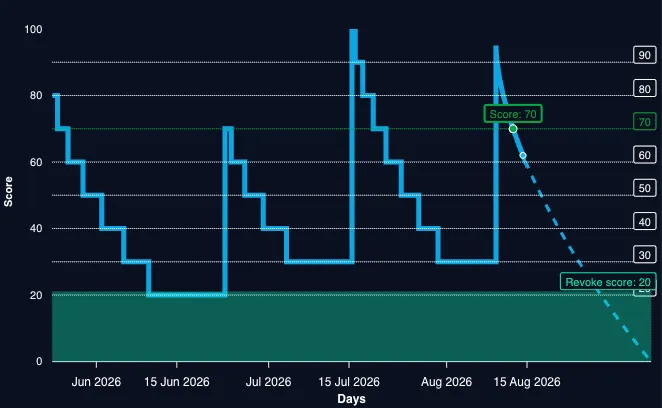
Processing. The Threat Intel Platform removes duplicate IOCs, applies AI-based context enrichment, assigns each indicator a confidence score from 0 to 100, and applies a time-based decay rule so stale intelligence loses weight over time.
Enrichment and detection. Scored indicators are pushed to the Coralogix platform, where incoming logs are normalized, matched against the indicator set, and enriched in real time. Enriched logs feed the out-of-the-box alerts and dashboards described below.
Threat intelligence sources
Indicators are collected from four complementary source classes. All sources are aggregated, de-duplicated, and validated before they reach your account.
| Source class | Description |
|---|---|
| Open-source feeds | Continuously polled public IOC feeds covering IP addresses, domains, URLs, and file hashes. |
| Security research publications | More than 70 vendor and independent research blogs, monitored for fresh IOCs from emerging campaigns. |
| Internal incident collection | Indicators surfaced by Snowbit MDR investigations and live incident response. |
| Threat reports and CISA KEV | Structured threat reports and the CISA Known Exploited Vulnerabilities catalog. |
Supported indicator types
Six indicator types are scored, contextualized, and matched against your telemetry in real time.
| Indicator type | Description |
|---|---|
| IP address | Malicious source and destination addresses, including botnet nodes and Tor exit nodes. |
| Domain | Known-bad and newly registered domains used for phishing, malware delivery, and command and control. |
| URL | Phishing, command and control, and malware-hosting links. |
| File hash | Malware sample hashes (MD5 and SHA families). |
| JA3 fingerprint | TLS client fingerprints used to identify command and control tooling. |
| JA4 fingerprint | Next-generation TLS fingerprints with improved resistance to evasion. |
How confidence scores are assigned
The initial confidence score reflects the threat category the indicator belongs to. Confirmed command and control infrastructure receives the highest scores, while uncorroborated or aging intelligence starts low and must earn a higher score through additional reporting. The scores in the table below are normalized to a 0 to 10 band.
| Score | Category | Examples | Rationale |
|---|---|---|---|
| 10 | APT / C2 | UNC6771, APT36, Cobalt Strike, Havoc, Brute Ratel, Sliver, Mythic | Active command and control frameworks on confirmed malicious infrastructure. |
| 9 | Offensive security tools | Metasploit, Meterpreter, PoshC2, Empire, Covenant | Known attack frameworks found on open ports; a strong indicator of compromise. |
| 9 | Remote access trojans | AsyncRAT, Remcos, QuasarRAT, NjRAT, DarkComet | Remote access trojans with confirmed C2 panels. |
| 8 | Malware hosting | Domains serving FakeApp, ClearFake | Confirmed malicious domains distributing malware. |
| 8 | Phishing kits / campaigns | Gophish, Evilginx, Modlishka | Detected phishing infrastructure. |
| 8 | Information stealers | RedLine, Raccoon, Vidar, LummaC2, StealC | Stealer families with active C2. |
| 7 | Exploit kits and fake updates | ClearFake, SocGholish, fake browser update campaigns | Drive-by download infrastructure. |
| 7 | Cryptominers | XMRig and other Monero miners on servers | Unauthorized mining activity that indicates compromise. |
| 6 | Botnet C2 | Mirai, Mozi, and Gafgyt command servers | Botnet command servers, as opposed to the devices they control. |
| 5 | Botnet-infected devices | Mirai-infected devices, IoT bots | Infected endpoints; often victims rather than attackers. |
| 5 | Scanner activity | Port scanners, SSH brute force, web scanners | May be attackers or legitimate security researchers. |
| 4 | Suspicious | Single-source report with no corroboration | Requires more evidence; the score rises as additional feeds report the indicator. |
| 3 | Unverified | Aged IOCs, expired domains, inactive IPs | May no longer be relevant; subject to decay and revocation. |
Scores are not static. An indicator reported by multiple independent feeds gains confidence, while an indicator that stops appearing in fresh intelligence decays toward the revoke threshold and is eventually retired.
Risk scoring and indicator lifecycle
Every indicator carries a risk score that reflects current confidence in its maliciousness.
- Initial score. When an indicator is created, it receives a score on a 0 to 100 scale, assigned from the incoming feed or set by the Snowbit Threat Intel team.
- Time-based decay. A decay rule steadily lowers the score as the intelligence ages. New corroborating evidence raises the score again.
- Revocation. When an indicator's score falls below the revoke threshold, it is retired from the active set. This keeps the indicator set current and cuts alert noise from stale intelligence.
- Normalization on ingestion. When indicators are pushed into Coralogix, the score is normalized to a 0 to 10 band, which simplifies alert thresholds.
For example, an IP address reported by a C2 tracker might enter the platform with a score of 8. If no further sightings occur, decay reduces the score toward the revoke threshold over the following weeks. If a new report confirms the address is still active, the score rises again and the indicator remains in the active set.
Enriched fields
If an IP, URL, or domain value in your log is reported as malicious, a new field named <key_name>_suspected is added to the relevant log, with key_name serving as the original log key. The field records the matched value, the number of feeds that reported it, and per-feed detail.
The <key_name>_suspected field contains the following fields:
| Field | Description |
|---|---|
| malicious_value | Actual value reported to be malicious |
| reporting_feeds | List of feeds that reported this value as malicious |
| total_feeds | Includes the number of the feeds in reporting_feeds and can be used in queries and alerts as a confidence level. |
Feeds that supply adversary context add the following detail to their entry under reporting_feeds:
{
  "adversary": {
    "confidence_level": 8,
    "date_identified": "2026-07-26",
    "feed_name": "Coralogix",
    "industry": "Multi-sector",
    "ioc_source": "blog",
    "malware_family": "AdaptixC2",
    "notes": "Traffic seen on port 4321",
    "reference": "",
    "tags": [
      "confidence:high",
      "status:unclassified",
      "type:ipv4"
    ],
    "targeted_countries": [
      "Global"
    ],
    "type": "IPv4"
  }
}
This enrichment is executed automatically while your logs are being streamed into Coralogix. All you need to do is to define which log keys contain IPs, URLs, or domains that should be looked up in the threat intelligence feeds and enriched upon a match.
To get the best value, it is recommended to create alerts based on these enriched logs, to be notified as soon as possible upon detection of potential malicious network traffic and respond immediately.
Get started
Navigate to Data Flow, then Data Enrichment.
Select Enrich threat intelligence to open the editor.
Select the JSON keys containing IPs, URLs, or domains to look up and enrich with malicious activity indicators.
Select Add Key.
If your logs don’t have a dedicated field for IP, URL, or domain, or your data isn’t JSON-formatted, you can use our parsing rules to extract these precise values from your log record into a dedicated key, to be looked up in the threat intelligence fields and enriched if they match.
From that point on, every incoming log with a value in a selected key is checked against the indicator set and enriched automatically.
Query enriched logs
Use DataPrime to explore enriched logs.
Find all logs where an IP was flagged as malicious:
source logs
| filter $d.cx_security.source_ip_suspected != null
Surface the most frequently seen malicious values so you can prioritize investigation:
source logs
| filter $d.cx_security.source_ip_suspected != null
| groupby $d.cx_security.source_ip_suspected.malicious_value aggregate count() as hits
| orderby hits desc
| limit 10
Focus on high-confidence matches only:
source logs
| filter $d.cx_security.source_ip_suspected.reporting_feeds.Coralogix.confidence_level >= 7
Dashboards
Unified Threat Intelligence ships with dashboards that answer both executive and analyst questions.
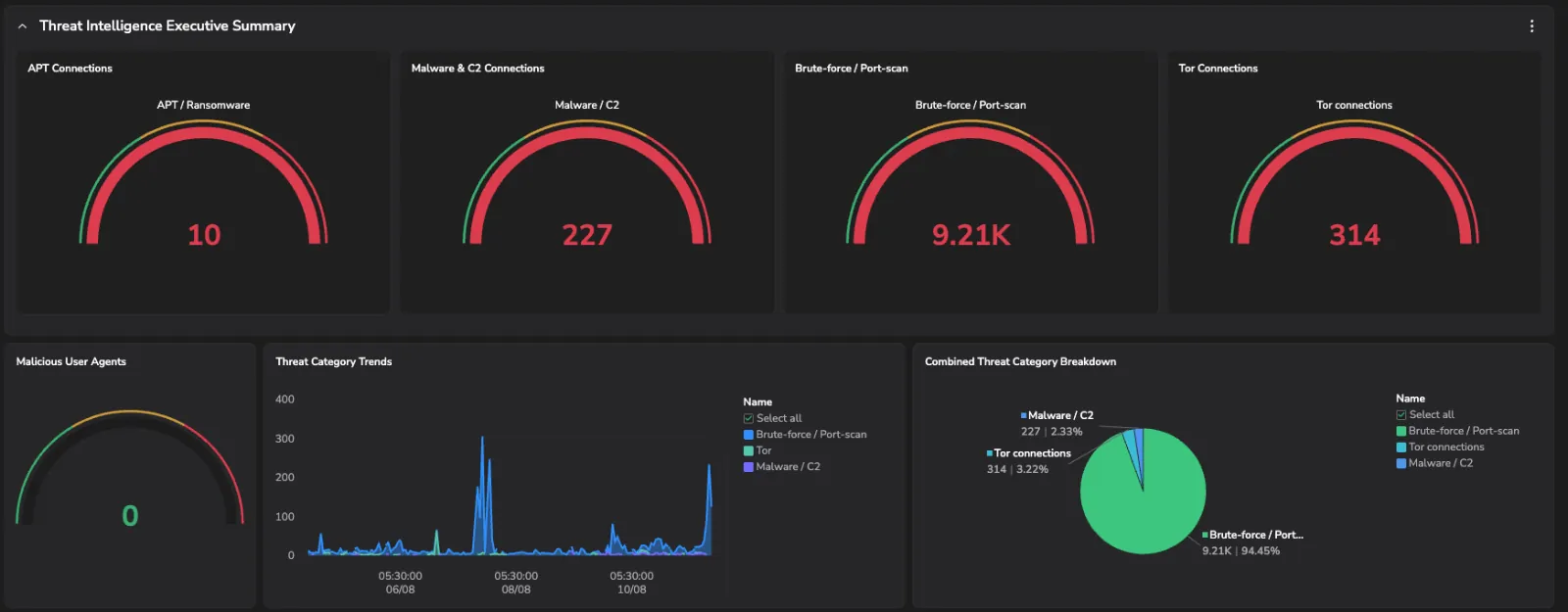
- Executive overview. A single-pane summary of threat activity across your environment: match volumes, trends, and the most active threat types.
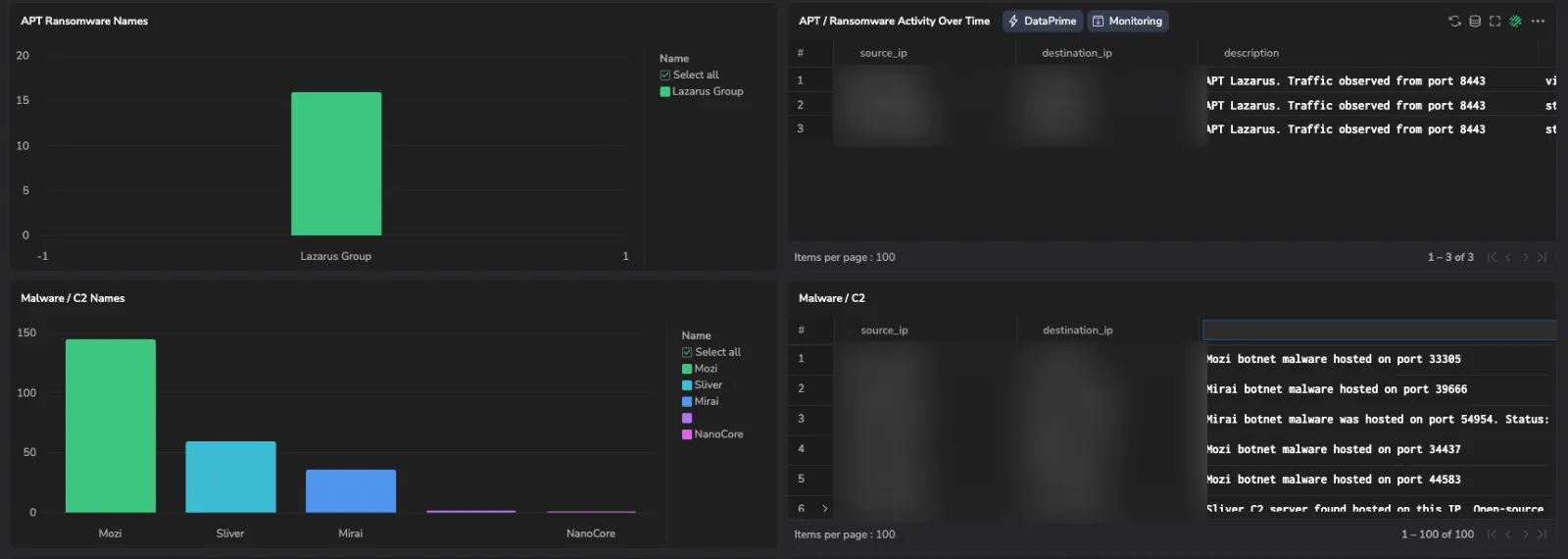
- Threat type deep dive. Drill into individual threat families, from ransomware and malware variants to connection-level source and destination mapping per threat type.
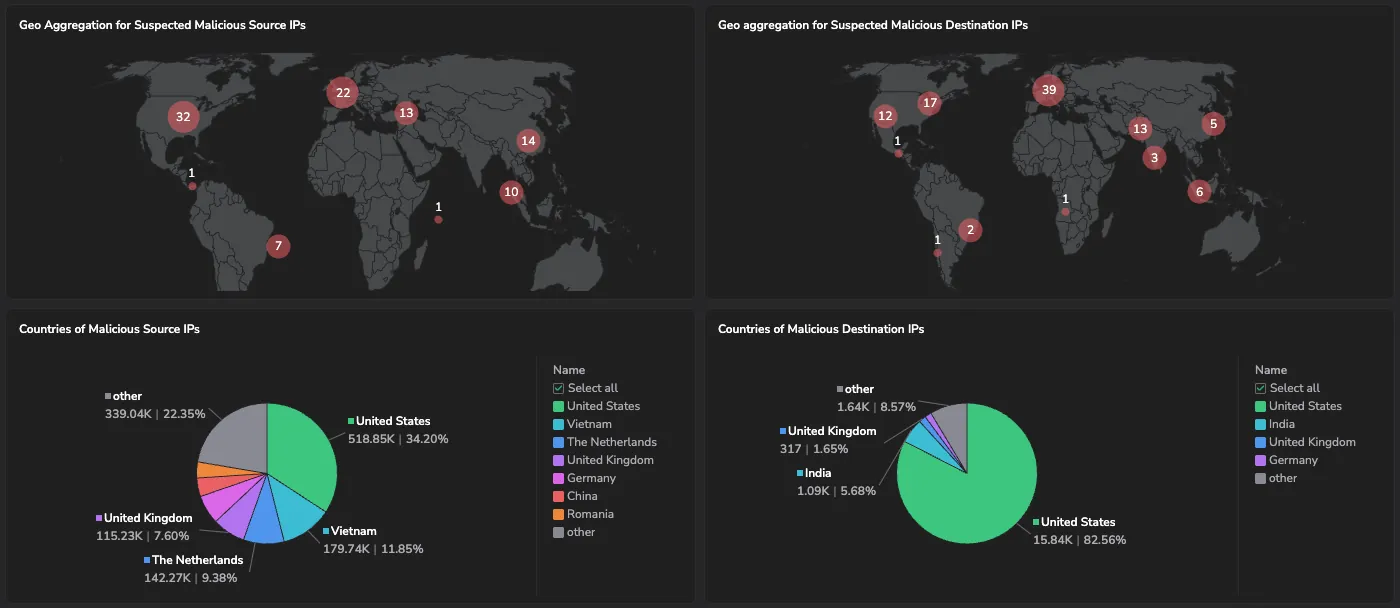
- Geo intelligence maps. World-map views aggregate malicious source and destination IPs by geography for fast attribution and region-based awareness.
- Most targeted ports. Identifies which services attackers probe most, useful for prioritizing exposure reduction.
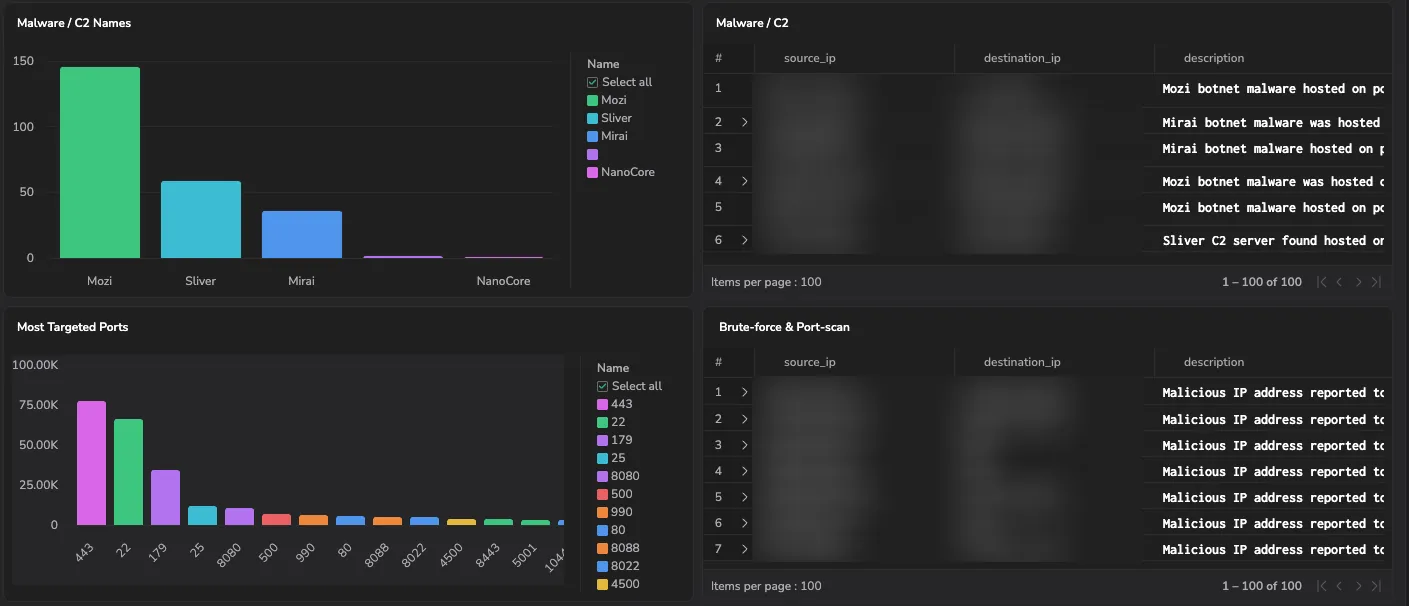
- Network threat activity. Time-series charts and enriched connection logs track malicious IPs, Tor exit nodes, and targeted destinations with application-level context.
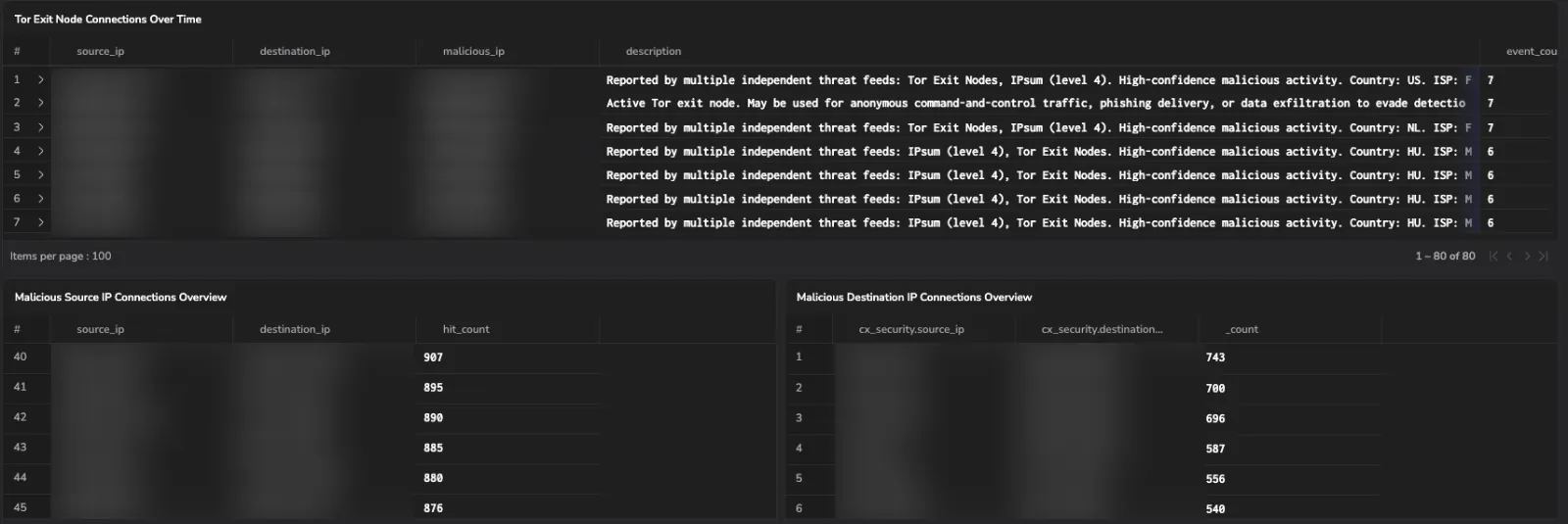
You can also build your own custom dashboards by querying logs that contain the enriched <key_name>_suspected field.
Bring your own intelligence
The platform is fully extensible. You can layer your own intelligence and enrichment on top of everything Coralogix delivers.
Custom threat intelligence. Ingest commercial feeds, ISAC and sharing-group intelligence, and internal IOC lists via STIX and TAXII. Your indicators are scored and decayed alongside Coralogix sources.
Out-of-the-box alerts
Pre-built Unified Threat Intelligence alerts fire the moment enriched telemetry matches a malicious indicator.
| Alert | Triggers when |
|---|---|
| Outgoing traffic to Malicious IP | A log records a connection from your environment to a known-malicious IP address. |
| Incoming traffic from Malicious IP | A log records a connection into your environment from a known-malicious IP address. |
| Malicious URL detected | A log contains a URL that matches a malicious indicator. |
| Malicious domain detected | A log contains a domain that matches a malicious indicator. |
| Malicious JA3 fingerprint detected | A TLS connection log carries a JA3 hash that matches known malicious tooling. |
| Malicious JA4 fingerprint detected | A TLS connection log carries a JA4 fingerprint that matches known malicious tooling. |
| Malicious file hash detected | A log contains a file hash that matches a known malware sample. |
Some of the extensions, such as "Snowbit STA", automatically configure their product log keys to be enriched by the Unified Threat Intelligence, as well as add predefined alerts to notify you immediately upon detection of malicious activity.
Additional resources
Read the case study Two true positives from one curated domain to see how a single curated indicator caught cryptominers at two customers.
Next steps
Add geographic location data to your logs based on IP addresses with Geo enrichment.