Send alerts and Cases to incident.io from Notification Center
This guide demonstrates how to configure a connector and define message configuration for integrating incident.io with Coralogix using the generic HTTPS destination type.
incident.io uses a single endpoint for both triggering and resolving alerts. The instructions below walk you through setting up the connector and message payloads to support this integration.
Connector configuration
The generic HTTPS connector integrates with any HTTPS endpoint. Configure the request method, headers, and body to establish communication between Coralogix Notification Center and a third-party system like incident.io.
Prerequisites
Before configuring the connector, create the Coralogix integration inside the incident.io app:
- Go to Alerts, then Create alert source.
- Select the Coralogix integration type from the list, give it a name, and select Continue.
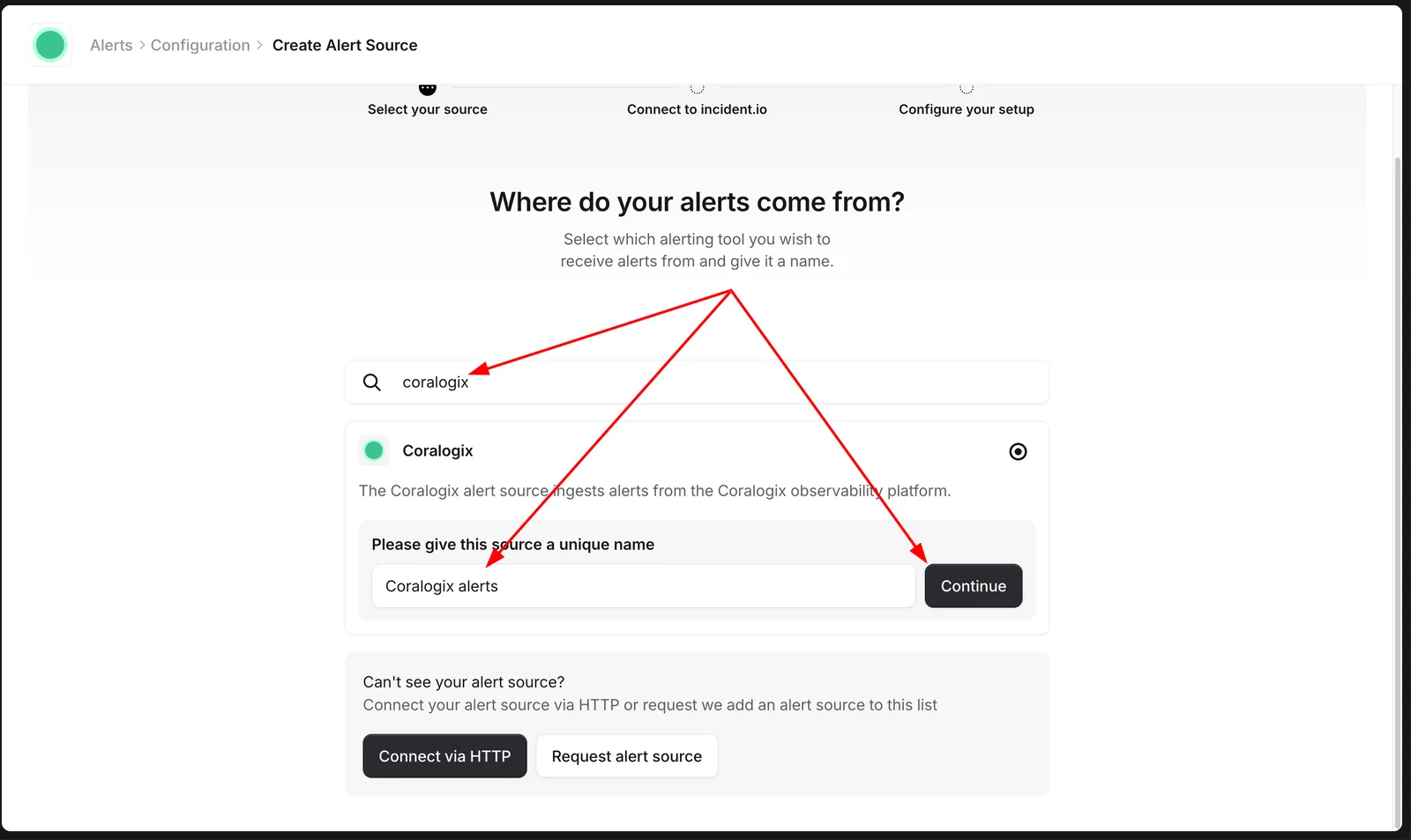
- On the next page, copy the provided URL and auth headers. These values are used during the connector creation stage.
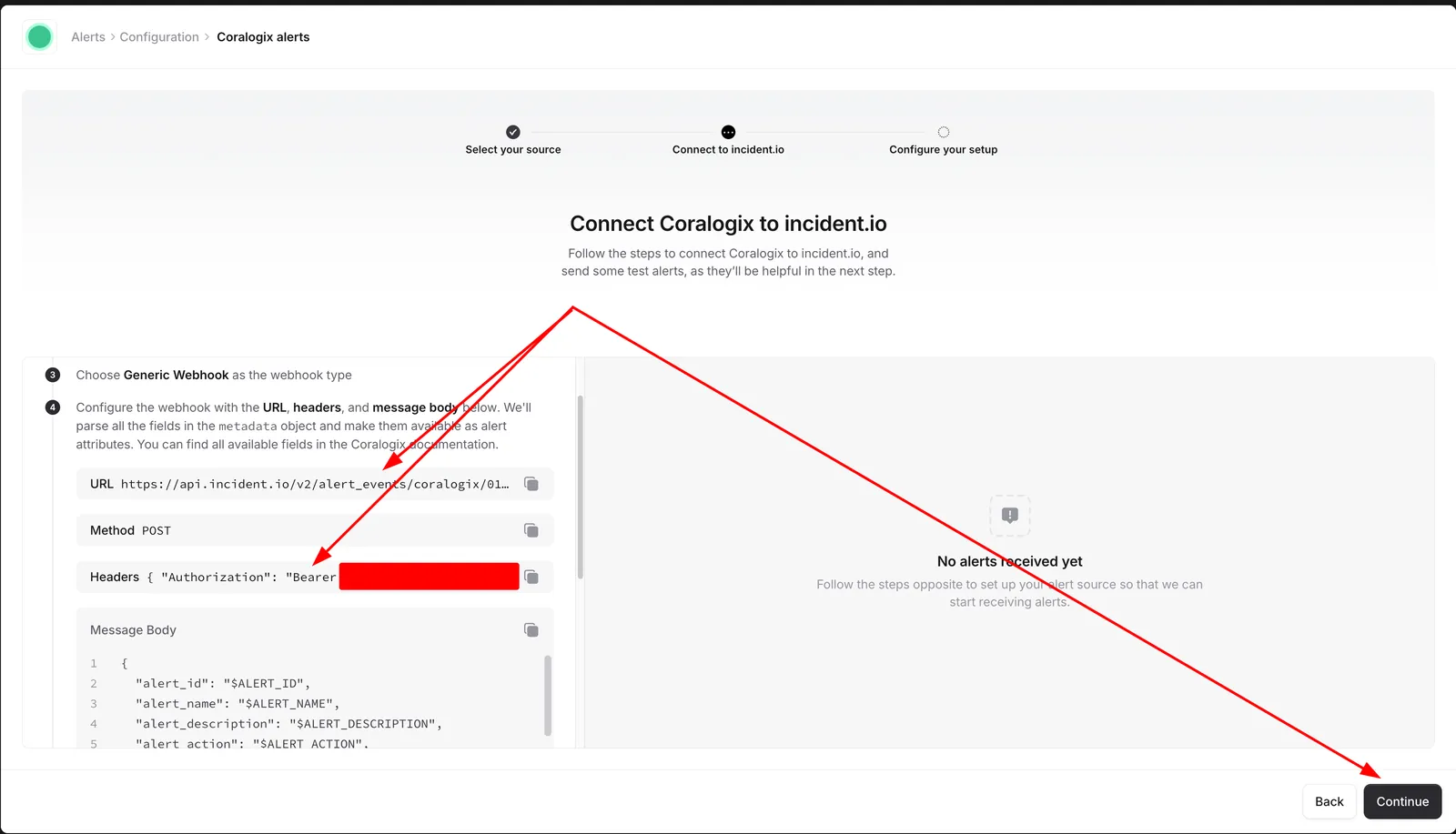
- Finish integration creation by selecting Continue. Pause and read more about integration capabilities if needed.
Create the connector with the following configuration:
-
URL:
https://api.incident.io/v2/alert_events/coralogix/<<connection_id>> -
Headers:
{"Authorization": "Bearer <<YOUR_API_KEY>>","Content-Type": "application/json"}
Message configuration
incident.io supports both alert and case notifications from Coralogix. Use the preset that matches the entity type you are routing.
- Alert preset
- Case preset
Create a preset for alerts using the following JSON structure (Body part):
{
  "alert_id": "{{alert.groupingKey}}",
  "alert_name": {% filter json_encode %}[ {{alert.highestPriority}} ]{{alertDef.name}}{% endfilter %},
  "alert_description": {{alertDef.description | json_encode}},
  "alert_action": {% if alert.status | lower == "triggered" %}"trigger"{% else %}"resolve"{% endif %},
  "alert_url": "{{alert.alertDataUrl | default(value = '')}}",
  "metadata": {
    "alert_id": "{{alert.id}}",
    "alert_name": {{alertDef.name | json_encode}},
    "alert_description": {{alertDef.description | json_encode}},
    "alert_action": {% if alert.status | lower == "triggered" %}"trigger"{% else %}"resolve"{% endif %},
    "alert_url": "{{alert.alertDataUrl | default(value = '')}}",
    "alert_priority": "{{alert.highestPriority | default(value = alertDef.priority)}}",
    "dedup_key": "{{alert.groupingKey}}"
  }
}
Create a preset for Cases using the following JSON structure (Body part). The alert_action resolves to trigger while the Case is ACTIVE or ACKNOWLEDGED, and to resolve after the Case closes.
{
  "alert_id": "{{ case.id }}",
  "alert_name": {{ case.title | json_encode }},
  "alert_description": {{ case.description | json_encode }},
  "alert_action": {% if case.status == "ACTIVE" or case.status == "ACKNOWLEDGED" %}"trigger"{% else %}"resolve"{% endif %},
  "alert_url": "{{ case.url }}",
  "metadata": {
    "case_id": "{{ case.id }}",
    "priority": "{{ case.priority }}",
    "status": "{{ case.status }}",
    "category": "{{ case.category }}",
    "created_at": "{{ case.createdAt }}",
    {% if case.updatedAt %}"updated_at": "{{ case.updatedAt }}",{% endif %}
    "assignee": "{{ case.assignee.userEmail | default(value = "N/A") }}",
    "labels": {{ case.labels | json_encode(pretty = true) }},
    "groupings": {{ case.groupings | json_encode(pretty = true) }}
  }
}
Next steps
Configure a PagerDuty connector to send alert notifications in Connector configuration.