AI settings
Control whether Olly can reach the public internet while it investigates. Network access applies to the whole team and to every Olly chat, and it stays off until an administrator turns it on.
AI settings is in public beta and is not yet available to every team. To request access, contact your account representative or Support.
What you need
- The
TEAM-AI-SETTINGS:MANAGEpermission. The page is available to administrators only and does not appear for other team members. - Olly enabled for your team. See Enable Olly.
Turn network access on or off
- In Coralogix, select Olly AI in the navigation bar, then AI Settings.
- Turn Enable network access on or off.
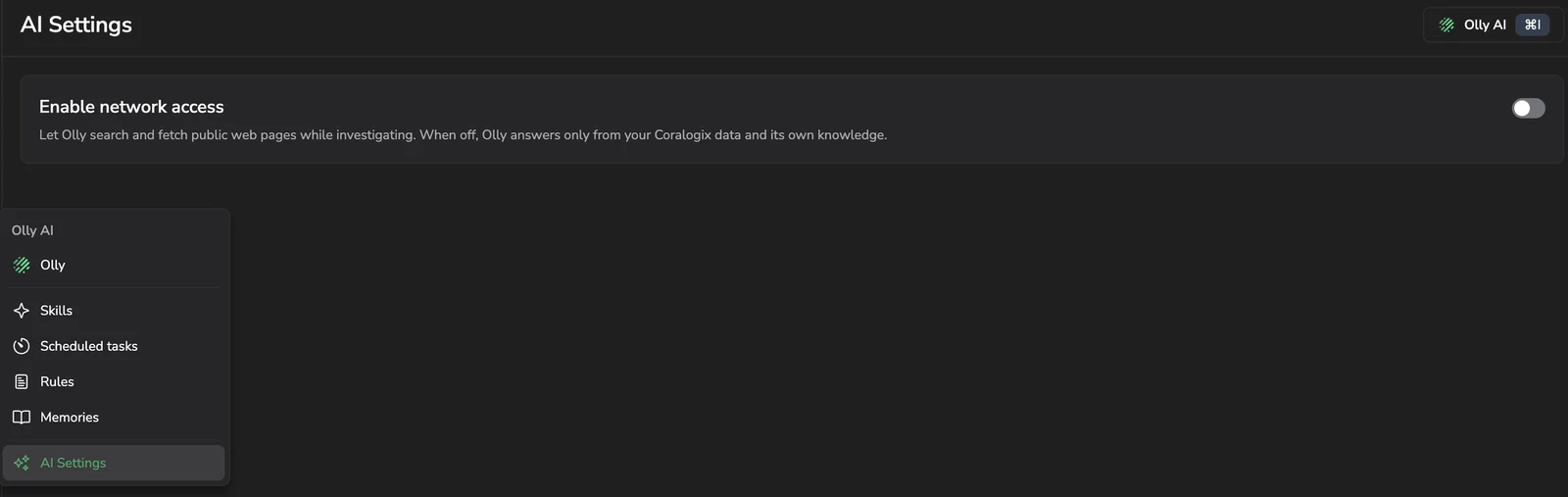
Shows the Olly AI menu used to reach the page, and the network access setting, which is off by default.
Your change saves as soon as you set the toggle and takes effect on the team's next message to Olly. If the save does not go through, the toggle returns to its previous state and Coralogix reports the failure.
What Olly can reach when network access is on
Olly can read a public web page when it already has the address. That address can come from a URL you gave it in chat, a URL returned by one of its tools, a link on a page it already fetched, or an address it already knows, such as a project's official documentation.
Olly has no web search tool. It does not query or scrape search engines, so it cannot find a page from a topic alone. When Olly has no usable address, it tells you and continues with your Coralogix data and its own knowledge. Olly cites a page only after it fetches that page successfully.
What Olly can reach when network access is off
- Olly cannot read public web pages, and does not reach the internet through the commands it runs while working on your request.
- Olly answers from your Coralogix data and its own knowledge, and tells you when an answer would have required the public internet.
- Olly's own tools and your team's integrations keep working. They reach Coralogix and your own services rather than the public internet.
- If your team uses the GitHub integration, Olly can still reach
github.comthrough that integration. See GitHub integration.
Next steps
Review how Olly processes and protects your data in Data processing, privacy, and compliance.