Model selection
Olly lets you pick a specific model for the chat, so you own the tradeoff between response speed, reasoning depth, and cost. The model list spans GPT, Claude, and Gemini, with recommended defaults that are tried-and-tested for everyday observability work.
Your selection persists across chats and sessions until you change it.
Available models
| Model | Provider | Notes | Best for | Example questions |
|---|---|---|---|---|
| GPT-6 Sol | OpenAI | Deeper reasoning for complex investigations and deep analysis | "Trace this cascading failure across services and pinpoint the root cause." | |
| GPT-5.6 Terra | OpenAI | Recommended | Day-to-day investigations and root-cause analysis | "Which service caused the afternoon latency increase?" |
| GPT-6 Luna | OpenAI | Quick lookups and simple data queries | "How many pods restarted in the last 15 minutes?" | |
| Claude Haiku 4.5 | Claude | Quick lookups and simple data queries | "What is the current CPU usage of node-3?" | |
| Claude Sonnet 4.6 | Claude | Routine, structured analysis tasks | "Correlate error logs with recent infrastructure changes." | |
| Claude Sonnet 5 | Claude | Recommended | Day-to-day investigations and general analysis | "Compare today's API errors to last week." |
| Claude Opus 5.5 | Claude | Deeper reasoning for complex investigations and deep analysis | "Investigate the root cause of a multi-service latency regression." | |
| Gemini 3 Flash | Quick lookups and simple data queries | "Show error rate for checkout service in the last hour." | ||
| Gemini 3.1 Pro | Recommended | Day-to-day investigations and root-cause analysis | "What's the current error rate for the checkout service?" |
Models marked Recommended are Olly's tried-and-tested defaults. In the UI, recommended models are highlighted with a Recommended tag next to the model name.
Select a model
- In the Olly chat input bar, select the model dropdown.
- Select a model from the list.
The selected model applies immediately and is used for all following prompts, across chats and sessions, until you change it.
You can switch models at any time during a conversation. Switching does not clear the conversation history.
Effort
Effort sets how long the model reasons before it answers. Higher effort produces deeper, more thorough analysis and takes longer; lower effort returns faster, lighter responses. Select an effort from the Effort control next to the model dropdown in the chat input bar. The levels, from fastest to deepest, are Instant, Minimal, Low, Medium, High, and X-High.
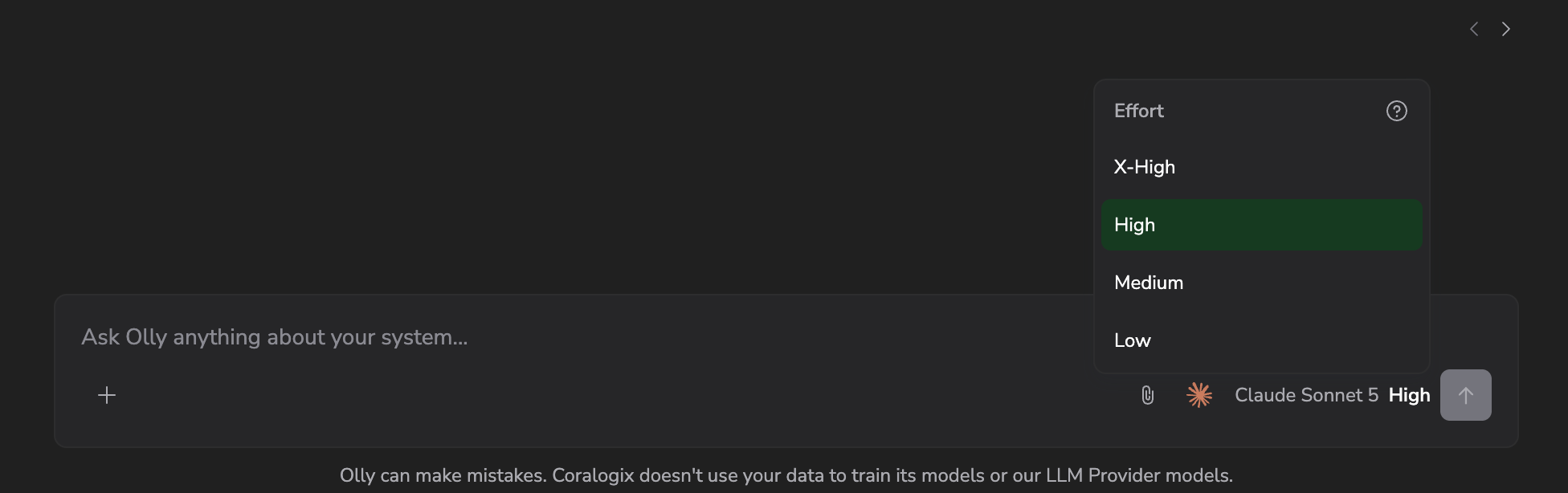
The levels available depend on the model you select. Every model that supports effort starts at Medium by default; change it and Olly remembers your choice for that model. Models that don't support a reasoning control (for example, Claude Haiku 4.5) show no Effort control; the input bar shows only the model name.
Your effort choice is saved per model, so each model keeps the effort you last used with it.
For guidance on when to raise or lower the effort, see Match the effort to the question.
How recommendations work
The Recommended tag marks the models Olly uses by default if you have not made a selection. Recommended models are the ones we have validated most thoroughly for observability workloads.
New models are added to the list as they become available. Existing selections are preserved when the list changes.
Persistence
Your model choice is saved per user, across chats and browser sessions. Other users in your team keep their own independent selections.
Why this matters
- Control the tradeoff: pick speed, depth, or cost on a per-task basis.
- Stay current: new model tiers are added to the list as they are released.
- Honest expectations: the answer you get reflects the model you picked. The tradeoff is deliberate.
For details on how each provider handles your data, including infrastructure, data protection, and training policies, see Data processing, privacy, and compliance.
Next steps
Customize how Olly responds to you by defining personal preferences in user rules.