Notification Center
Case attachments in custom notification templates
A custom Case preset can now carry the context Coralogix gathered when the Case opened: alert graphs, log samples, and the rows its DataPrime enrichment query returned. Until now that context reached only the Case page and the native Slack, Microsoft Teams, and email templates, so anyone routing Cases to a ticketing system or an internal tool through a webhook received the bare Case fields. Attachments are exposed under _context.attachments, and get_dataprime_enrichments() returns the enrichment rows as one flat list you can place anywhere in the body. Both work in every connector type, including Generic HTTPS, and the preset editor renders the template with sample data as you build, so you can shape a payload for Jira Service Management or ServiceNow before sending a test. Learn more
Send Case notifications straight from the alert
Set Case notification destinations directly on an alert definition, with no router or routing labels needed when an alert only has to reach one place. Add up to 10 destinations from the alert wizard, such as Slack, Microsoft Teams, PagerDuty, email, or any other connector that supports Cases, each with its own message template and its own set of Case events, so you can page PagerDuty only when a Case activates while Slack receives every update. Destinations carry the alert's enrichment query results, and they fire in addition to routing labels, so existing routers keep working; if both reach the same connector and template, the notification is sent once. Routers remain the recommended default for ownership-based delivery, and destinations cover alerts that need their own notification settings. Learn more
Four more Case notification triggers
Case routing rules can now notify on Unacknowledged, Reactivated, KPI breached, and Olly analysis ready, alongside the existing lifecycle events. Notify a channel when someone hands a Case back, when a resolved or closed Case becomes active again, when a Case passes its Time to acknowledge, Time to resolve, or Time to update target, or when automatic analysis finishes. Each trigger routes independently, so a KPI breach can page a different audience from a routine activation. Learn more
Notification enrichment is now available to everyone
Enrichment is out of early access and enabled for every team, with no request needed. Attach a DataPrime query to an alert and its results travel with the Case notification, so a responder sees the data without running the same diagnostic query by hand. The query runs once, when the Case activates, and the results render as a table in the Slack and Microsoft Teams apps and in the body of an email, and are saved on the Case for anyone who opens it later. The alert editor now links straight to the query examples and best practices. Learn more
Notification enrichment: query results inside the notification
Attach an enrichment query to an alert and its results travel with the notification, so a responder sees the context without opening Explore and running the same diagnostic query by hand. Reuse the alert's own query or define a different Lucene or DataPrime query, when a Case is created, the query runs automatically, the result table renders as a native table in the Slack and Microsoft Teams apps, and the same table is saved on the Case for anyone who opens it later. Available for Case notifications only; contact Coralogix Support to enable it for your team.
Microsoft Teams app: action buttons, link unfurling, and comment sync
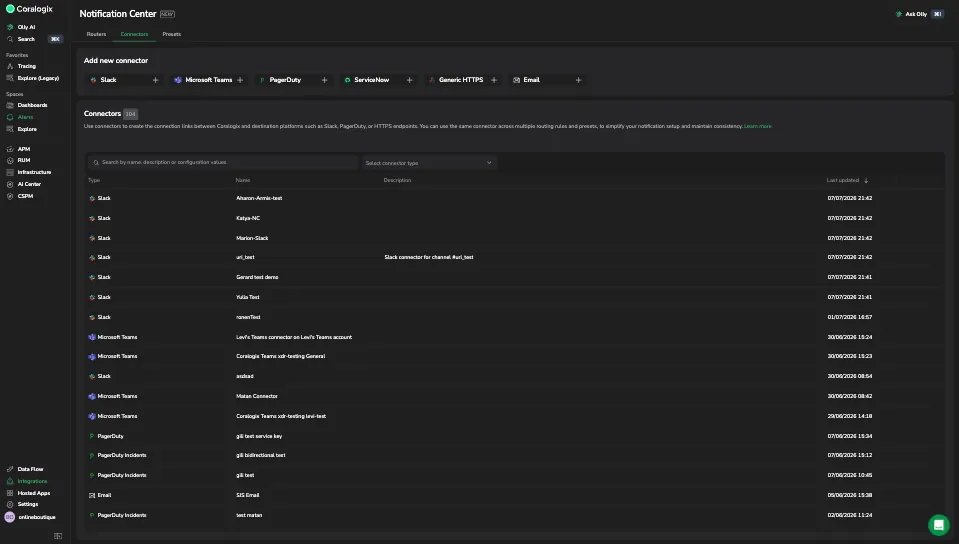
The Microsoft Teams app is out of private beta and available to every customer from the Notification Center Connectors page, at parity with the Slack app. Action buttons let you acknowledge, assign, resolve, and close a Case from the Teams message itself, with the card updating in near real time so the channel always shows the Case's current state. Case link unfurling turns a pasted Coralogix Case link into a rich preview with the Case's key details. Two-way comment sync carries comments between the Teams thread and the Case timeline in both directions, so the discussion in Teams becomes part of the Case record. Learn more
Native Microsoft Teams connector
Route alert and Case notifications to Microsoft Teams channels through a native connector, the replacement for the Office 365 incoming webhooks Microsoft retired. A Teams administrator installs the Coralogix app in your tenant, then you select a channel by pasting its link or entering its IDs. The full Case lifecycle (assign, acknowledge, resolve, close) reflects in the Teams message and on the Case timeline in near real time, with an option to keep updates in one thread. Learn more
AWS EventBridge connector with global endpoint support
Send Case notifications to your own AWS EventBridge event bus through a native connector rather than a webhook. Setup runs through a CloudFormation stack in your account, after which the connector behaves like any other: presets, routers, and test notifications that preview exactly what lands in AWS. Naming a secondary region as a global endpoint fallback keeps notifications flowing when the primary region is unavailable. Case notifications only.
View connectors, presets, and routers as code

Every connector, preset, and router can now be viewed as Terraform, Coralogix Operator YAML, or OpenAPI. The panel generates from the live definition rather than a static example, so routing labels, rules, targets, and fallback targets all appear as configured, ready to copy or download. Teams working infrastructure-first can adopt Notification Center without hand-writing the definitions or letting the UI and their IaC drift apart. Learn more
Notification deliveries tab
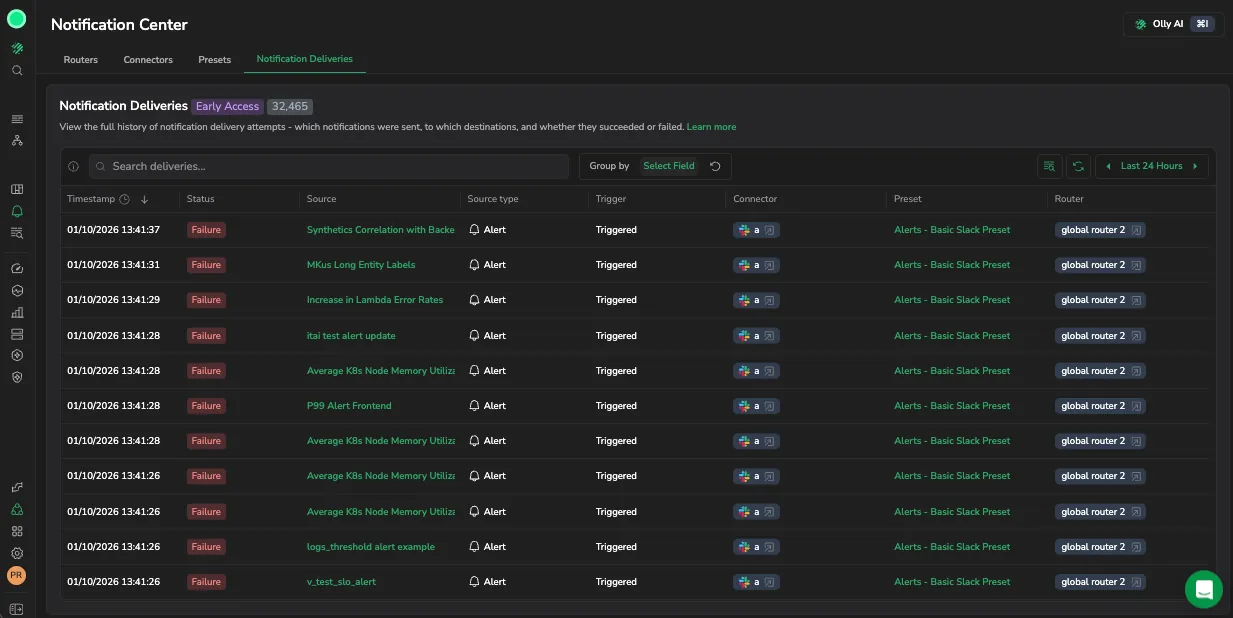
A searchable history of delivery attempts, mapped into columns for source, trigger, connector, preset, and router. Open a delivery for the failure category, the error the destination actually returned, the HTTP status, and every attempt with its latency. Group by status, source, or connector to find which destination is failing and by how much, and jump from any row to the connector, preset, or router that produced it. Case notifications record successes and failures; alert notifications record failures. Learn more
Alert notification parity for Case notifications
Case notifications now carry every field the legacy alert payload did, so a legacy webhook can move to Case-based notifications without its payload changing shape. Existing integrations keep working while gaining Case routing, deduplication, and richer context, which removes the reason to run both notification systems side by side. The template editor also suggests array-aware expressions as you type. Learn more
Slack message update and threading controls
Two per-connector options decide how Case updates appear in Slack. Update the existing Case message edits the original post so it always shows current status instead of adding a message per change, and Reply in thread posts each update as a threaded reply to build a timeline. Enable both for a live top line with the full history beneath it. Case notifications only, and the connector flags whether your Slack integration needs updating first. Learn more
Dynamic field builder for connectors
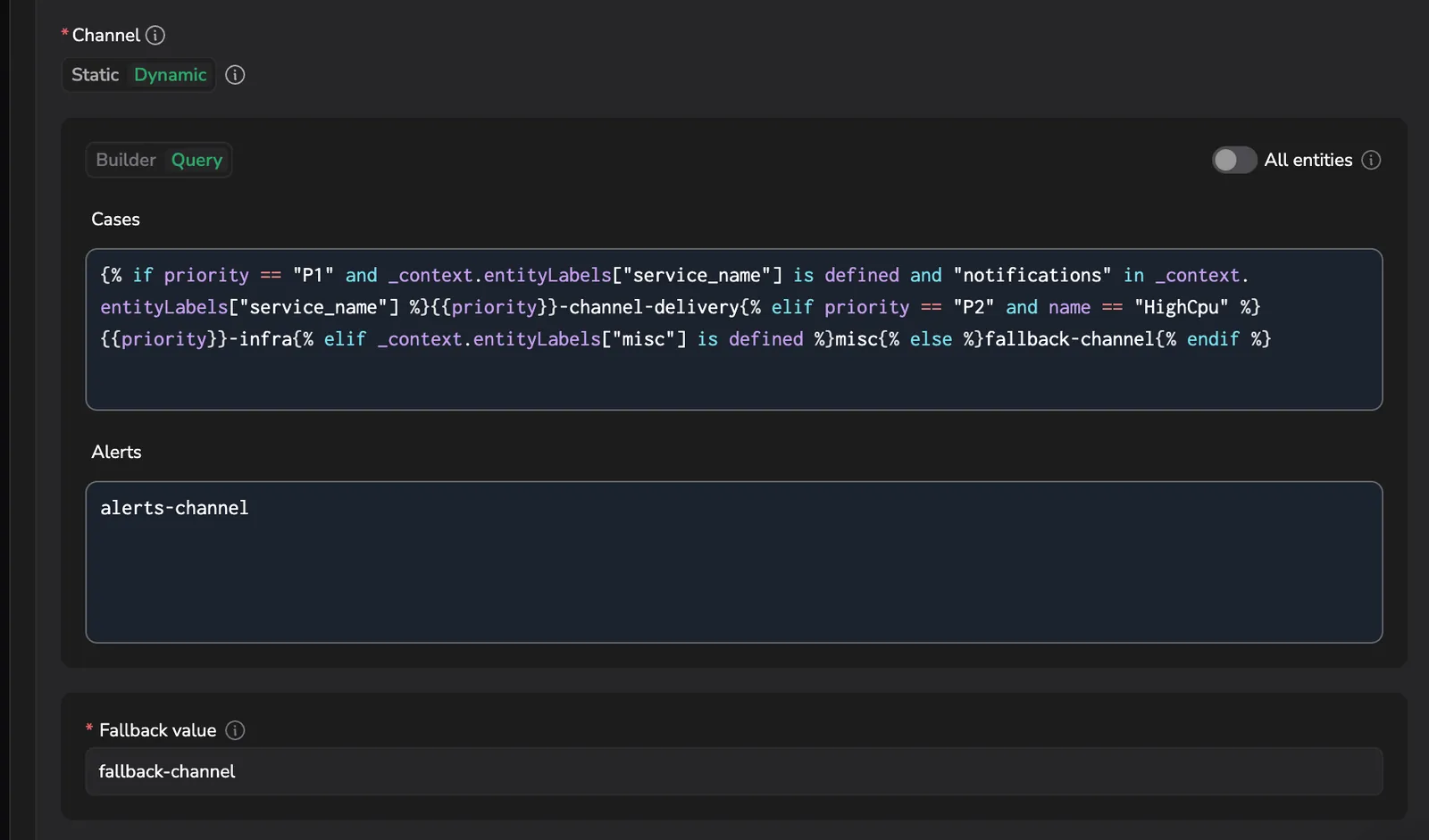
Route a connector to a different channel, recipient, or service without writing a query expression. Set a static value or build a dynamic one from conditions on priority, name, or labels, with the builder suggesting the attributes teams use most. Conditions combine with AND in a row and OR across rows, the first match wins, and a required fallback covers everything else, so one connector serves many teams instead of one connector per channel. Available on Email, Webhook, and PagerDuty connectors as well as Slack. Learn more
Service Catalog integration for ownership labels

Set an ownership label by selecting a service from the APM Service Catalog instead of typing it. Because ownership labels decide which team is notified and which service an alert or Case belongs to, a typo or a near-duplicate name used to send a notification to the wrong team or nowhere at all. Catalog services are tagged Catalog; free text still works, tagged Custom, for services not yet in the catalog. Learn more
Notification deliveries dataset
Every delivery attempt across every connector is recorded in the notification.deliveries system dataset and queryable in Explore, with no setup and at no cost. Alert notifications record failures; Case notifications record successes and failures. Learn more
Fallback for undefined template variables
Set one fallback for every undefined variable in a template, so a missing field renders your placeholder instead of an error string in the notification your responders read. Learn more
Routing rules without conditions
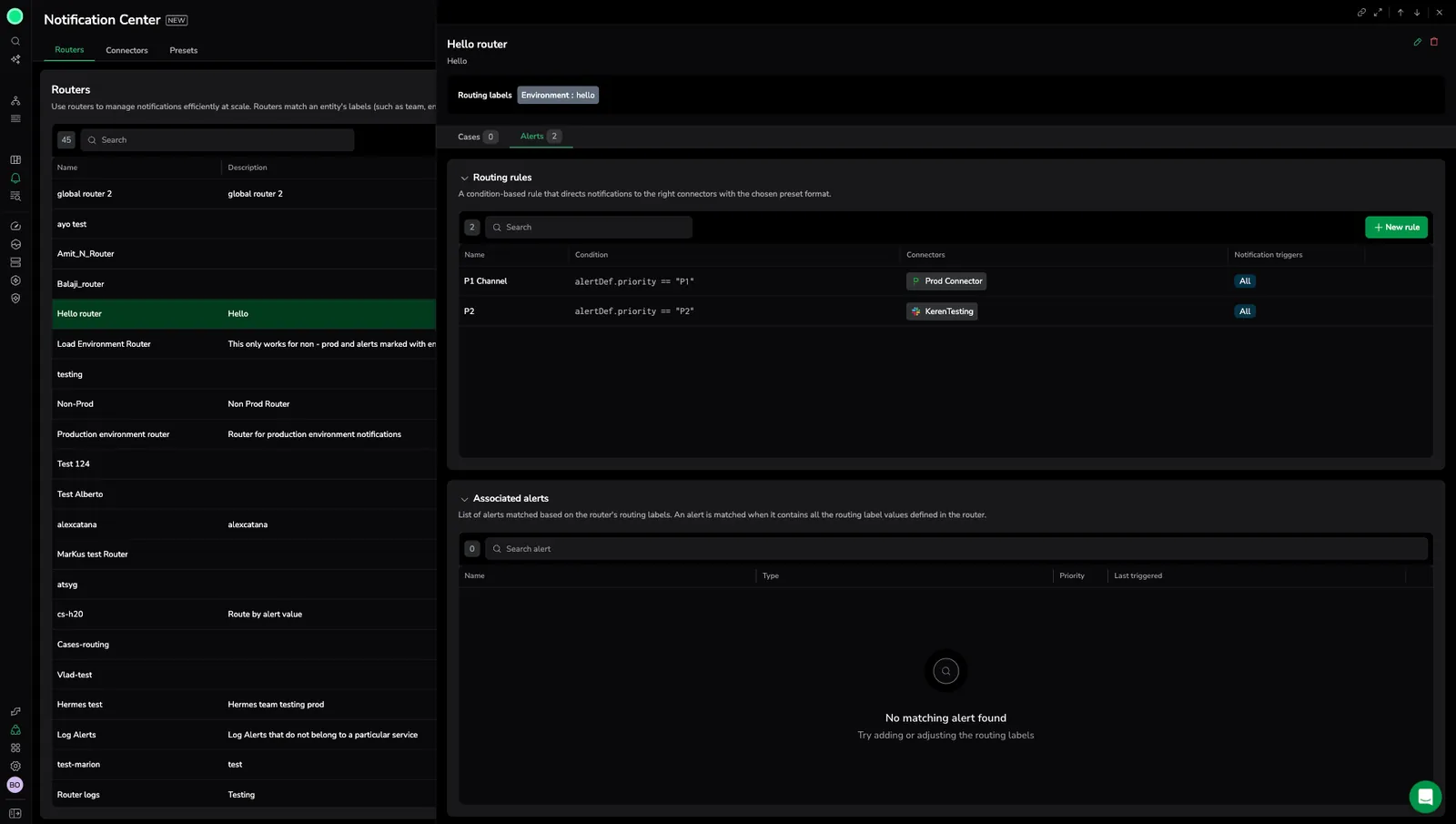
A routing rule no longer needs a condition to be valid. Select a destination and the rule works, which makes the common case (everyone on this label gets this notification) a two-field setup rather than an expression to write. Learn more
Customizable notification triggers
Select which events fire a routing rule rather than notifying on all of them: for Cases, activated, acknowledged, assigned, resolved, and closed; for alerts, triggered and resolved. Learn more
Router enable and disable toggle
Turn a router off and back on instead of deleting and rebuilding it, which makes testing a routing change safe to undo. Learn more
Cases as an entity type, condition templating, and two new destinations
Cases join alerts as a Notification Center entity type, so routing rules can trigger on Case lifecycle events and use ownership labels. Rule conditions accept Tera templates for name matching, label checks, regular expressions, and Case status or severity. ServiceNow arrives as a destination type for creating and updating records from notifications, and Jira Service Management can be configured over HTTPS alongside OpsGenie. Learn more