Error template view
As part of our multi-faceted Error Tracking, take advantage of the Error Template View, where similar errors are grouped into a single template for swift and easy analysis.
Overview
Grouping errors as part of Real User Monitoring is a strategic approach to managing and improving the quality of your digital services. It enhances your ability to diagnose issues, prioritize fixes, optimize performance, and ultimately deliver a better user experience. By understanding the nature and impact of errors, you can make informed decisions to enhance the reliability and performance of your website or application.
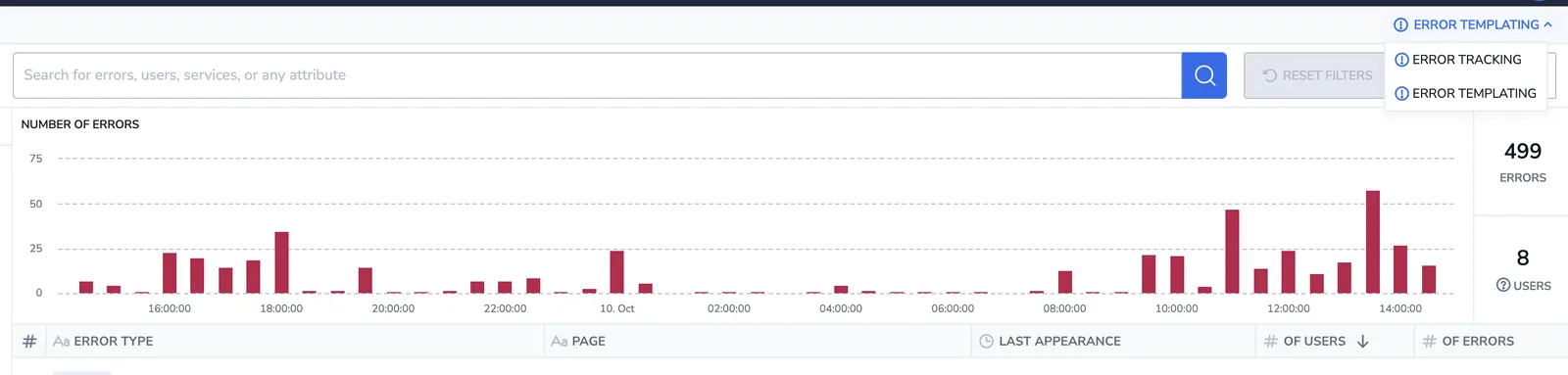
Error Template View provides you with an overview of all the errors generated from your browser, grouped by templates. View the last appearance, number of users the error affects, and the number of times the error occurred. Filter according to your needs.
Access error template view
Access Error Template View by clicking on the drop-down menu in the upper-right corner of your Error Tracking UI. Move between ERROR TEMPLATING (grouped errors) and ERROR TRACKING (individual errors).
Error template view components
Error Template View includes:
-
Error Overall Graph and KPIs. This graph presents the error trend in the application, in addition to the overall number of errors and users affected.
-
Template Grid. Use the error template grid to view error template information, row by row. Modify columns and the information presented based on your specific interests. Clicking on a specific template will take you to the analytics view, where you can see the distribution of the error.
-
Filters. Refine your view by filtering templates according to particular error attributes.
-
Alerts. Create alerts directly from this screen by clicking CREATE ALERT in the upper right-hand corner.
Error sources and grouping keys
Front-end errors are grouped by source type. Each source type has a grouping key. The specific fields that determine whether two errors belong to the same template. Fields that appear in the template grid but are not part of the grouping key do not affect which template an error is assigned to. In particular, page URL (fragment), error type, and labels are never part of the grouping key. A single template may span many distinct page URL values or error types.
| Source type | event_context.type | Grouping key |
|---|---|---|
Exception | error | Tokenized error message + top stack frame |
Custom | log | Tokenized error message |
Network | network-request | Normalized network request URL + HTTP status code |
How grouping works
Message tokenization. For Exception and Custom errors, the error message is normalized before grouping. Values that vary between instances (UUIDs, hexadecimal values, timestamps, and standalone numbers) are masked. Two errors with messages such as Failed to load /assets/abc-123 and Failed to load /assets/def-456 produce the same template because the varying path segments are masked.
Exception stack frame (tiered). For Exception errors, the grouping key includes the top stack frame in addition to the tokenized message. When a source map is available, the resolved original file and line are used. Without a source map, the raw minified frame is used as a fallback. Two exceptions with identical tokenized messages but different call sites produce separate templates.
Network request URL. For Network errors, the grouping key is the URL of the failing network request, not the page URL where the error was observed. These two values are distinct, and the page URL does not affect grouping for network errors.
Template fields
| Field | Description |
|---|---|
| Error type | General category of the error (e.g., TypeError). Displayed in the grid; not part of the grouping key. |
| Error message | Description of the error. For Exception and Custom errors, the tokenized form of this message is part of the grouping key. |
| Page URL | The URL fragment of the page where the error was observed. Displayed in the grid; not part of the grouping key. |
| Network request | The URL of the failing network request. Together with the HTTP status code, this forms the grouping key for Network errors. |
| Status code | HTTP status code of the failed network request (e.g., 404, 500). Part of the grouping key for Network errors. |
| Application | The application or component that generated the error. |
rum_template_id | Stable identifier for this template. Use in DataPrime queries to filter or aggregate errors by template. |
rum_template_pattern | The tokenized message pattern that defines this template, with variable values shown as placeholders (e.g., <UUID>, <number>). |
Additional resources
| Documentation | Error Tracking: User Manual |