
Protect budgets and critical data
Quota Rules
Subtitle: Keep your critical data flowing by setting hard limits per entity type at ingestion, and stop noisy sources from crowding out what matters.
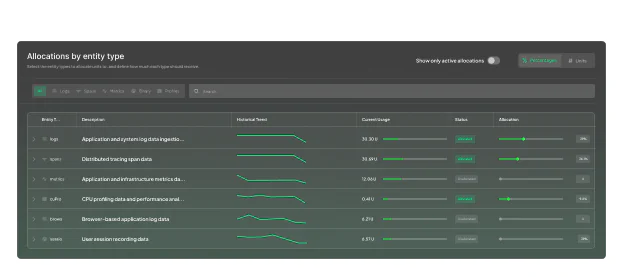
Turn quota into enforceable control

You decide what gets capacity, not ingest order
Reserve a share of your team’s daily quota per entity type, so your quota is distributed the way you designed it, not the way traffic happened to flow that day.

Protect critical data, even when traffic spikes
When traffic surges, reserved allocations hold automatically: security traces, SLO metrics, and compliance events keep flowing, not competing for whatever quota remains.

Flex when you need it, without losing control
When one entity type has room to spare, others can use it , without touching reserved allocations. Traffic patterns change; your allocations can keep up.

Enforced at ingestion, not after it
Most observability platforms flag quota issues after ingestion completes. Quota Rules enforces limits before data lands, with no separate quota layer, after-the-fact reconciliation, and gaps between what you configure and what actually gets blocked.
Allocation that enforces itself
Define limits by entity type
Reserve a share of your team’s daily quota for each entity type, by percentage or by units. Instead of forcing all data types to compete under a single team-level cap, each entity type gets its own allocation, so quota governance stays precise and aligned with how your teams actually use observability data.
Use spare quota without losing control
Entity types consume their reserved allocation first. Enable overflow to let them draw from the unallocated pool when needed, never from another entity type's reserved share. When the pool runs out, enforcement applies automatically.
See exactly where quota is going
Quota Rules gives teams a single view of allocation, actual usage, and overflow status by entity type. See which data types are consuming their share, which are underused, and where blocking occurs so you can adjust allocations based on real usage patterns instead of guesswork.

Go deeper inside log streams with TCO Optimizer
Entity-type allocation is just the start for log-heavy workloads. Pair Quota Rules with TCO Optimizer to route specific log subsets as quota is consumed, use DataPrime Expression Language (DPXL)-based filters to downgrade or block lower-value traffic, so higher-priority logs always land.
