Set a monthly budget on every Olly API Key

FinOps spent a decade making cloud spend predictable, and teams now point the same discipline at a workload that behaves nothing like a virtual machine. In the FinOps Foundation’s State of FinOps 2026 survey, drawn from 1,192 practitioners representing more than $83 billion in annual cloud spend, 98% now manage AI spend, up from 31% two years earlier. The main driver for this was agents. They run on a schedule rather than on a click, work at machine pace, and consume tokens whether or not a human reads the output. At Coralogix, we want our users to confidently use our autonomous agent, Olly, without fear, so we’ve introduced unit budgets for API keys in Olly.
What an autonomous investigation actually costs
Anthropic published the token numbers from its own multi-agent research system. In their data, agents use about four times more tokens than chat interactions, and multi-agent systems use about fifteen times more tokens than chats. EY puts the same shift in per-interaction terms, describing a chat that once cost $0.04 becoming a $1.20 orchestration once tool retrieval, planning, and subagents are involved. Anthropic also found that token usage by itself explains 80% of the variance in how well their system performed, with tool calls and model choice as the other two factors.
The tokens an agent spends are the investigation. An agent that reads more logs, pulls more traces, tests more hypotheses, and discards more dead ends produces a better answer than one that stops early, and it costs more to run because it did more work. When the bill is unpredictable, teams manage the risk the only way they can: run the agent on fewer services, less often, at lower effort, and reserve it for incidents that already look serious. That is a real cost, paid in investigations that never ran, and it lands hardest on the low-signal problems an agent is good at chewing through. The control worth having bounds the agent without making it worse at its job.
Olly is already token efficient, now it’s token aware
Olly works on data at rest in your own cloud object storage, in open formats, and none of that reading reaches the bill. The DataPrime Query Engine (DQE) fans a scan out across shards and aggregates at the source, DataPrime does its aggregation server side so a wide scan returns a small result rather than a large one, and the semantic layer runs cheap metadata queries first to narrow the expensive ones. Each of those choices puts fewer tokens in front of the model for the same answer. An investigation sweeping a hundred services across a month of history costs no more to query than one reading a single service for an hour, and under per-query pricing that is exactly the investigation you learn to avoid.
API key budgets add the other half of the cost management equation. Olly bills on tokens, the dimension that tracks the work the agent actually did, and a budget turns that dimension into something an admin sets in advance rather than reads after the fact.
Wiring up API Key limits
Usage Management lives at Settings, Olly AI, Usage Management, and the Automations & Agents tab holds every API key that talks to Olly, alongside the equivalent views for users and groups.
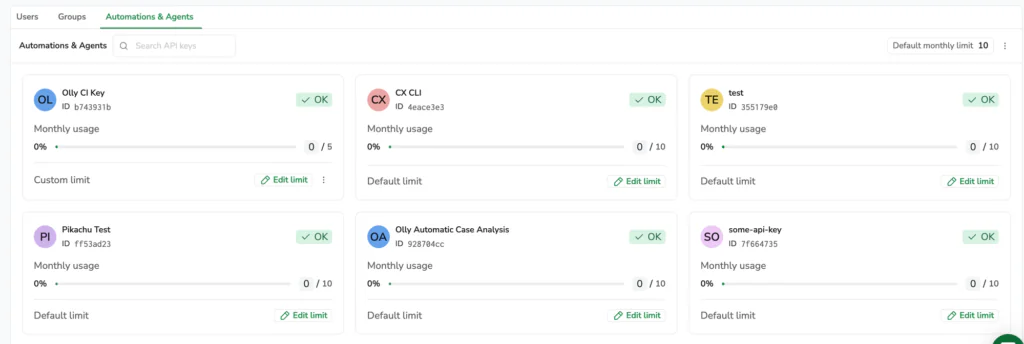
Each key gets a card showing its identifier, its consumption for the current billing cycle, the limit it is measured against, and whether that limit is a custom figure or the account default. The status badge does the triage: OK below 70% of the limit, Approaching between 70% and the limit, and Limit reached at or above it.
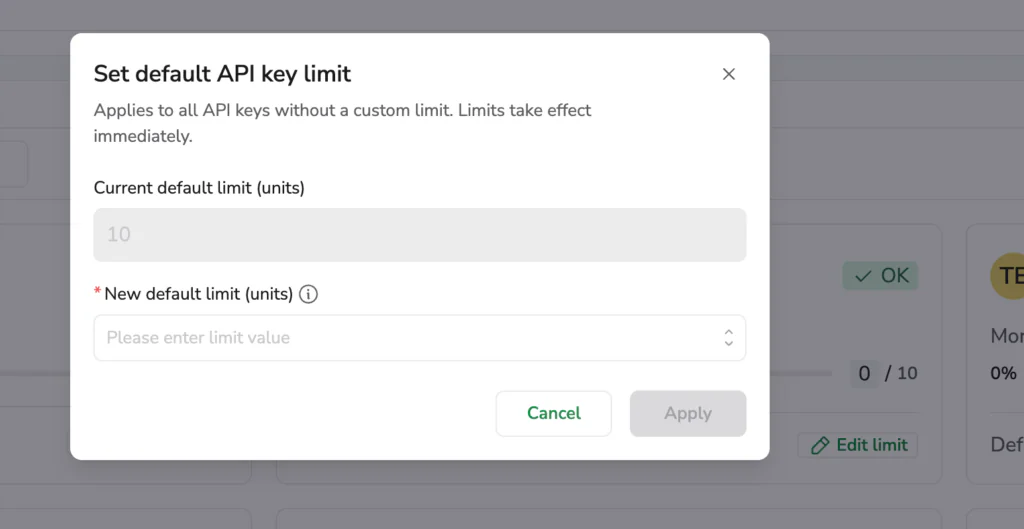
Start with the default, from Set default monthly limit at the top of the tab. The new default limit applies to every key without a custom limit, takes effect immediately, and reaches keys created after you set it, so the keys you have not thought about are covered from the first day. From there, use Edit limit on any card that deserves a different number. A continuous integration key running a single check per commit does not need the allowance of an agent doing automatic case analysis on every production incident, and an experimental key from last quarter should not spend like either of them.
Where to start
Set the default, give it a cycle, then read the cards and see which keys sit near their ceiling. The keys that keep landing on Approaching are usually the ones doing the work you most want done, and they are the argument for raising an allowance rather than cutting one. The Usage Management documentation covers setting a limit for an API key, and the same screen holds the per-user and per-group views when you want the rest of the picture.