Dataspaces and Datasets: A faster, governed, observability data layer

Observability AI is only as good as the data layer beneath it.
Without structure, queries and AI scan huge swaths of data on each investigation or lose precision. This can lead to:
- Performance bottlenecks that slow queries and dashboards
- Permission complexity and hard-to-scale governance
- Unattributable costs across teams
- Analysis that vanishes the moment it finishes running
That era is over.
Coralogix is launching Dataspaces and Datasets: a data layer that gives teams structured control over how observability data is organized, routed, secured, and billed, without changing how you send telemetry. And with this launch, that structure is also yours to shape: with user-defined datasets, you can create a dataset for every team, service, or use case, each with its own schema, access, retention, and quota.
One stream in, governed and contextual data out. Dashboards that stay fast as data grows. Costs that map to teams, not spreadsheets. AI agents that reason precisely instead of guessing across terabytes.
How it works
Nothing changes how you send data. No new agents, no SDK changes, no re-instrumentation. You keep sending telemetry as a single stream, and Coralogix handles the logical segmentation on the platform side.
What is logical segmentation?
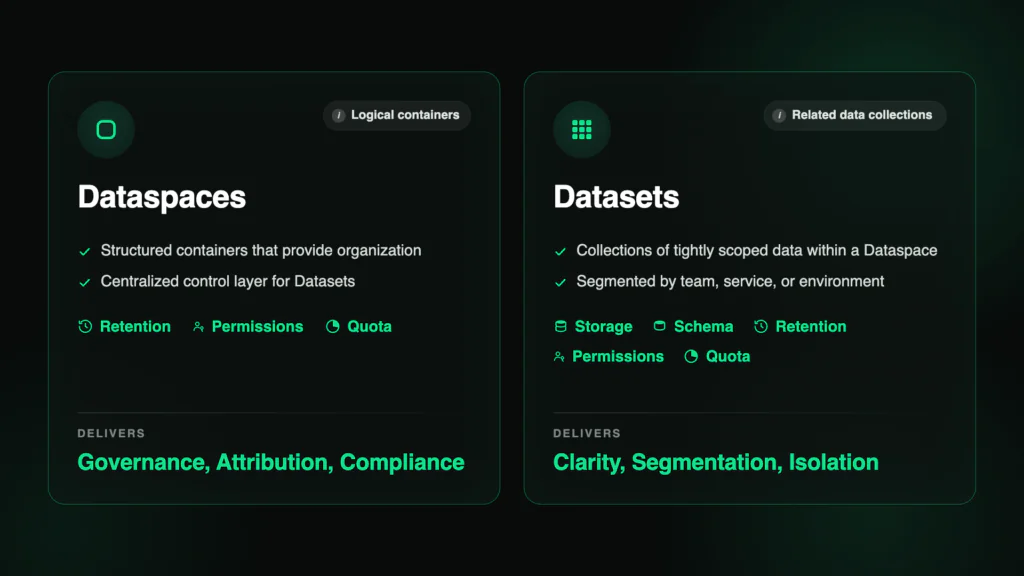
- A Dataspace is a structured container for organization and policy management.
- A Dataset is a named, governed collection within it, with its own schema, access controls, retention policy, and cost tracking.
Everything you send lands in the default dataspace, while the system dataspace exposes the platform’s own telemetry as queryable datasets.
Now, with user-defined datasets, you can carve that structure to fit your org: the payments team works in default/payments, the security team governs default/security-audit, and FinOps sees exactly how much each domain ingests.
What structured data delivers
- Performance. Scoped datasets mean queries scan less and return faster. Summary datasets turn terabyte aggregations into reusable megabyte assets. Dashboards stay instant at any scale.
- Governance. Named datasets that mirror your org – by team, service, or domain. Each self-describing, each with its own schema, access controls, retention, and quotas per dataset – not per account. Compliance and operations coexist under one roof.
- Efficiency. Per-dataset cost attribution with daily breakdowns and enforceable limits. Leaner token consumption on every AI query. No spreadsheets, no guesswork.
- AI precision. Scoped context, clean schemas, and pre-aggregated data mean agents reason on what matters instead of guessing across terabytes. Same model, sharper answers.
Two ways to shape your data
User-defined datasets come in two forms, built for two distinct jobs: ending data chaos and making query results permanent.
Streaming datasets route raw incoming data into named datasets using granular DataPrime expressions in the TCO Optimizer. You can also route programmatically with writeTo – a DataPrime command that sends query results directly to any dataset on the fly. Route by any field, any condition, any business logic – not just application, subsystem, and severity. A single log can even fan out to multiple datasets when compliance and operations need different views. No other observability vendor offers expression-driven routing on arbitrary fields.
And every dataset is self-describing: it records why it was created and what belongs in it, so both engineers and AI agents can judge relevance before scanning a single row.
Summary datasets solve a problem every team knows: query results that vanish the moment they execute. Run a Background Query, save its results to a dataset, and point your dashboards at pre-aggregated data instead of re-scanning raw logs on every load. A terabyte of raw logs becomes a few megabytes of summary; load times drop from minutes to seconds and stay there as data grows. (Migrating from Splunk? This is your summary index, native.)
Your observability platform as queryable data
The System Dataspace (system/) exposes Coralogix’s own behavior as governed, queryable datasets – observability on observability. It includes system datasets like :
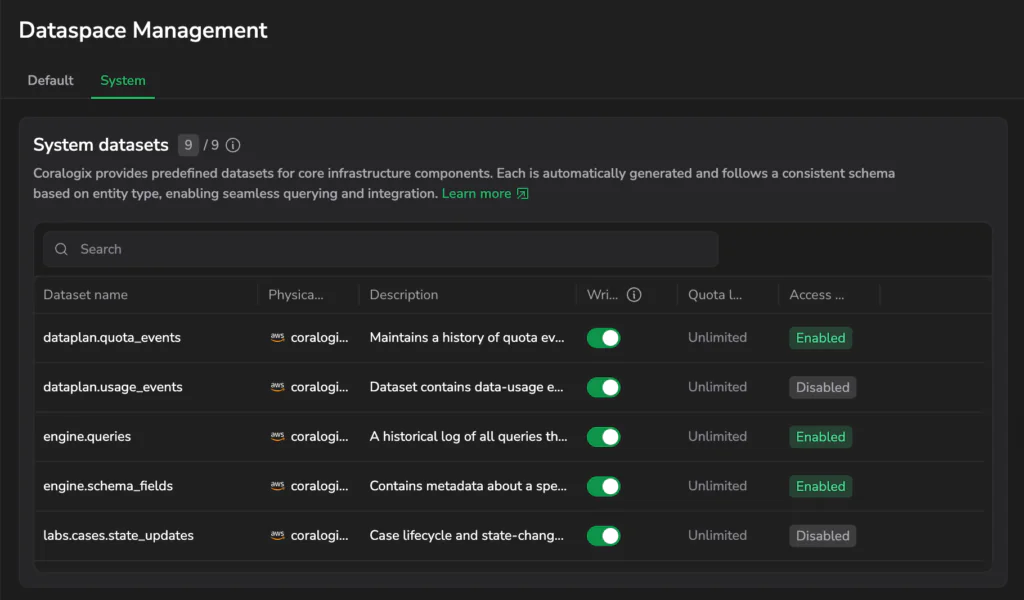
engine.queries– every query executed in your account, with performance and execution contextaaa.audit_events– a full audit trail of account activity for compliancedataplan.usage_events– data usage metrics as a queryable dataset
See the full list of system datasets and how they work here.
What used to require a support export – adoption trends, heavy queries, audit reviews, schema drift – you can now query yourself with DataPrime, from inside your account. With this launch, that same battle-tested architecture extends to the data you define.
What you can do today
Everything above is live right now. Start using user-defined datasets today:
- Create and route – define datasets in the default dataspace, route data with granular DataPrime expressions (DPXL) or programmatically with
writeTo, and fan a single log out to multiple datasets when compliance and operations need different views - Govern per dataset – set permissions, retention, and quotas at the dataset level; keep security logs for 7 years and debug logs for 7 days in the same account
- Attribute cost – track per-dataset ingestion with daily breakdowns, historical trends, and enforceable limits
- Persist analysis – save and compound Background Query results into reusable summary datasets that stay queryable in Explore, and make dashboards querying historical data lightning fast.
Available now
This is the data layer AI-native observability runs on, and it’s live in your account today. Send your data the way you always have. Shape it around the way your teams actually work. And give every engineer and every agent data they can finally trust.
Join the webinar on July 16th