Evil Token: AI-Enabled Device Code Phishing Campaign

Snowbit by Coralogix – Threat Intelligence Advisory
1. Executive Summary
On April 6, 2026, Microsoft Defender Security Research published an advisory detailing a large-scale phishing campaign that leverages the OAuth Device Code Authentication flow to compromise Microsoft 365 accounts across organizations globally. This campaign represents a significant evolution from manual social engineering to fully automated, AI-driven attack infrastructure.
The campaign is powered by EvilToken, a Phishing-as-a-Service (PhaaS) toolkit that enables threat actors to generate live device codes on demand, bypassing the standard 15-minute code expiration window. Generative AI is used to craft hyper-personalized phishing lures aligned to each victim’s role, with themes including requests for proposals (RFPs), invoices, document sharing notifications, and manufacturing workflows. Since mid-March 2026, Microsoft has observed 10 to 15 distinct campaigns launching every 24 hours, with hundreds of organizations compromised daily.
The attack is particularly dangerous because it bypasses multi-factor authentication (MFA) entirely. When a user enters the device code on Microsoft’s legitimate login portal, they unknowingly authorise the threat actor’s session.
The attacker then obtains OAuth access and refresh tokens, which are used for email exfiltration, lateral phishing, device registration for persistent access, and creation of malicious inbox rules.
2. What is EvilToken?
EvilTokens is a device code phishing kit sold as a service on Telegram. It’s been around since mid-February 2026 and has picked up traction fast, a separate private channel for paying users, and a whole bot ecosystem handling sales, support, and deployment.
EvilTokens operates by tricking the victim into authenticating on Microsoft’s real login infrastructure. The victim completes their normal sign-in including multi-factor authentication on a legitimate Microsoft page, while unknowingly authorising the attacker’s session
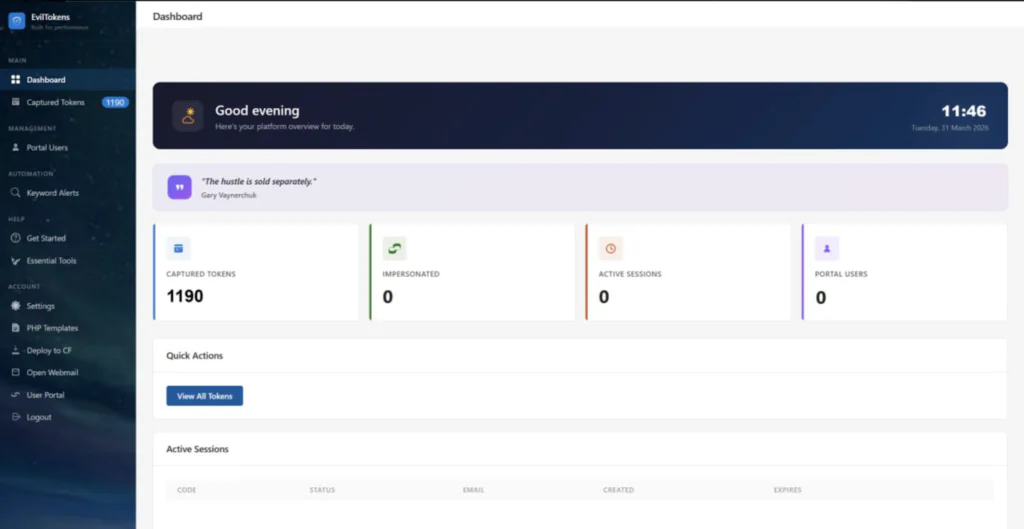
Key Features
- Device code phishing pages impersonating DocuSign, SharePoint, Adobe Acrobat Sign, OneDrive, voicemail alerts, calendar invitations, and email quarantine notices -with live code generation that bypasses the 15-minute expiry window
- Automated token harvesting – access tokens (60–90 minute validity) and refresh tokens (90-day rolling validity) captured the moment the victim completes authentication
- Built-in mailbox access allowing attackers to read, search, and exfiltrate email content directly through stolen OAuth tokens
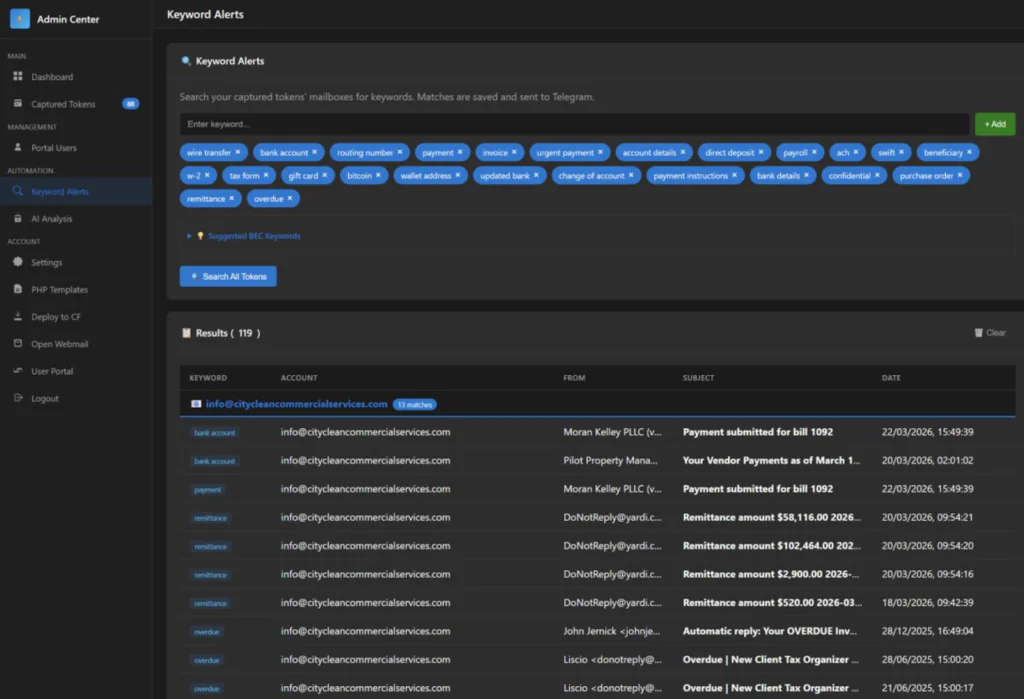
- AI-powered mailbox analysis that automatically identifies high-value targets and flags financial conversation threads for BEC interception
- Token persistence mechanisms including device registration for Primary Refresh Token (PRT) acquisition, enabling long-term SSO access that survives password resets
How the attack works
- The victim receives a phishing email that could be a shared document, an invoice, a voicemail alert, a DocuSign request, whatever fits their role. These lures are often AI-generated and personalised to the target.
- They click the link. It bounces through a chain of redirects Cloudflare Workers, Vercel, AWS Lambda, compromised legitimate sites to dodge URL scanners and sandboxes.
- They land on a phishing page impersonating something like Adobe Acrobat Sign or SharePoint. The page shows a device code and says something like “verify your identity to access this document.”
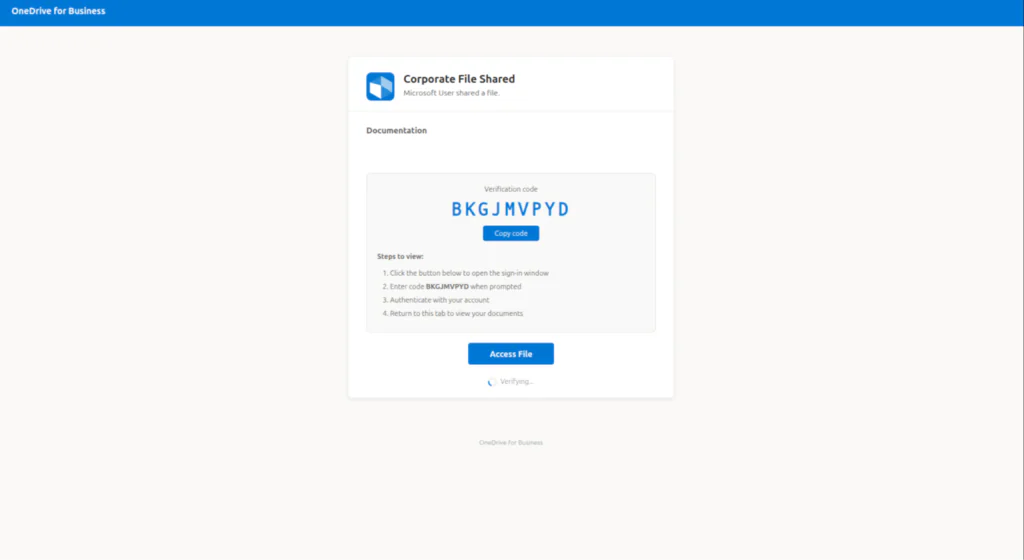
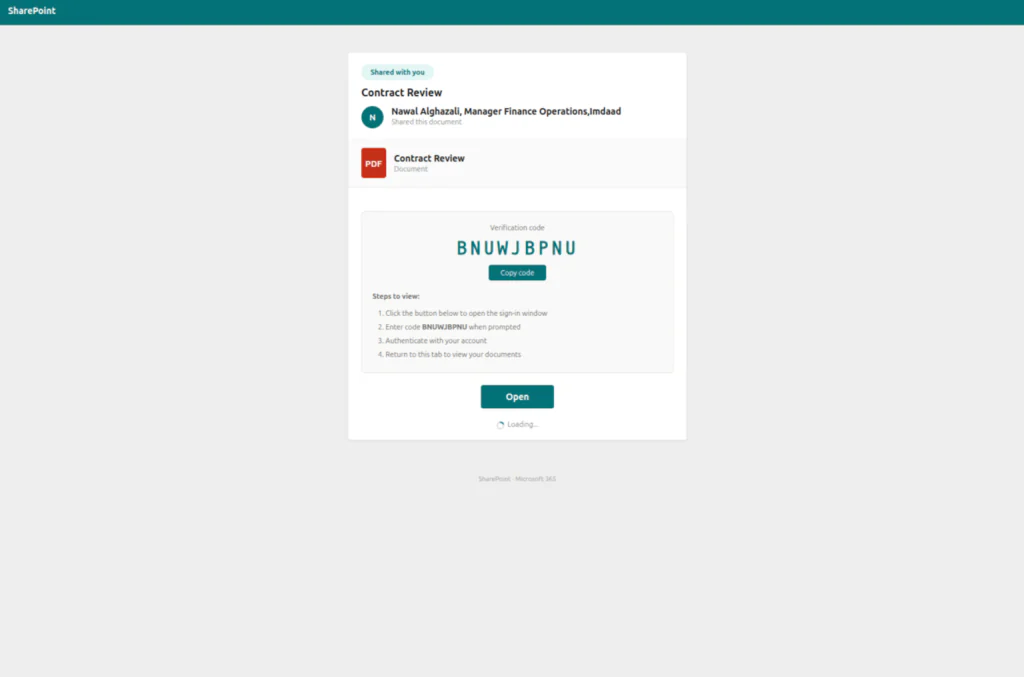
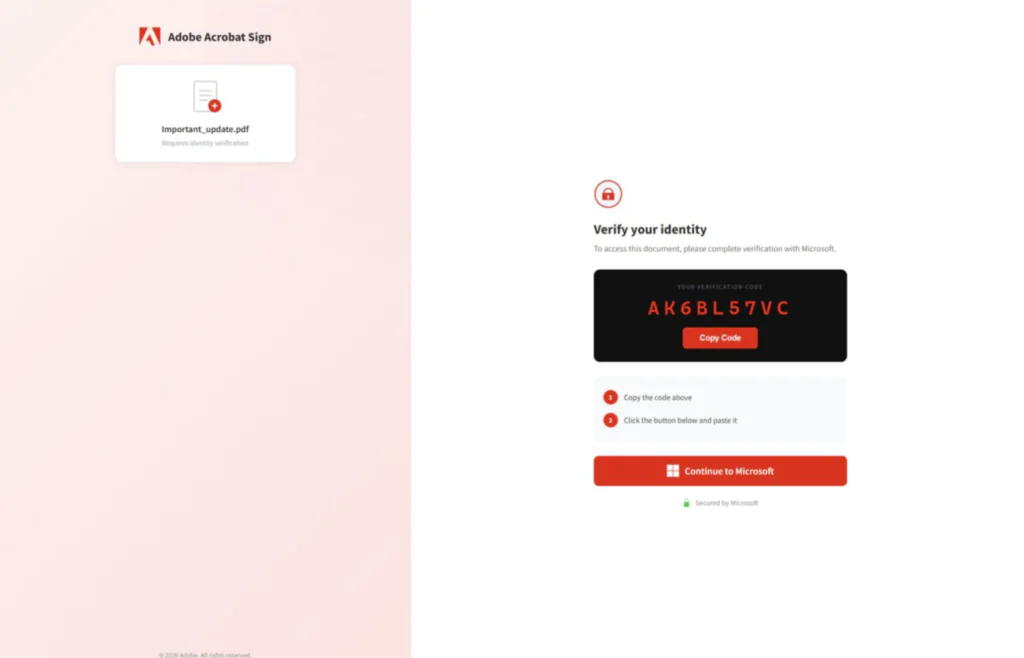
- Here’s the key part: that code is generated live. The moment the victim hits the page, the EvilTokens backend fires a request to Microsoft’s device authorisation endpoint (/oauth2/v2.0/devicecode) and gets back a fresh code with a 15-minute window. This is what solved the timing problem that made older device code phishing impractical.
- The victim copies the code and clicks “Continue to Microsoft,” which opens the real microsoft.com/devicelogin page. They paste the code, log in with their credentials, complete MFA all on legitimate Microsoft infrastructure.
- Meanwhile, the EvilTokens backend is polling Microsoft’s token endpoint. The moment the victim completes auth, the backend grabs the access token (good for 60–90 minutes) and the refresh token (rolling 90-day validity, renews each time it’s used).
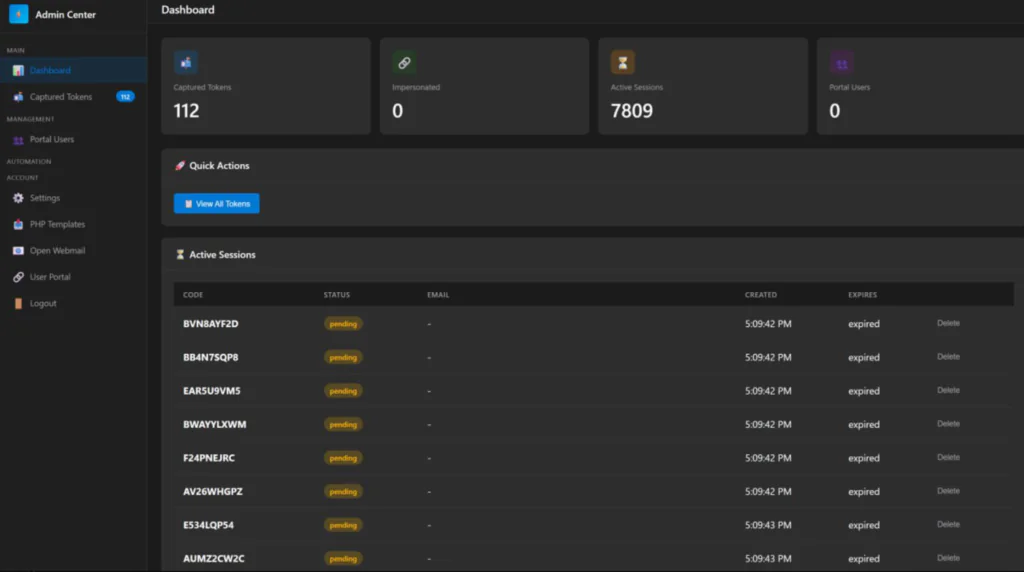
- From there, the attacker has full access to email via Exchange Online, files from OneDrive and SharePoint, Teams conversations, contacts. In more advanced scenarios, they use the refresh token to register a new device in Entra ID and obtain a Primary Refresh Token (PRT), giving them persistent SSO across the victim’s entire M365 environment without ever needing to authenticate again.
3. Threat Overview
3.1 Device Code Authentication Abuse
Device Code Authentication is a legitimate OAuth 2.0 grant type designed for input-constrained devices such as smart TVs, IoT terminals, and CLI tools that cannot support interactive browser-based login. In this flow, a code is presented on one device, and the user authenticates by entering it into a browser on a separate device. Threat actors exploit this mechanism by initiating the device code flow themselves and socially engineering the victim into entering the code, thereby authorising the attacker’s session without any credential exposure.
3.2 Campaign Characteristics
This campaign distinguishes itself from prior device code phishing through several key innovations:
• Dynamic Code Generation: Unlike static campaigns, codes are generated at the moment the victim interacts with the phishing link, ensuring the 15-minute validity window is never exceeded.
• AI-Powered Lure Creation: Generative AI produces role-specific phishing emails that reference real business contexts such as invoices, RFPs, and voicemail notifications, significantly increasing engagement rates.
• Multi-Stage Delivery Infrastructure: Phishing traffic is routed through compromised legitimate domains and high-reputation serverless platforms (Vercel, Cloudflare Workers, AWS Lambda, Railway.com) to evade domain blocklists and URL reputation checks.
• Browser-in-the-Browser (BitB) Technique: Landing pages simulate legitimate browser windows within the web page, presenting convincing Microsoft login interfaces to the victim.
• Automated Post-Compromise Operations: Stolen tokens are immediately used via Microsoft Graph API for email enumeration, data exfiltration, inbox rule creation, and lateral phishing – often within minutes of the initial compromise.
3.3 Post-Compromise Activity
Following account compromise, threat actors conducted the following operations:
• Token Replay: OAuth tokens replayed from cloud hosting infrastructure (DigitalOcean, PacketHub) to access mailboxes without triggering credential-based alerts.
• Device Registration: New devices registered within minutes to generate Primary Refresh Tokens (PRTs) for long-term persistence.
• Microsoft Graph Reconnaissance: Automated enumeration of mailbox contents, contacts, and OneDrive files to identify high-value financial data.
• Lateral Phishing: Compromised accounts used to send phishing emails to thousands of internal and external recipients, leveraging organisational trust.
• Evidence Destruction: Rapid bulk deletion of emails (Move to Deleted Items, Soft Delete, Hard Delete) at rates far exceeding normal user behaviour, targeting sharing notifications and security alerts.
• Inbox Rule Manipulation: Creation of forwarding and deletion rules to maintain persistent access and exfiltrate sensitive communications containing keywords such as “payroll” and “invoice.”
4. Attack Chain
The campaign follows a structured multi-phase attack chain:
Phase 1 – Reconnaissance : Threat actors query Microsoft’s GetCredentialType API endpoint to validate whether target email addresses exist and are active within the tenant. This enumeration is conducted well in advance of the phishing attempt.
Phase 2 – Lure Delivery: AI-generated phishing emails are sent to validated addresses. Emails contain either a malicious PDF attachment with embedded links or a direct URL. Lures are tailored to the victim’s role using data harvested from public profiles and corporate directories.
Phase 3 – Redirection Chain: The initial link redirects through multiple layers of serverless infrastructure (Vercel, Cloudflare Workers, Railway, AWS Lambda) before reaching the final phishing page, evading URL scanners and sandbox analysis.
Phase 4 – Device Code Capture: The landing page dynamically generates a live device code via a background script that interacts with the Microsoft identity platform. The code is displayed to the victim alongside a button redirecting to the legitimate Microsoft login portal.
Phase 5 – Token Acquisition: When the victim enters the code and completes authentication (including MFA), the threat actor’s polling script detects the successful authentication and captures the resulting access and refresh tokens.
Phase 6 – Post-Compromise Operations: Tokens are used for email exfiltration, lateral phishing, device registration, inbox rule creation, and evidence destruction.
5. MITRE ATT&CK Mapping
The following MITRE ATT&CK techniques were observed or are associated with this campaign:
| Technique ID | Technique Name | Tactic | Observed Behaviour |
| T1566.002 | Phishing: Spearphishing Link | Initial Access | AI-generated phishing emails with role-specific lures directing users to device code authentication pages. |
| T1528 | Steal Application Access Token | Credential Access | Device code flow abused to capture OAuth tokens, granting persistent access without credential exposure. |
| T1550.001 | Use Alternate Authentication Material: Application Access Token | Defense Evasion | Stolen tokens replayed from attacker infrastructure to bypass MFA and session controls. |
| T1114.002 | Email Collection: Remote Email Collection | Collection | Microsoft Graph API used to exfiltrate mailbox contents and identify high-value financial data. |
| T1078.004 | Valid Accounts: Cloud Accounts | Persistence | Compromised cloud identities leveraged for lateral phishing and sustained access. |
| T1098.005 | Account Manipulation: Device Registration | Persistence | New devices registered to generate Primary Refresh Tokens for long-term persistence. |
| T1204.002 | User Execution: Malicious File | Execution | Phishing PDFs with embedded links to credential harvesting portals. |
| T1059.006 | Command and Scripting | Execution | Automated scripts (python-requests, kali365) used for Graph API interaction and email operations. |
6. Indicators of Compromise (IOCs)
| Type | Indicator | Context |
| IP Address | 167.99.0.116 | DigitalOcean (ASN 14061), US |
| IP Address | 104.248.200.231 | DigitalOcean (ASN 14061), US |
| IP Address | 157.230.53.233 | DigitalOcean (ASN 14061), US |
| IP Address | 159.203.163.96 | DigitalOcean (ASN 14061), US |
| IP Address | 162.243.166.119 | DigitalOcean (ASN 14061), US |
| IP Address | 185.81.126.157 | PacketHub S.A. (ASN 136787), US |
| IP Address | 151.241.19.10 | DigitalOcean, US |
| IP Address | 172.67.152.123 | Cloudflare, US |
| IP Address | 172.67.144.113 | Cloudflare, US |
| IP Address | 2606:4700:3037::6815:388b | Cloudflare (IPv6), US |
| User-Agent | python-requests/2.31.0 | Automated scripting agent |
| User-Agent | kali365-live/1.0.0 | M365 exploitation toolkit |
| Domain | ms-teamsmeeting.top | Microsoft Teams impersonation |
| Domain | microsoft365onlineoffice.com | Microsoft 365 impersonation |
| Domain | microsoftonlineoffice365.com | Microsoft 365 impersonation |
| Domain | microsoftofficeonline365.com | Microsoft 365 impersonation |
| Domain | filesharebysecureoffice365.com | Credential harvesting |
| Domain | office365documentbysecuredportal.com | Credential harvesting |
| Domain | documentsecuredbyoffice365.com | Microsoft impersonation |
| Domain | sharepoint.serverportalreview.com | SharePoint impersonation |
| Domain | mscontactmembersheardliners.com | Microsoft impersonation |
| Domain | verifyoff36s5hareddocauthby.biz | Credential harvesting |
| Domain | authverfyupdatebydoc.biz | Credential harvesting |
| Domain | onlinedocumentreviewandsign.com | Fake document signing portal |
| Domain | documentsalived.com | Fake document auth portal |
| Domain | assetstrust.cfd | Credential harvesting |
| Domain | coremessagesecure1x.com | Phishing domain |
| Domain | accountmessage.com | Phishing domain |
| Domain | secure-encryptions.cc | Phishing domain |
| Domain | webviewdoc.com | Phishing domain |
| Domain | auth.apparelgate.co.uk | Auth portal impersonation |
| Domain | confirm.ctcafinancial.com | Phishing domain |
| Domain | celestineholdlings.com | Phishing domain |
| Domain | nikadent.icu | Phishing domain |
| Domain | viesonlinecheck1.com | Phishing domain |
| Domain | bookingservicestwo.sbs | Phishing domain |
| Domain | loginmicrosoftonline.democrakidsradio.org | Microsoft login phishing |
| Domain | loginonlinemicrosoftde.democrakidsradio.org | Microsoft login phishing |
| Domain | democrakidsradio.org | Microsoft login phishing host |
| Domain | edocument-docsign-auth.yakaclicker.com | Document signing impersonation |
| Domain | adobeonlinedocauth.danaevasilis.gr | Adobe/Microsoft auth impersonation |
| Domain | adobeonlinedocauth.galileu10.com.br | Adobe auth impersonation |
| Domain | onlinedocauth.galileu10.com.br | Adobe auth impersonation |
| Domain | sedoasiis.com | Phishing domain |
| Domain | noboundseyetech.com | Phishing domain |
| Domain | newmarys.com | Phishing domain |
| Domain | concordisseniorliving.net | Phishing domain |
| Domain | mbreysinc.com | Phishing domain |
| Domain | powwowavants.cc | Phishing domain |
| Domain | bluemangolove.com | Phishing domain |
| Domain | natmanco.com | Phishing domain |
| Domain | schulzscpa.com | Phishing host (Cloudflare-proxied) |
| Domain | shares.genixnet.com | Phishing domain |
| Domain | docupdf.kcurb.com | Phishing domain |
| Domain | document.fredericopovoa.com.br | Phishing domain |
| Domain | sentino.villagegreenretirement.com | Phishing domain |
| Domain | marubeni.facilcomputer.com | Phishing domain |
| Domain | support.softvillasolutions.com | Phishing domain |
| Domain | file.newmarys.com | Phishing domain |
| Domain | douwetiwn.newmarys.com | Phishing domain |
| Domain | securedocs.newmarys.com | Phishing domain |
| Domain | myoffc.noboundseyetech.com | Phishing domain |
| Domain | tues.concordisseniorliving.net | Phishing domain |
| Domain | news.thesocialne.com | Phishing domain |
| Domain | anglet.industherm.info | Phishing domain |
| URL | sypgiaacgfdzsxgfsuzr.supabase.co/functions/v1/redirect-handler | Supabase redirect handler used as lure |
| URL | red-snow-4512.cheefu-foo.workers.dev | Cloudflare Worker redirect lure |
| URL | catalog-assets-cdn.s3.ap-southeast-1.amazonaws.com | AWS S3 redirect lure |
| URL | public-assets-cdn-host.s3-accelerate.dualstack.amazonaws.com | AWS S3 redirect lure |
| URL | cosmosuites.ph/03-secure-file.html | Phishing domain |
| URL | ameethya.com/z2documents/share/index.html | Phishing domain |
| URL | safwansteel.com/index.html | Phishing domain |
| URL | pagosqa.defensadeudores.cl/index.html | Phishing domain |
| URL | multiserviciosdelacosta.com/wp-admin/index.html | Compromised WordPress site as lure |
| URL | atout-precocite.fr/spip.php | Compromised SPIP site used as lure |
| URL | antoniovigilanterepl.hibikeizoku.com | Redirect source for credential phishing |
| URL | https://sedoasiis.com/l/fRuXbEm89t8 | Redirects to 167.99.0.116 |
| URL | https://assetstrust.cfd | Phishing domain |
7. Detection Alerts Deployed
The following detection alerts have been created or enhanced in the Coralogix SIEM to provide coverage against this campaign and similar identity-based attacks targeting Microsoft 365 environments. These alerts leverage Entra ID (Azure AD) sign-in logs, Identity Protection risk events, and Microsoft 365 Unified Audit Log data.
| Log Source | Alert Name | Detection Rationale |
| Entra ID – Identity Protection | Impossible Travel Detected (atypicalTravel) | Flags geographically impossible sign-in patterns indicative of token replay from foreign infrastructure. |
| Entra ID – Identity Protection | Anonymized IP Address Sign-in | Triggers when sign-ins originate from anonymising proxies, VPNs, or cloud hosting providers commonly used by adversaries. |
| Entra ID – Identity Protection | Anomalous Token Detected | Detects tokens with unusual claim structures or unexpected issuance patterns consistent with device code abuse. |
| Entra ID – Identity Protection | Unfamiliar Sign-in Properties | Identifies sign-ins deviating from a user’s established behavioural baseline (device, location, user-agent). |
| Entra ID – Identity Protection | Sign-in from New Country | Alerts when authentication originates from a country not previously associated with the user account. |
| Entra ID – Identity Protection | Token Issuer Anomaly Detected | Flags discrepancies in the token issuer chain that may indicate a forged or replayed token. |
| Entra ID – Identity Protection | Suspicious Browser Detected | Detects sign-ins from automation user-agents (e.g., python-requests, kali365-live) rather than standard browsers. |
| Entra ID – Identity Protection | Malicious IP Address Sign-in | Matches sign-in source IPs against Microsoft Threat Intelligence feeds for known malicious infrastructure. |
| Entra ID – Identity Protection | Leaked Credentials Detected | Identifies credentials that have appeared in public breach repositories or dark web marketplaces. |
| Entra ID – Identity Protection | User Risk Level Elevated to High | Consolidation alert when multiple risk detections converge to raise a user’s aggregate risk to High. |
| Entra ID – Sign-in Logs | High Risk Sign-in (Including Non-Interactive) | Captures both interactive and non-interactive sign-ins flagged at medium or high risk by Identity Protection. |
| Entra ID – Sign-in Logs | Multiple IPs on Same Session ID | Detects session tokens being used from disparate IP addresses, a hallmark of AiTM token replay. |
| Entra ID – Sign-in Logs | Impossible Travel – Non-Interactive (Multi-Country) | Extends impossible travel detection to service-to-service and background token refresh activity. |
| Microsoft 365 – Unified Audit | Mass External Sharing in SharePoint / OneDrive | Triggers when a user account shares documents or files with a large number of external recipients within a short timeframe. |
| Microsoft 365 – Unified Audit | Bulk File Deletion in SharePoint / OneDrive | Detects rapid high-volume deletion of files or emails, consistent with anti-forensic evidence destruction. |
| Microsoft 365 – Unified Audit | Suspicious Inbox Rules Created | Alerts on creation of inbox rules that forward, redirect, or delete emails – a common persistence mechanism. |
| Microsoft 365 – Unified Audit | Mass Email Send via Graph API | Detects high-volume email dispatch patterns via Microsoft Graph, especially from non-standard user-agents. |
8. Recommendations
The following hardening measures are prioritised based on the direct impact they would have had in preventing or containing this specific campaign. Organisations are advised to evaluate each recommendation against their environment and implement accordingly.
- Block or Step-Up Authentication from Cloud Hosting Provider IPs : Attacker infrastructure in this campaign consistently leveraged commodity cloud hosting providers (DigitalOcean, PacketHub S.A.) for token replay and automated operations
- Enable Token Protection and Continuous Access Evaluation (CAE) Enable Token Protection (currently in Preview) within Conditional Access session controls to cryptographically bind session tokens to the device and TLS session that generated them. This directly mitigates AiTM token replay, as stolen cookies containing MFA claims become unusable on attacker infrastructure.
- Restrict Microsoft Graph API Permissions and Monitor for Abuse : Post-compromise activity relies heavily on Microsoft Graph API for email enumeration, bulk send, and data exfiltration. Implement App Consent Policies to limit which applications can request high-privilege scopes such as Mail.ReadWrite, Mail.Send, Files.ReadWrite.All, and Contacts.ReadWrite.
- Reduce Token Lifetime and Disable Legacy MFA Bypass Settings: Reduce sign-in frequency to 1 hour for sensitive applications via Conditional Access session controls. Disable the legacy “Remember MFA on trusted devices” setting in Entra ID MFA configuration, as this extends the window for token abuse. Implement sign-in frequency policies that force re-authentication at regular intervals for high-risk applications.
- Enforce Managed Device Compliance via Conditional Access: Create a Conditional Access policy requiring devices to be Compliant or Hybrid Entra ID Joined for all Microsoft 365 access. In observed incidents, every attacker session originated from unmanaged devices (isCompliant: false, isManaged: false). Since threat actors cannot enrol VPS or cloud infrastructure into an organisation’s Intune tenant, this single control would block the majority of malicious sessions
Note: Several of the controls recommended above such as Token Protection, CAE, advanced Conditional Access policies, and Intune device compliance require Microsoft Entra ID P1/P2 licensing (included with Microsoft 365 E3/E5 or available as standalone add-ons). These controls are not enabled by default and require explicit configuration within the Entra ID and Intune admin portals.
9. Snowbit Response
The Snowbit security research team has taken the following proactive actions in response to this incident:
- Immediate IOC enrichment: All network indicators from this advisory have been ingested into the Snowbit threat intelligence platform. Automated alerting is now active across all customer tenants.
- Detection Alerts Deployed: All alerts has been deployed wherever the azure ad logs are available in customer logs and alerting has been enabled